Ultralight Vehicle Spawner 1.0


![Simple Lockpicking [.NET] [Legacy]](https://img.gta5-mods.com/q75-w500-h333-cfill/images/simple-lockpicking-net-legacy/77d92b-Gemini_Generated_Image_kw1kvkkw1kvkkw1k.jpeg "Simple Lockpicking [.NET] [Legacy]")


225
8
225
8
A Refreshing New GTA V Addon Spawner
No bloated code. No asi. No NativeUI. No LemonUI. All dot net from scratch.
No update required after Rockstar updates. Uses your existing Menyoo or other preview images.
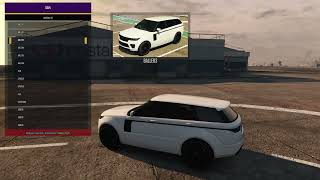
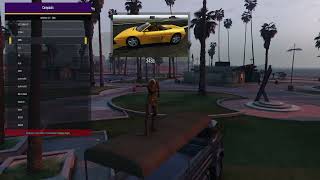
This is a powerful, yet lightweight script that identifies every vehicle you have, vanilla and addons, and populates a menu done from scratch. Vehicles are placed in GTA V categories and image previews are displayed for both categories and vehicles.
This is the standalone version. It is already partially implemented in Venue. Why a standalone? Because not everyone wants pretty pictures in their trainer. if you do want a visual trainer (work in progress) without bloat:
https://www.gta5-mods.com/scripts/gta-v-visual-menu-gen-3-trainer-wip
Installation
1. Contents of Scripts folder goes, you guessed it, in the Scripts folder
Ultralight.dll and UltralightConfig.ini
2. The folder called CategoryImages goes here:
\menyooStuff\Graphics\Vehicle Previews\CategoryImages
You don't have Menyoo? Just create the folders/path above. Don't worry GTA V will never know the difference.
Requirements SHV5 and SHVDN5. Tested in Legacy Only
Image for Vanilla and Addon Previews
These are not included. The vehicle images go in menyoostuff\Graphics\Vehicle Previews
you can download images on this site or you may already have them.
https://www.gta5-mods.com/misc/vehicle-previews-add-for-menyoo
Note: The Category images are included as demos and go in path described above.
Menu Key - you set it in the file called UltralightConfig.ini.
Bugs/Known Issues: none so far
Disclaimer: the category images are not mine, for demo purposes only. If and when you change them, keep the same name and file extension.
Vagos Ped
The vagos ped in the video has over 100 outfits compared to the game version which has 2. This was done using the YMT Editor which greatly simplfies the process of editing ymt files. No 3D modeling was done, everything was done with existing drawables and of course Photoshop to make texture variations.
No bloated code. No asi. No NativeUI. No LemonUI. All dot net from scratch.
No update required after Rockstar updates. Uses your existing Menyoo or other preview images.
This is a powerful, yet lightweight script that identifies every vehicle you have, vanilla and addons, and populates a menu done from scratch. Vehicles are placed in GTA V categories and image previews are displayed for both categories and vehicles.
This is the standalone version. It is already partially implemented in Venue. Why a standalone? Because not everyone wants pretty pictures in their trainer. if you do want a visual trainer (work in progress) without bloat:
https://www.gta5-mods.com/scripts/gta-v-visual-menu-gen-3-trainer-wip
Installation
1. Contents of Scripts folder goes, you guessed it, in the Scripts folder
Ultralight.dll and UltralightConfig.ini
2. The folder called CategoryImages goes here:
\menyooStuff\Graphics\Vehicle Previews\CategoryImages
You don't have Menyoo? Just create the folders/path above. Don't worry GTA V will never know the difference.
Requirements SHV5 and SHVDN5. Tested in Legacy Only
Image for Vanilla and Addon Previews
These are not included. The vehicle images go in menyoostuff\Graphics\Vehicle Previews
you can download images on this site or you may already have them.
https://www.gta5-mods.com/misc/vehicle-previews-add-for-menyoo
Note: The Category images are included as demos and go in path described above.
Menu Key - you set it in the file called UltralightConfig.ini.
Bugs/Known Issues: none so far
Disclaimer: the category images are not mine, for demo purposes only. If and when you change them, keep the same name and file extension.
Vagos Ped
The vagos ped in the video has over 100 outfits compared to the game version which has 2. This was done using the YMT Editor which greatly simplfies the process of editing ymt files. No 3D modeling was done, everything was done with existing drawables and of course Photoshop to make texture variations.
First Uploaded: 3 days ago
Last Updated: 3 days ago
Last Downloaded: 13 minutes ago
21 Comments
A Refreshing New GTA V Addon Spawner
No bloated code. No asi. No NativeUI. No LemonUI. All dot net from scratch.
No update required after Rockstar updates. Uses your existing Menyoo or other preview images.
This is a powerful, yet lightweight script that identifies every vehicle you have, vanilla and addons, and populates a menu done from scratch. Vehicles are placed in GTA V categories and image previews are displayed for both categories and vehicles.
This is the standalone version. It is already partially implemented in Venue. Why a standalone? Because not everyone wants pretty pictures in their trainer. if you do want a visual trainer (work in progress) without bloat:
https://www.gta5-mods.com/scripts/gta-v-visual-menu-gen-3-trainer-wip
Installation
1. Contents of Scripts folder goes, you guessed it, in the Scripts folder
Ultralight.dll and UltralightConfig.ini
2. The folder called CategoryImages goes here:
\menyooStuff\Graphics\Vehicle Previews\CategoryImages
You don't have Menyoo? Just create the folders/path above. Don't worry GTA V will never know the difference.
Requirements SHV5 and SHVDN5. Tested in Legacy Only
Image for Vanilla and Addon Previews
These are not included. The vehicle images go in menyoostuff\Graphics\Vehicle Previews
you can download images on this site or you may already have them.
https://www.gta5-mods.com/misc/vehicle-previews-add-for-menyoo
Note: The Category images are included as demos and go in path described above.
Menu Key - you set it in the file called UltralightConfig.ini.
Bugs/Known Issues: none so far
Disclaimer: the category images are not mine, for demo purposes only. If and when you change them, keep the same name and file extension.
Vagos Ped
The vagos ped in the video has over 100 outfits compared to the game version which has 2. This was done using the YMT Editor which greatly simplfies the process of editing ymt files. No 3D modeling was done, everything was done with existing drawables and of course Photoshop to make texture variations.
No bloated code. No asi. No NativeUI. No LemonUI. All dot net from scratch.
No update required after Rockstar updates. Uses your existing Menyoo or other preview images.
This is a powerful, yet lightweight script that identifies every vehicle you have, vanilla and addons, and populates a menu done from scratch. Vehicles are placed in GTA V categories and image previews are displayed for both categories and vehicles.
This is the standalone version. It is already partially implemented in Venue. Why a standalone? Because not everyone wants pretty pictures in their trainer. if you do want a visual trainer (work in progress) without bloat:
https://www.gta5-mods.com/scripts/gta-v-visual-menu-gen-3-trainer-wip
Installation
1. Contents of Scripts folder goes, you guessed it, in the Scripts folder
Ultralight.dll and UltralightConfig.ini
2. The folder called CategoryImages goes here:
\menyooStuff\Graphics\Vehicle Previews\CategoryImages
You don't have Menyoo? Just create the folders/path above. Don't worry GTA V will never know the difference.
Requirements SHV5 and SHVDN5. Tested in Legacy Only
Image for Vanilla and Addon Previews
These are not included. The vehicle images go in menyoostuff\Graphics\Vehicle Previews
you can download images on this site or you may already have them.
https://www.gta5-mods.com/misc/vehicle-previews-add-for-menyoo
Note: The Category images are included as demos and go in path described above.
Menu Key - you set it in the file called UltralightConfig.ini.
Bugs/Known Issues: none so far
Disclaimer: the category images are not mine, for demo purposes only. If and when you change them, keep the same name and file extension.
Vagos Ped
The vagos ped in the video has over 100 outfits compared to the game version which has 2. This was done using the YMT Editor which greatly simplfies the process of editing ymt files. No 3D modeling was done, everything was done with existing drawables and of course Photoshop to make texture variations.
First Uploaded: 3 days ago
Last Updated: 3 days ago
Last Downloaded: 13 minutes ago
 5mods on Discord

This mod is now fully implemented in the Venue VIsual Trainer which goes well beyond just vehicles.
Although this script, in theory, will not be impacted by regular Rockstar updates - it generates vehicles lists at run time as opposed to other scripts that hard code the vanilla vehicles - new features will not be implemented. Those will be in Venue only.
https://www.gta5-mods.com/scripts/gta-v-visual-menu-gen-3-trainer-wip
@JoyLucien Actually there is none at all. This is raw footage with OBS, no custom cameras. Interesting you brought that up because I did a similar one for Charlotte, using a custom script i wrote to replace the gameplay camera. Same theme.
This is a player centric camera - keyboard controls, up, down, right, left, and revolving with speed control on pgdn/pgup
https://www.youtube.com/watch?v=FJqOlk2tU3E
@GTAV Visual Menu I notice the video shifts slightly following the player's movements, almost like tracking. Could this be achieved using functions related to focus points?
@JoyLucien The first video is just raw screen capture using OBS. Keep in mind that the dancer is the player. The video in the link is done with my own camera script which locks the camera onto the player. This is a very complex script, but the essential par is :scriptCamera.PointAt(playerPosition)
The "tracklng" you mention is most likely due the animation itself which i think the author took from mixamo (adobe) if i'm not mistaken.
Or it could be the way i implemented Lerp
public static float Lerp(float start, float end, float amount)
{
return start + (end - start) * amount;
}
@GTAV Visual Menu ok,Aren't you John? You sound just like him.
@JoyLucien if you mean John from Canada, he is one of my closest friends and we also collaborate.
@GTAV Visual Menu It must be the John from Canada you mentioned. He previously released a similar vehicle‑spawner tool but deleted it shortly afterwards. In fact, you can now use WinForms to add an in‑game overlay to build menus, just like ImGui. You can even embed WebView2 to create FiveM‑style menus with HTML interfaces. Drawing menu UIs using built‑in functions comes with far too many limitations.
@JoyLucien I enjoy drawing rectangles, and if you're using sprites, well you still need the images.I just created a toolbar as well. What is your source for using WinForms , which in my opinion is nothing special although it has controls like dropdowns.
@JoyLucien Just curious, what do you mean by limitations. What limitations. I even have a slider which is better than LemonUI.
And you can't compare FiveM to GTA V SP, FiveM has servers basically allowing you to do whatever you want. The UI framework I'm building has a very small footprint. The last thing I want is bloated Windows crap. No overlays, no other garbage to increase load times and create game instability.
Most off all, I want standard GTA V mod installations - these are very simple for anyone who has installed GTA V mods. Obviously new users struggle even with installing simple entities like peds. Very few people know how to install things manually
We live in a world where people are lazy and want tools to do everything for them. We're also seeing "AI Slop" dominating the scripts section. I've never seen new scripts appear at this super high frequency and I'm betting the majority are non devs, non programmers, using Claude AI, ChatGPT, DeepSeek etc.
Dont get me wrong I"m a huge fan of AI for image generation, I2V, T2V, and technologies like TTS, but not for generating scripts, particularly ones that can be done with 1 or 2 native functions.
@GTAV Visual Menu For example, the built-in game mouse operation isn't as smooth as the computer's built-in mouse. If you display both the computer mouse and the game mouse simultaneously, you'll find the game mouse is always a bit slower. From a UI rendering perspective, it's not as flexible as WinForms in many aspects. WinForms interfaces are smoother, and many functional ideas for UI rendering cannot be implemented with the built-in function. Furthermore, if you want a more complex UI, you need to spend more time testing and optimizing the code, which WinForms can easily achieve.
For example, your current vehicle image display, including the tiled display in another project, requires loading YTD or PNG icons into the game's memory and then calling them using built-in functions. This itself consumes a lot of the game's memory.
Of course, I'm only mentioning this method because I currently use WinForms for UI creation; I'm not forcing you to use it.
Regarding FiveM, I'm referring to the ability to achieve the same effect as FiveM's HTML UI by embedding a WebView2 within WinForms. The HTML interface is very beautiful and flexible.
@JoyLucien Good discussion. I'll share my viewpoint(s) - unranked.
1. Menus are not for gameplay. Smoothness and latency (and ping if online coop) are not critical unless you're playing CODMW, TF2, BF, or CS etc. If you noticed in one of my videos, i go thru menu images in nanoseconds.
2. We're in 2026, and users who expect to mod the game until it screams mercy on laptops with integrated graphics are not going to be happy with the new generations of games. My scripts run on a 4080, which is far from the high end cards today without any latency issues.
3. I use two methodologies for rendering images in game. External images in Windows folders which use pixels and need to be normalized and YTD sprites which thankfully don't need to be normalized but need a more complicated installation and can't be installed while game is running. Each has their pros and cons. I do both.
4. With respect to those images, none of the images I used were optimized. This is particularly true of the external images which are png files instead of jpegs. Unless you have a 4K monitor and an RTX 5090, jpeg/jpgs are a better way to go.
5. I just created a toolbar menu which works very well and will be released in the next release of the Venue Visual Menu.
@JoyLucien toolbar at bottom of the screen
https://i.postimg.cc/hjkLxmKk/eeeeeeeee.jpg
@GTAV Visual Menu LemonUI is sufficient for simple functions. There is a similar video where all the UIs are embedded into WinForms using WebViewer2.: https://youtu.be/2Z1-IipM6dk
@JoyLucien All that is a drawn sprite around a text capture box. Look at what John and Charlotte are doing. Their user input capture was done well before the other guys, only difference is John didn't put a sprite around it. With a transparent sprite I could do that myself in 5 minutes. Yeah, it looks very nice, but everything you see there i can do with native functions and custom sprites.
Want to see state of the art mods? Watch this. What Team Charlotte are doing with LLM and TTS is lightyears ahead of anyone else in the community because they are doing it locally....no cloud services.
https://www.youtube.com/watch?v=1VN5YY5FRNM
@GTAV Visual Menu It uses an HTML‑based interface identical to FiveM's, implemented by embedding WebViewer2 via WinForms. The local UI is built with the same CSS, HTML and JS files used in FiveM. Some FiveM scripts can be slightly modified and ported as‑is for single‑player use.
Many people have already created AI mods that run local models, and plenty of developers here are working on similar projects.
What I referred to above is merely the HTML interface matching FiveM's. Native functions can certainly achieve comparable results, yet they are undeniably less convenient, feature‑rich and visually polished than HTML‑based solutions. That is all I am saying; the rest is up to you.
@JoyLucien I'll take a look but honestly, menus and notifications and dialog boxes etc kill immersion. I have all of those turned off either by default or by my own scripts on my GTA V. Ideally everything would be done by keys but of course that's not the perfect solution even if you had 100 keys.
My objective with scripts like this one and Venue are to make menus more fun by making them visual.
As for your comment "Many people have already created AI mods that run local models,"
Absolutely not. If you're thinking the LivingLSAI - NOPE, it uses cloud services
Local means:
1. Local chat engine which is uncensored, providing unscripted conversations between player and peds, and between peds.
This involves a server like Ollama
2. Local TTS models. These include Piper, Kokoro, Pocket etc. The video I showed you uses all 3.
3. A local TTS Server: Good luck finding one that works with GTA V. The one in the video was written with python by John.
So please provide a link and I'll confirm if an AI mod is local or not. And yeah, I also know python inside out.
@JoyLucien and just in passing, although i don't use it, nor Edge nor Chrome, it's called Webview2 not Webviewer.
But to be objective, I'll take a look at it and see if there are any applications other than missions and RP - not my area.
@GTAV Visual Menu Someone in my country has created a similar AI script that can utilize cloud services as well as local LLM AI, though I am not very interested in this area.
To be precise, they are WebView2Loader.dll and Microsoft.Web.WebView2.Core.dll. You can find this package by searching for WebView2 on NuGet.
@JoyLucien Cloud services are garbage, whether you pay or not, because they are censored. Google is the worst. Ollama is free and local and has hundreds of models including uncensored and allowing different context sizes which is critical for AI chat.
I've never seen a local AI framework, other than John's, and if you do get the chat engine going, the TTS is another issue. There are dozens and dozens of TTS offerings (open source, local) but none of them have servers compatible with the RAGE engine. That's why it was done in python specifically for GTA V. There are 2 other very important limitations with opensource TTS besides the server:
1. Latency. This is because the process is player text challenge --TTS -NPC response- TTS
2. Voices. Each TTS offers a few voices only. The framework I'm talking about uses cloned voices, as well as those from Pocket, Piper, and KoKoro. So essentially, you can clone anyone you want including your own voice.
All that to say it would be interesting to see what you saw as a local AI implementation, but honestly I"m talking a cutting edge mod and once more, all of i seen is garbage that trys to pass as quasi sentient when it's hardcoded.
@JoyLucien P.S. Thanks for the links, I will definitely check them out.