
0 files liked
15 comments
0 videos
1 upload
0 followers
6,286 downloads
 5mods on Discord

Hi, sorry I have not really been active here, but I just tried the mod again on GTA V Steam version and it still works very well. i'm sorry I have not been helpful to people who have had issues, i'm just a super user, not a real dev, and I only remake this mod for my personal use, then decided to share it. It was designed to rename files from your program files folder using a batch script, so if you have any security or antivirus apps that don't like it, it may be why it doens't work. In windows 10 latest versions and windows 11, there is an anti ransomware feature that blocks access to documets, onedrive, desktop and other such folders to random apps like mine, so this may be your issue.
@DeathBlade314 If you cannot open it at all, it may be because of your antivirus.
@MuscularSheep62 Try this: use shortcut : WIN+R, it opens the run window. inside, type this %USERPROFILE%\Desktop\ and then hit enter.
This is the folder to which the mod creates the shortcut, which normally on most computers is the desktop. But if your computer is configured differently by manufacturer or because you have a special language, this may not work. Then you can fetch the shortcut from the folder which has opened, and place it on the desktop.
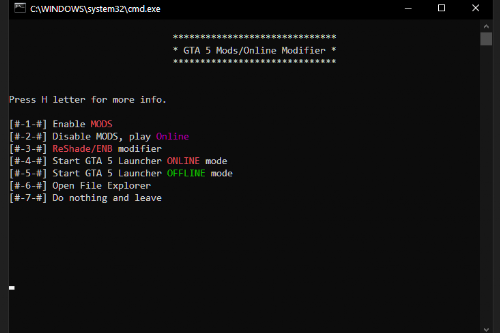
@T-Rex20 Of course, this is not a crack. The game will always sign you into the social club. What it does is enable your mods and then start the game. If you select online, it will disable all mods and then start the game, so that you can join online games safely.
GTA V never banned me for playing with LOTS of mods in offline mode, even though I was logged into the social club at all times.
@moistless you have to put it in the gta folder first. Do not worry, as explained in the readme file, the bat will auto create a shortcut for itself on your desktop
Fixed as of v1.2, pending approval
@DJ-LEXX I'll look into it, maybe I mismatched files, sorry about that
@DJ-LEXX have you tried pressing with numpad keys or F keys ? sometimes it's just that
@DJ-LEXX I'm not sure why, it should work on 7. Did you follow the instructions provided ?
@SSGSSJ4Gogito Sorry I don't see why, it works perfectly and is quite fast, there is no need for the hassle