MaxedStreetLights Enhanced (2.0) (Aqua)



![GTA VI Inspired Features, HUD & Radar System (WIP) [OIV][Enhanced/Legacy]](https://img.gta5-mods.com/q75-w500-h333-cfill/images/enhanced-oiv-gta-6-inspired-hud/6e20f1-cover_banner.jpg "GTA VI Inspired Features, HUD & Radar System (WIP) [OIV][Enhanced/Legacy]")
![Peds Pain & Death Sounds Improvements [PP&DSI]](https://img.gta5-mods.com/q75-w500-h333-cfill/images/new-death-sounds-for-peds/fe7077-pp%26dsi.png "Peds Pain & Death Sounds Improvements [PP&DSI]")


4,378
28
4,378
28
🌃 MaxedStreetLights – Realistic Lighting Overhaul
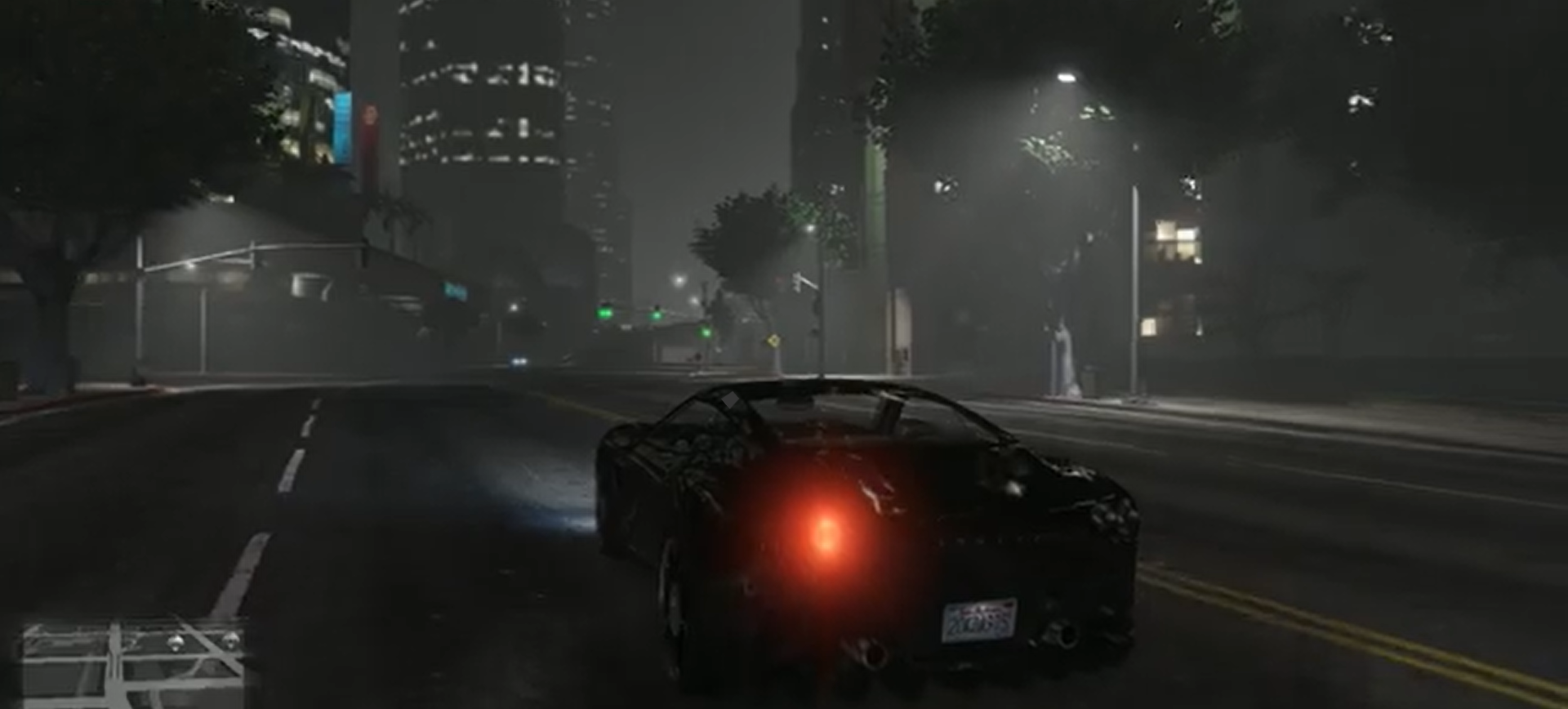
Transform GTA V's outdated yellow street lighting into a clean, realistic white lighting system across the entire map. This overhaul modernizes the game's nighttime atmosphere by replacing the default warm glow with crisp, natural-looking illumination while maintaining the game's original aesthetic and performance.
━━━━━━━━━━━━━━━━━━━━━━━━━━━━━━
✨ Features
━━━━━━━━━━━━━━━━━━━━━━━━━━━━━━
✔ Complete overhaul of streetlight lighting
✔ Reworked traffic light illumination
✔ Updated LOD (distance) lighting
✔ Improved fog volume colors
✔ Eliminates the default yellow haze across all regions
✔ Consistent white lighting throughout Los Santos and Blaine County
✔ Compatible with Vanilla, ENB, NVE, QuantV, and GTA V Enhanced
━━━━━━━━━━━━━━━━━━━━━━━━━━━━━━
📥 Installation
━━━━━━━━━━━━━━━━━━━━━━━━━━━━━━
⚠️ Before making any changes, back up your original files.
This mod includes an OpenIV Package Installer (.oiv) for quick and easy installation.
Method 1 – OpenIV Package Installer (Recommended)
1. Open OpenIV.
2. Navigate to Tools → Package Installer.
3. Select the included MaxedStreetLights.oiv file.
4. Follow the on-screen instructions to complete the installation.
Method 2 – Manual Installation
Using OpenIV or CodeWalker RPF Explorer, copy the following files to their respective locations:
lodlights.rpf
→ mods/update/x64/levels/
v_trafficlights.rpf
→ mods/x64h.rpf/levels/gta5/props/roadside/
vfxfogvolumeinfo.ymt
→ mods/x64a.rpf/data/effects/
Ensure your Mods folder is enabled before replacing any files.
━━━━━━━━━━━━━━━━━━━━━━━━━━━━━━
📝 Changelog
━━━━━━━━━━━━━━━━━━━━━━━━━━━━━━
Version 2.0 (July 25, 2026)
• Added Grand Theft Auto V Enhanced support.
• Added OpenIV Package Installer (.oiv) for one-click installation.
• Fixed excessive light coronas.
• Corrected remaining yellow lighting textures.
• Improved overall lighting consistency.
--------------------------------------------------
Version 1.0 (June 29, 2025)
• Replaced outdated yellow lighting on all prop_streetlight_* and related streetlight props.
• Converted all streetlight emissions to a clean, consistent white color.
• Refined .ymap light entities for improved accuracy and uniform lighting across the map.
• Edited vfxfogvolumeinfo.ymt to remove yellow fog tinting across all regions.
• Overhauled lodlights.rpf to ensure white lighting remains visible at long distances.
• Fully tested with Vanilla, ENB, NVE, and QuantV setups.
• Compatible with OpenIV and CodeWalker.
━━━━━━━━━━━━━━━━━━━━━━━━━━━━━━
📌 Notes
━━━━━━━━━━━━━━━━━━━━━━━━━━━━━━
• Designed to provide a cleaner, brighter, and more realistic nighttime experience.
• Compatible with most graphics mods unless they replace the same files.
• If another mod modifies these files, install MaxedStreetLights last.
• Always keep backups of your original files before installation.
Enjoy a brighter, cleaner, and more immersive Los Santos at night!
Transform GTA V's outdated yellow street lighting into a clean, realistic white lighting system across the entire map. This overhaul modernizes the game's nighttime atmosphere by replacing the default warm glow with crisp, natural-looking illumination while maintaining the game's original aesthetic and performance.
━━━━━━━━━━━━━━━━━━━━━━━━━━━━━━
✨ Features
━━━━━━━━━━━━━━━━━━━━━━━━━━━━━━
✔ Complete overhaul of streetlight lighting
✔ Reworked traffic light illumination
✔ Updated LOD (distance) lighting
✔ Improved fog volume colors
✔ Eliminates the default yellow haze across all regions
✔ Consistent white lighting throughout Los Santos and Blaine County
✔ Compatible with Vanilla, ENB, NVE, QuantV, and GTA V Enhanced
━━━━━━━━━━━━━━━━━━━━━━━━━━━━━━
📥 Installation
━━━━━━━━━━━━━━━━━━━━━━━━━━━━━━
⚠️ Before making any changes, back up your original files.
This mod includes an OpenIV Package Installer (.oiv) for quick and easy installation.
Method 1 – OpenIV Package Installer (Recommended)
1. Open OpenIV.
2. Navigate to Tools → Package Installer.
3. Select the included MaxedStreetLights.oiv file.
4. Follow the on-screen instructions to complete the installation.
Method 2 – Manual Installation
Using OpenIV or CodeWalker RPF Explorer, copy the following files to their respective locations:
lodlights.rpf
→ mods/update/x64/levels/
v_trafficlights.rpf
→ mods/x64h.rpf/levels/gta5/props/roadside/
vfxfogvolumeinfo.ymt
→ mods/x64a.rpf/data/effects/
Ensure your Mods folder is enabled before replacing any files.
━━━━━━━━━━━━━━━━━━━━━━━━━━━━━━
📝 Changelog
━━━━━━━━━━━━━━━━━━━━━━━━━━━━━━
Version 2.0 (July 25, 2026)
• Added Grand Theft Auto V Enhanced support.
• Added OpenIV Package Installer (.oiv) for one-click installation.
• Fixed excessive light coronas.
• Corrected remaining yellow lighting textures.
• Improved overall lighting consistency.
--------------------------------------------------
Version 1.0 (June 29, 2025)
• Replaced outdated yellow lighting on all prop_streetlight_* and related streetlight props.
• Converted all streetlight emissions to a clean, consistent white color.
• Refined .ymap light entities for improved accuracy and uniform lighting across the map.
• Edited vfxfogvolumeinfo.ymt to remove yellow fog tinting across all regions.
• Overhauled lodlights.rpf to ensure white lighting remains visible at long distances.
• Fully tested with Vanilla, ENB, NVE, and QuantV setups.
• Compatible with OpenIV and CodeWalker.
━━━━━━━━━━━━━━━━━━━━━━━━━━━━━━
📌 Notes
━━━━━━━━━━━━━━━━━━━━━━━━━━━━━━
• Designed to provide a cleaner, brighter, and more realistic nighttime experience.
• Compatible with most graphics mods unless they replace the same files.
• If another mod modifies these files, install MaxedStreetLights last.
• Always keep backups of your original files before installation.
Enjoy a brighter, cleaner, and more immersive Los Santos at night!
First Uploaded: June 29, 2025
Last Updated: July 25, 2026
Last Downloaded: 1 hour ago
36 Comments
More mods by MaxedDev:
🌃 MaxedStreetLights – Realistic Lighting Overhaul
Transform GTA V's outdated yellow street lighting into a clean, realistic white lighting system across the entire map. This overhaul modernizes the game's nighttime atmosphere by replacing the default warm glow with crisp, natural-looking illumination while maintaining the game's original aesthetic and performance.
━━━━━━━━━━━━━━━━━━━━━━━━━━━━━━
✨ Features
━━━━━━━━━━━━━━━━━━━━━━━━━━━━━━
✔ Complete overhaul of streetlight lighting
✔ Reworked traffic light illumination
✔ Updated LOD (distance) lighting
✔ Improved fog volume colors
✔ Eliminates the default yellow haze across all regions
✔ Consistent white lighting throughout Los Santos and Blaine County
✔ Compatible with Vanilla, ENB, NVE, QuantV, and GTA V Enhanced
━━━━━━━━━━━━━━━━━━━━━━━━━━━━━━
📥 Installation
━━━━━━━━━━━━━━━━━━━━━━━━━━━━━━
⚠️ Before making any changes, back up your original files.
This mod includes an OpenIV Package Installer (.oiv) for quick and easy installation.
Method 1 – OpenIV Package Installer (Recommended)
1. Open OpenIV.
2. Navigate to Tools → Package Installer.
3. Select the included MaxedStreetLights.oiv file.
4. Follow the on-screen instructions to complete the installation.
Method 2 – Manual Installation
Using OpenIV or CodeWalker RPF Explorer, copy the following files to their respective locations:
lodlights.rpf
→ mods/update/x64/levels/
v_trafficlights.rpf
→ mods/x64h.rpf/levels/gta5/props/roadside/
vfxfogvolumeinfo.ymt
→ mods/x64a.rpf/data/effects/
Ensure your Mods folder is enabled before replacing any files.
━━━━━━━━━━━━━━━━━━━━━━━━━━━━━━
📝 Changelog
━━━━━━━━━━━━━━━━━━━━━━━━━━━━━━
Version 2.0 (July 25, 2026)
• Added Grand Theft Auto V Enhanced support.
• Added OpenIV Package Installer (.oiv) for one-click installation.
• Fixed excessive light coronas.
• Corrected remaining yellow lighting textures.
• Improved overall lighting consistency.
--------------------------------------------------
Version 1.0 (June 29, 2025)
• Replaced outdated yellow lighting on all prop_streetlight_* and related streetlight props.
• Converted all streetlight emissions to a clean, consistent white color.
• Refined .ymap light entities for improved accuracy and uniform lighting across the map.
• Edited vfxfogvolumeinfo.ymt to remove yellow fog tinting across all regions.
• Overhauled lodlights.rpf to ensure white lighting remains visible at long distances.
• Fully tested with Vanilla, ENB, NVE, and QuantV setups.
• Compatible with OpenIV and CodeWalker.
━━━━━━━━━━━━━━━━━━━━━━━━━━━━━━
📌 Notes
━━━━━━━━━━━━━━━━━━━━━━━━━━━━━━
• Designed to provide a cleaner, brighter, and more realistic nighttime experience.
• Compatible with most graphics mods unless they replace the same files.
• If another mod modifies these files, install MaxedStreetLights last.
• Always keep backups of your original files before installation.
Enjoy a brighter, cleaner, and more immersive Los Santos at night!
Transform GTA V's outdated yellow street lighting into a clean, realistic white lighting system across the entire map. This overhaul modernizes the game's nighttime atmosphere by replacing the default warm glow with crisp, natural-looking illumination while maintaining the game's original aesthetic and performance.
━━━━━━━━━━━━━━━━━━━━━━━━━━━━━━
✨ Features
━━━━━━━━━━━━━━━━━━━━━━━━━━━━━━
✔ Complete overhaul of streetlight lighting
✔ Reworked traffic light illumination
✔ Updated LOD (distance) lighting
✔ Improved fog volume colors
✔ Eliminates the default yellow haze across all regions
✔ Consistent white lighting throughout Los Santos and Blaine County
✔ Compatible with Vanilla, ENB, NVE, QuantV, and GTA V Enhanced
━━━━━━━━━━━━━━━━━━━━━━━━━━━━━━
📥 Installation
━━━━━━━━━━━━━━━━━━━━━━━━━━━━━━
⚠️ Before making any changes, back up your original files.
This mod includes an OpenIV Package Installer (.oiv) for quick and easy installation.
Method 1 – OpenIV Package Installer (Recommended)
1. Open OpenIV.
2. Navigate to Tools → Package Installer.
3. Select the included MaxedStreetLights.oiv file.
4. Follow the on-screen instructions to complete the installation.
Method 2 – Manual Installation
Using OpenIV or CodeWalker RPF Explorer, copy the following files to their respective locations:
lodlights.rpf
→ mods/update/x64/levels/
v_trafficlights.rpf
→ mods/x64h.rpf/levels/gta5/props/roadside/
vfxfogvolumeinfo.ymt
→ mods/x64a.rpf/data/effects/
Ensure your Mods folder is enabled before replacing any files.
━━━━━━━━━━━━━━━━━━━━━━━━━━━━━━
📝 Changelog
━━━━━━━━━━━━━━━━━━━━━━━━━━━━━━
Version 2.0 (July 25, 2026)
• Added Grand Theft Auto V Enhanced support.
• Added OpenIV Package Installer (.oiv) for one-click installation.
• Fixed excessive light coronas.
• Corrected remaining yellow lighting textures.
• Improved overall lighting consistency.
--------------------------------------------------
Version 1.0 (June 29, 2025)
• Replaced outdated yellow lighting on all prop_streetlight_* and related streetlight props.
• Converted all streetlight emissions to a clean, consistent white color.
• Refined .ymap light entities for improved accuracy and uniform lighting across the map.
• Edited vfxfogvolumeinfo.ymt to remove yellow fog tinting across all regions.
• Overhauled lodlights.rpf to ensure white lighting remains visible at long distances.
• Fully tested with Vanilla, ENB, NVE, and QuantV setups.
• Compatible with OpenIV and CodeWalker.
━━━━━━━━━━━━━━━━━━━━━━━━━━━━━━
📌 Notes
━━━━━━━━━━━━━━━━━━━━━━━━━━━━━━
• Designed to provide a cleaner, brighter, and more realistic nighttime experience.
• Compatible with most graphics mods unless they replace the same files.
• If another mod modifies these files, install MaxedStreetLights last.
• Always keep backups of your original files before installation.
Enjoy a brighter, cleaner, and more immersive Los Santos at night!
First Uploaded: June 29, 2025
Last Updated: July 25, 2026
Last Downloaded: 1 hour ago
 5mods on Discord

LegacyMaxedWhiteStreetLights uploaded with MaxedV Legacy Version! and Can Be Installed Seperately!
thanks for using MaxedMods!
@sloba89serbia @sloba89serbia delayed due to fragments issue with legacy,
now modified from scratch for legacy, showcase uploaded on yt.
thanks!
I would also love a legacy version! Can't wait to see it.
@itsjzee85 thanks, Glad to hear that! I definitely want to bring a Legacy version of the streetlight mod at some point — just focused right now on polishing MaxedV Graphics to get it stable and feature-complete first. Once that’s out, I’ll look into backporting where possible. Appreciate the patience!
@itsjzee85 legacy version is almost ready,
just some lights have low coronas!
@MaxedDev You have no idea how happy seeing this made me lol. I love this and is deff top tier on my list!
@itsjzee85
Haha I appreciate that a lot! 😄
I'm just a 20-year-old dude with a big passion for game dev and modding — basically running on a single-core CPU with no cooling and way too many background tasks 😅
One moment I'm tweaking white streetlights, then I'm lost in road shaders, and before I know it, I'm knee-deep in math trying to fake volumetric clouds like ReShade without melting my brain.
I switch between ideas so fast I sometimes forget what project I even launched 😂 But honestly, that’s what makes it fun — experimenting, learning, and chasing whatever crazy idea sparks next. Your support really means a lot, and it keeps the little fan in my brain spinning! 😁🧠💻
@MaxedDev BROOOOOO. I love everything u said and how u said it lolol. I feel like we are both hella animated people lol specially how u were talking about working on something then all of a sudden our brains go "oohhhh let's do this mod" lol. It's awesome your only 20 and are doing this. I always imagine everyone being older. And the math part. Thats where I fall off lol Math is not my deal. But kindness and making my little train mod is :)
There is no way your running on a single core whaaaat that's crazy. U can borrow a couple of my cores lmao. I'll send 2, that will leave me 6 :D lol but yeah man that is incredible for what u have to work with. So whatchu workin on now in between all the other mods mind goin all crazy!
@itsjzee85 LegacyMaxedWhiteStreetLights uploaded with MaxedV Legacy Version! and Can Be Installed Seperately!
First time user here, I was wondering if there's a replacement mod for the lights, I like the aesthetics of this idea, but the bright light bubble is so bright, at first, I liked it, but then I was like HOLY HELL ITS BRIGHT, so if there is a replacement mod you made it would be a pleasure if you send a replacement ASAP with kindness, DIZZY
@DIZZYBOI808 Sorry for the late reply — and thanks, buddy, glad you liked it!
Yes — those files are part of the Enhanced build. I uploaded them with the MaxedV Enhanced package. Just download MaxedV Enhanced and copy the files from the manual folder into the right game folders.
If you can’t figure it out, just DM me on Discord (or anywhere we can chat in real time by text). I’ll walk you through step by step on how to install only the streetlights from the MaxedV Enhanced build.
is the legacy version out yet?
@namlop72kute sorry for late reply,
will be uploaded today as a part of MaxedV Legacy And Enhanced Version, With Improvements to visual adn performance!
I've never tried this mod because I'm using the legacy version. I really like your project because of the review and I hope one day you can add a legacy version, thanks man.
@Deigoo Thanks,
legacy Version Will Be added this Month!
how to make it compatible with nve gta enhanced
@TixDarT format conversion,
for enhanced version the mod will be released next week
@MaxedDev Hey brother, Can you tell how to install on GTA V ENHANCED with Natural Vision Enhance Installed? Cus we have the onigiri folder to place the mods instead of the mods folder right? and the mods folder does not work anymore cus of NVE, so where do these files go inside the onigiri folder? Help
安裝後,載入故事模式時出現檔案損壞。如何解除安裝?
How to extract files for Enhanced, OpenRPF browser doesn't do the job!