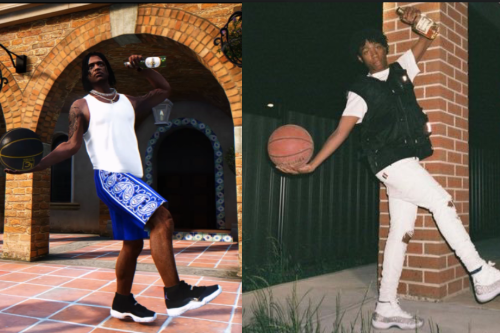
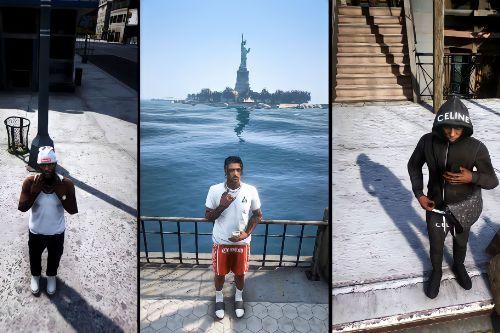
Realism (QuantV ReShade Preset) 1.0




1,789
5
1,789
5
Requirements:
ReShade (Latest Version)
reshade.me
QuantV (Patreon)
INSTALLATION:
Single Player:
1. Install ReShade from https://reshade.me/
2. Copy one of the .ini preset files into your main GTA V folder
3. Launch the game and select the preset in ReShade
FiveM:
1. Make sure ReShade is installed in FiveM
2. Copy the preset .ini file into your FiveM - Plugins folder
3. Select the preset in-game using the ReShade menu (HOME key)
Join my Discord community:
https://discord.gg/85FcWbsaGs
Let me know what you think, and don't forget to rate if you enjoy the preset!
ReShade (Latest Version)
reshade.me
QuantV (Patreon)
INSTALLATION:
Single Player:
1. Install ReShade from https://reshade.me/
2. Copy one of the .ini preset files into your main GTA V folder
3. Launch the game and select the preset in ReShade
FiveM:
1. Make sure ReShade is installed in FiveM
2. Copy the preset .ini file into your FiveM - Plugins folder
3. Select the preset in-game using the ReShade menu (HOME key)
Join my Discord community:
https://discord.gg/85FcWbsaGs
Let me know what you think, and don't forget to rate if you enjoy the preset!
First Uploaded: October 07, 2026
Last Updated: October 07, 2026
Last Downloaded: 2 hours ago
1 Comment
More mods by ModsTravic:
Requirements:
ReShade (Latest Version)
reshade.me
QuantV (Patreon)
INSTALLATION:
Single Player:
1. Install ReShade from https://reshade.me/
2. Copy one of the .ini preset files into your main GTA V folder
3. Launch the game and select the preset in ReShade
FiveM:
1. Make sure ReShade is installed in FiveM
2. Copy the preset .ini file into your FiveM - Plugins folder
3. Select the preset in-game using the ReShade menu (HOME key)
Join my Discord community:
https://discord.gg/85FcWbsaGs
Let me know what you think, and don't forget to rate if you enjoy the preset!
ReShade (Latest Version)
reshade.me
QuantV (Patreon)
INSTALLATION:
Single Player:
1. Install ReShade from https://reshade.me/
2. Copy one of the .ini preset files into your main GTA V folder
3. Launch the game and select the preset in ReShade
FiveM:
1. Make sure ReShade is installed in FiveM
2. Copy the preset .ini file into your FiveM - Plugins folder
3. Select the preset in-game using the ReShade menu (HOME key)
Join my Discord community:
https://discord.gg/85FcWbsaGs
Let me know what you think, and don't forget to rate if you enjoy the preset!
First Uploaded: October 07, 2026
Last Updated: October 07, 2026
Last Downloaded: 2 hours ago
 5mods on Discord

This file has been approved automatically. If you think this file should not be here for any reason please report it.