Freeze Time 1.2


![Real Life Mod [Legacy]](https://img.gta5-mods.com/q75-w500-h333-cfill/images/real-life-mod-legacy/da786a-Reallifemod.png "Real Life Mod [Legacy]")


134
8
134
8
Description:
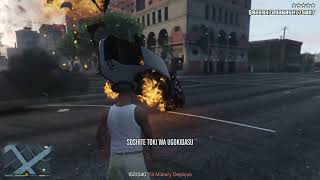
This mod lets you completely freeze time in GTA V Singleplayer. When you stop time, everything around you freezes in place (people, cars, helicopters, trains, and rockets), while you can still walk around and shoot normally. You can also freeze or unfreeze single targets (like one specific NPC, car, helicopter, or rocket) by aiming or looking at them and pressing G while the rest of the world keeps moving.
Anything you do while time is frozen will happen as soon as time starts moving again. For example, if you shoot an NPC or ram them with a car while time is stopped, they will take the full impact and fly away in the direction of the hit as soon as you unfreeze time. When time resumes, all cars and NPCs continue moving with their previous speed and momentum. Works on both GTA V Legacy and Enhanced (including shvdnenh).
Features:
- Freeze and unfreeze the entire game world at any time (Z or X)
- Target Freeze: Aim or look at a specific NPC, car, helicopter, or rocket and press G to freeze or unfreeze only that target while everything else keeps moving
- Unfreeze Single Targets During World Freeze: While the whole world is frozen, look at any frozen person or vehicle and press G to let only that target move again
- Vehicle Impact & Airborne Momentum (NEW): NPCs hit or lifted into the air by your car keep their impact direction and fly away naturally when unfrozen instead of staying stuck in the air
- Player Vehicle Freeze Option (NEW): Freeze your own vehicle in place (by pressing G while driving or setting FreezePlayerVehicle=true in ZaWarudo.ini) and keep 100 procent of your previous speed when unfreezing
- Superhero & Throwable Weapons Support (NEW): Items and throwable weapons held or thrown by the player (such as Thor's hammer in JulioNIB's superhero mods) can now be thrown freely during time freeze (configurable via FreezePlayerThrownItems in ZaWarudo.ini)
- Delayed damage: NPCs and cars you shoot or hit while frozen take the damage and fall down when unfrozen
- Cars, helicopters, and trains freeze in place and keep their speed afterwards
- Custom sound effects and screen filter during time stop
- Settings (keys, duration, cooldown, player vehicle freeze, throwable items, volume) can be changed in the ZaWarudo.ini file
Controls:
- Press Z (or X) to start and stop the full world time freeze
- Aim or look at a target and press G to freeze or unfreeze only that target
- While driving a vehicle (without aiming at another target), press G to freeze or unfreeze your own vehicle and keep its speed
- Look at empty space on foot (without aiming a weapon) and press G to unfreeze all single targets at once
Changelog:
v1.2:
- Fixed an issue where NPCs hit or lifted off the ground by a vehicle stayed floating in the air after unfreezing, they now fly away in the direction of the impact with their full momentum
- Added an option to also freeze the player's own vehicle and keep its momentum when unfreezing (press G while in a vehicle, or set FreezePlayerVehicle=true in ZaWarudo.ini)
- Added an option to not freeze items and throwable weapons held or thrown by the player, fixing ranged attacks like Thor's throwable hammer in JulioNIB's superhero script (FreezePlayerThrownItems=false by default in ZaWarudo.ini)
v1.1:
- Added Single-Target Freeze (press G while aiming or looking at an NPC, vehicle, or rocket to freeze/unfreeze only that target)
- Added ability to unfreeze individual targets while the whole world is frozen
- Added support and crash fix for SHVDN Enhanced (shvdnenh)
- Improved key detection so Z, X, and G always respond reliably in-game
- Fixed an issue where unfrozen NPCs were pushed backwards
Requirements:
- Script Hook V
- ScriptHookVDotNet v3 (or SHVDN Enhanced / shvdnenh)
Installation:
1. Install Script Hook V and ScriptHookVDotNet v3.
2. Open the downloaded ZIP file.
3. Drag and drop the "scripts" folder into your main GTA V game folder.
Bugs and Fixes:
- Fixed (v1.2): NPCs lifted into the air after being hit by a vehicle staying suspended in mid-air after unfreezing.
- Fixed (v1.2): Player throwable items and superhero weapons (like Thor's hammer) getting stuck in mid-air during time freeze.
- Fixed (v1.1): The Z key sometimes not responding in-game for some players.
- Fixed (v1.1): Mod not working / crashing on SHVDN Enhanced (shvdnenh) when pressing the freeze key.
- Fixed (v1.1): NPCs getting pushed backwards when unfreezing them.
- No other known bugs. If you find any other bugs or issues, please let me know in the comments!
Credits:
- Created by GTAJoddy
Enjoy the mod and let me know what specific changes you'd like to see next.
This mod lets you completely freeze time in GTA V Singleplayer. When you stop time, everything around you freezes in place (people, cars, helicopters, trains, and rockets), while you can still walk around and shoot normally. You can also freeze or unfreeze single targets (like one specific NPC, car, helicopter, or rocket) by aiming or looking at them and pressing G while the rest of the world keeps moving.
Anything you do while time is frozen will happen as soon as time starts moving again. For example, if you shoot an NPC or ram them with a car while time is stopped, they will take the full impact and fly away in the direction of the hit as soon as you unfreeze time. When time resumes, all cars and NPCs continue moving with their previous speed and momentum. Works on both GTA V Legacy and Enhanced (including shvdnenh).
Features:
- Freeze and unfreeze the entire game world at any time (Z or X)
- Target Freeze: Aim or look at a specific NPC, car, helicopter, or rocket and press G to freeze or unfreeze only that target while everything else keeps moving
- Unfreeze Single Targets During World Freeze: While the whole world is frozen, look at any frozen person or vehicle and press G to let only that target move again
- Vehicle Impact & Airborne Momentum (NEW): NPCs hit or lifted into the air by your car keep their impact direction and fly away naturally when unfrozen instead of staying stuck in the air
- Player Vehicle Freeze Option (NEW): Freeze your own vehicle in place (by pressing G while driving or setting FreezePlayerVehicle=true in ZaWarudo.ini) and keep 100 procent of your previous speed when unfreezing
- Superhero & Throwable Weapons Support (NEW): Items and throwable weapons held or thrown by the player (such as Thor's hammer in JulioNIB's superhero mods) can now be thrown freely during time freeze (configurable via FreezePlayerThrownItems in ZaWarudo.ini)
- Delayed damage: NPCs and cars you shoot or hit while frozen take the damage and fall down when unfrozen
- Cars, helicopters, and trains freeze in place and keep their speed afterwards
- Custom sound effects and screen filter during time stop
- Settings (keys, duration, cooldown, player vehicle freeze, throwable items, volume) can be changed in the ZaWarudo.ini file
Controls:
- Press Z (or X) to start and stop the full world time freeze
- Aim or look at a target and press G to freeze or unfreeze only that target
- While driving a vehicle (without aiming at another target), press G to freeze or unfreeze your own vehicle and keep its speed
- Look at empty space on foot (without aiming a weapon) and press G to unfreeze all single targets at once
Changelog:
v1.2:
- Fixed an issue where NPCs hit or lifted off the ground by a vehicle stayed floating in the air after unfreezing, they now fly away in the direction of the impact with their full momentum
- Added an option to also freeze the player's own vehicle and keep its momentum when unfreezing (press G while in a vehicle, or set FreezePlayerVehicle=true in ZaWarudo.ini)
- Added an option to not freeze items and throwable weapons held or thrown by the player, fixing ranged attacks like Thor's throwable hammer in JulioNIB's superhero script (FreezePlayerThrownItems=false by default in ZaWarudo.ini)
v1.1:
- Added Single-Target Freeze (press G while aiming or looking at an NPC, vehicle, or rocket to freeze/unfreeze only that target)
- Added ability to unfreeze individual targets while the whole world is frozen
- Added support and crash fix for SHVDN Enhanced (shvdnenh)
- Improved key detection so Z, X, and G always respond reliably in-game
- Fixed an issue where unfrozen NPCs were pushed backwards
Requirements:
- Script Hook V
- ScriptHookVDotNet v3 (or SHVDN Enhanced / shvdnenh)
Installation:
1. Install Script Hook V and ScriptHookVDotNet v3.
2. Open the downloaded ZIP file.
3. Drag and drop the "scripts" folder into your main GTA V game folder.
Bugs and Fixes:
- Fixed (v1.2): NPCs lifted into the air after being hit by a vehicle staying suspended in mid-air after unfreezing.
- Fixed (v1.2): Player throwable items and superhero weapons (like Thor's hammer) getting stuck in mid-air during time freeze.
- Fixed (v1.1): The Z key sometimes not responding in-game for some players.
- Fixed (v1.1): Mod not working / crashing on SHVDN Enhanced (shvdnenh) when pressing the freeze key.
- Fixed (v1.1): NPCs getting pushed backwards when unfreezing them.
- No other known bugs. If you find any other bugs or issues, please let me know in the comments!
Credits:
- Created by GTAJoddy
Enjoy the mod and let me know what specific changes you'd like to see next.
Первая загрузка: 2 дня назад
Последнее обновление: 5 часов назад
Последнее скачивание: 17 минут назад
13 комментариев
Description:
This mod lets you completely freeze time in GTA V Singleplayer. When you stop time, everything around you freezes in place (people, cars, helicopters, trains, and rockets), while you can still walk around and shoot normally. You can also freeze or unfreeze single targets (like one specific NPC, car, helicopter, or rocket) by aiming or looking at them and pressing G while the rest of the world keeps moving.
Anything you do while time is frozen will happen as soon as time starts moving again. For example, if you shoot an NPC or ram them with a car while time is stopped, they will take the full impact and fly away in the direction of the hit as soon as you unfreeze time. When time resumes, all cars and NPCs continue moving with their previous speed and momentum. Works on both GTA V Legacy and Enhanced (including shvdnenh).
Features:
- Freeze and unfreeze the entire game world at any time (Z or X)
- Target Freeze: Aim or look at a specific NPC, car, helicopter, or rocket and press G to freeze or unfreeze only that target while everything else keeps moving
- Unfreeze Single Targets During World Freeze: While the whole world is frozen, look at any frozen person or vehicle and press G to let only that target move again
- Vehicle Impact & Airborne Momentum (NEW): NPCs hit or lifted into the air by your car keep their impact direction and fly away naturally when unfrozen instead of staying stuck in the air
- Player Vehicle Freeze Option (NEW): Freeze your own vehicle in place (by pressing G while driving or setting FreezePlayerVehicle=true in ZaWarudo.ini) and keep 100 procent of your previous speed when unfreezing
- Superhero & Throwable Weapons Support (NEW): Items and throwable weapons held or thrown by the player (such as Thor's hammer in JulioNIB's superhero mods) can now be thrown freely during time freeze (configurable via FreezePlayerThrownItems in ZaWarudo.ini)
- Delayed damage: NPCs and cars you shoot or hit while frozen take the damage and fall down when unfrozen
- Cars, helicopters, and trains freeze in place and keep their speed afterwards
- Custom sound effects and screen filter during time stop
- Settings (keys, duration, cooldown, player vehicle freeze, throwable items, volume) can be changed in the ZaWarudo.ini file
Controls:
- Press Z (or X) to start and stop the full world time freeze
- Aim or look at a target and press G to freeze or unfreeze only that target
- While driving a vehicle (without aiming at another target), press G to freeze or unfreeze your own vehicle and keep its speed
- Look at empty space on foot (without aiming a weapon) and press G to unfreeze all single targets at once
Changelog:
v1.2:
- Fixed an issue where NPCs hit or lifted off the ground by a vehicle stayed floating in the air after unfreezing, they now fly away in the direction of the impact with their full momentum
- Added an option to also freeze the player's own vehicle and keep its momentum when unfreezing (press G while in a vehicle, or set FreezePlayerVehicle=true in ZaWarudo.ini)
- Added an option to not freeze items and throwable weapons held or thrown by the player, fixing ranged attacks like Thor's throwable hammer in JulioNIB's superhero script (FreezePlayerThrownItems=false by default in ZaWarudo.ini)
v1.1:
- Added Single-Target Freeze (press G while aiming or looking at an NPC, vehicle, or rocket to freeze/unfreeze only that target)
- Added ability to unfreeze individual targets while the whole world is frozen
- Added support and crash fix for SHVDN Enhanced (shvdnenh)
- Improved key detection so Z, X, and G always respond reliably in-game
- Fixed an issue where unfrozen NPCs were pushed backwards
Requirements:
- Script Hook V
- ScriptHookVDotNet v3 (or SHVDN Enhanced / shvdnenh)
Installation:
1. Install Script Hook V and ScriptHookVDotNet v3.
2. Open the downloaded ZIP file.
3. Drag and drop the "scripts" folder into your main GTA V game folder.
Bugs and Fixes:
- Fixed (v1.2): NPCs lifted into the air after being hit by a vehicle staying suspended in mid-air after unfreezing.
- Fixed (v1.2): Player throwable items and superhero weapons (like Thor's hammer) getting stuck in mid-air during time freeze.
- Fixed (v1.1): The Z key sometimes not responding in-game for some players.
- Fixed (v1.1): Mod not working / crashing on SHVDN Enhanced (shvdnenh) when pressing the freeze key.
- Fixed (v1.1): NPCs getting pushed backwards when unfreezing them.
- No other known bugs. If you find any other bugs or issues, please let me know in the comments!
Credits:
- Created by GTAJoddy
Enjoy the mod and let me know what specific changes you'd like to see next.
This mod lets you completely freeze time in GTA V Singleplayer. When you stop time, everything around you freezes in place (people, cars, helicopters, trains, and rockets), while you can still walk around and shoot normally. You can also freeze or unfreeze single targets (like one specific NPC, car, helicopter, or rocket) by aiming or looking at them and pressing G while the rest of the world keeps moving.
Anything you do while time is frozen will happen as soon as time starts moving again. For example, if you shoot an NPC or ram them with a car while time is stopped, they will take the full impact and fly away in the direction of the hit as soon as you unfreeze time. When time resumes, all cars and NPCs continue moving with their previous speed and momentum. Works on both GTA V Legacy and Enhanced (including shvdnenh).
Features:
- Freeze and unfreeze the entire game world at any time (Z or X)
- Target Freeze: Aim or look at a specific NPC, car, helicopter, or rocket and press G to freeze or unfreeze only that target while everything else keeps moving
- Unfreeze Single Targets During World Freeze: While the whole world is frozen, look at any frozen person or vehicle and press G to let only that target move again
- Vehicle Impact & Airborne Momentum (NEW): NPCs hit or lifted into the air by your car keep their impact direction and fly away naturally when unfrozen instead of staying stuck in the air
- Player Vehicle Freeze Option (NEW): Freeze your own vehicle in place (by pressing G while driving or setting FreezePlayerVehicle=true in ZaWarudo.ini) and keep 100 procent of your previous speed when unfreezing
- Superhero & Throwable Weapons Support (NEW): Items and throwable weapons held or thrown by the player (such as Thor's hammer in JulioNIB's superhero mods) can now be thrown freely during time freeze (configurable via FreezePlayerThrownItems in ZaWarudo.ini)
- Delayed damage: NPCs and cars you shoot or hit while frozen take the damage and fall down when unfrozen
- Cars, helicopters, and trains freeze in place and keep their speed afterwards
- Custom sound effects and screen filter during time stop
- Settings (keys, duration, cooldown, player vehicle freeze, throwable items, volume) can be changed in the ZaWarudo.ini file
Controls:
- Press Z (or X) to start and stop the full world time freeze
- Aim or look at a target and press G to freeze or unfreeze only that target
- While driving a vehicle (without aiming at another target), press G to freeze or unfreeze your own vehicle and keep its speed
- Look at empty space on foot (without aiming a weapon) and press G to unfreeze all single targets at once
Changelog:
v1.2:
- Fixed an issue where NPCs hit or lifted off the ground by a vehicle stayed floating in the air after unfreezing, they now fly away in the direction of the impact with their full momentum
- Added an option to also freeze the player's own vehicle and keep its momentum when unfreezing (press G while in a vehicle, or set FreezePlayerVehicle=true in ZaWarudo.ini)
- Added an option to not freeze items and throwable weapons held or thrown by the player, fixing ranged attacks like Thor's throwable hammer in JulioNIB's superhero script (FreezePlayerThrownItems=false by default in ZaWarudo.ini)
v1.1:
- Added Single-Target Freeze (press G while aiming or looking at an NPC, vehicle, or rocket to freeze/unfreeze only that target)
- Added ability to unfreeze individual targets while the whole world is frozen
- Added support and crash fix for SHVDN Enhanced (shvdnenh)
- Improved key detection so Z, X, and G always respond reliably in-game
- Fixed an issue where unfrozen NPCs were pushed backwards
Requirements:
- Script Hook V
- ScriptHookVDotNet v3 (or SHVDN Enhanced / shvdnenh)
Installation:
1. Install Script Hook V and ScriptHookVDotNet v3.
2. Open the downloaded ZIP file.
3. Drag and drop the "scripts" folder into your main GTA V game folder.
Bugs and Fixes:
- Fixed (v1.2): NPCs lifted into the air after being hit by a vehicle staying suspended in mid-air after unfreezing.
- Fixed (v1.2): Player throwable items and superhero weapons (like Thor's hammer) getting stuck in mid-air during time freeze.
- Fixed (v1.1): The Z key sometimes not responding in-game for some players.
- Fixed (v1.1): Mod not working / crashing on SHVDN Enhanced (shvdnenh) when pressing the freeze key.
- Fixed (v1.1): NPCs getting pushed backwards when unfreezing them.
- No other known bugs. If you find any other bugs or issues, please let me know in the comments!
Credits:
- Created by GTAJoddy
Enjoy the mod and let me know what specific changes you'd like to see next.
Первая загрузка: 2 дня назад
Последнее обновление: 5 часов назад
Последнее скачивание: 17 минут назад
 5mods on Discord

I've added both file and folder from Freezetime to scripts, where i do have NativeUI, when clicked on z, its not working time is not freezed.
great,Does this use the same method as https://www.gta5-mods.com/scripts/freeze-time-beta? Could you add a feature later to freeze the entity being aimed at while excluding other entities from being frozen?
@sriram_19 Make sure you have **ScriptHookVDotNet v3** installed (ScriptHookVDotNet3.dllmust be in your main GTA V folder — older SHVDN v2 will not load the script). Also check thatZaWarudo.dllis directly insideGTA V/scripts/ZaWarudo.dll(notscripts/scripts/) and check ifGTA V/scripts/ZaWarudo/ZaWarudo.logis created when you launch the game. You can also press **X** (secondary key) or changeKey=inscripts/ZaWarudo/ZaWarudo.ini.
@JoyLucien Thanks! No, this mod is built from scratch with a completely different engine-level approach (NoScriptThread + direct memory/skeleton matrix locking and a deferred damage/impulse buffer), so animations, ragdolls, vehicles, helicopters, projectiles, and delayed gunshots freeze and resume cleanly without the 2017 beta's animation/crash bugs. Freezing only the aimed-at entity (single-target freeze while the rest of the world keeps moving) is a great idea — I'll add that in the next update!
@GTAJoddy it is not work ,i use shvdnenh。
01:03:57.866 ERROR in Tick: System.ArgumentOutOfRangeException: Non-negative number required.
Parameter name: capacity
at System.ThrowHelper.ThrowArgumentOutOfRangeException(ExceptionArgument argument, ExceptionResource resource)
at System.Collections.Generic.List`1..ctor(Int32 capacity)
at SHVDN.NativeMemory.FwScriptGuidPoolTask.GetGuidHandlesFromProjectilePool(Void* fwScriptGuidPool, UInt64* projectilePool, Int32 itemCount, Int32 maxItemCount, Func`2 predicate)
at SHVDN.NativeMemory.FwScriptGuidPoolTask.Run()
at SHVDN.ScriptDomain.ExecuteTaskWithGameThreadTlsContext(IScriptTask task, Boolean forceResetTimeoutStopwatch)
at SHVDN.NativeMemory.GetProjectileHandles()
at GTA.World.GetAllProjectiles()
at ZaWarudoMod.ZaWarudo.ScanAndFreezeWorld(Ped player, Int32 now)
at ZaWarudoMod.ZaWarudo.BeginFreeze(Int32 now, Ped player)
at ZaWarudoMod.ZaWarudo.HandleToggleKey(Int32 now, Ped player)
at ZaWarudoMod.ZaWarudo.OnTick(Object sender, EventArgs e)
@JoyLucien Try to start the Game with Admin rights. I will check it
@JoyLucien Do play on Legacy oder Enhanced?
@GTAJoddy how did you bypass the $2.147.683.487 money limit?
@lukas10 GTA V's native stat system uses a 32-bit integer (max $2,147,483,647), but the game's C++ HUD and Pause Menu UI actually support 64-bit numbers. The mod patches the cash-reading functions in memory (CHudCash, Pause Header, and Stats Tab) to read a full 64-bit balance directly instead of calling the 32-bit CStatsMgr::GetInt, while keeping the 32-bit stat at a safe $1B proxy buffer to track purchases and earnings without overflowing.
@GTAJoddy legacy
1.1 works, but there is an issue. When the player drives a vehicle into another NPC, the NPC freezes after being lifted off the ground. After unfreezing, the NPC will not resume moving in the direction of the impact with its original momentum; instead, it stays suspended in the air.
Also, it does not freeze the player's vehicle. A toggle option could be added so that the player vehicle is also frozen when freezing occurs, and the vehicle retains its previous momentum upon unfreezing.
@JoyLucien Thanks. I will add These soon too
@GTAJoddy Could also add an option to freeze or not freeze items and throwable weapons held by the player? For example, with julionib's superhero script, Thor's throwable hammer for ranged attacks cannot be thrown remotely when frozen right now and gets stuck in place.