Cinematic Idle/AFK Cam 1.1


139
5
139
5
Cinematic IDLE/AFK Camera
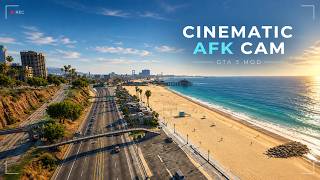
This mod replaces the annoying IDLE/AFK Camera that activates after inactivity of a minute or two and just stares at random Peds, read features below
Key Features
- Automatic Standby Takeoff after your configured time
- Disables Vanilla Idle Cameras
- Minimal menu to control/adjust everything
- Works On-Foot & in Vehicles
- 5 Aerial Flight Modes/Perspectives (With auto cycle or choose one)
- Seamless transitions between mods
- 4 Visual Filters
- Cinematic Letterbox Bars
- Auto save changes, so you don't have to do again and again
Controls
All controls in .INI File, But you need it anyway because there is a in-game menu
How to install
Simply copy and paste files in Scripts folder
Requirements
- ScriptHookV
- ScriptHookVDotNet v3
Uodated to 1.1:
Added Gamepad controls in menu, also you can modify keys in .INI file
If you use this mod in your own trainer or in a video, kindly tag my account
This mod replaces the annoying IDLE/AFK Camera that activates after inactivity of a minute or two and just stares at random Peds, read features below
Key Features
- Automatic Standby Takeoff after your configured time
- Disables Vanilla Idle Cameras
- Minimal menu to control/adjust everything
- Works On-Foot & in Vehicles
- 5 Aerial Flight Modes/Perspectives (With auto cycle or choose one)
- Seamless transitions between mods
- 4 Visual Filters
- Cinematic Letterbox Bars
- Auto save changes, so you don't have to do again and again
Controls
All controls in .INI File, But you need it anyway because there is a in-game menu
How to install
Simply copy and paste files in Scripts folder
Requirements
- ScriptHookV
- ScriptHookVDotNet v3
Uodated to 1.1:
Added Gamepad controls in menu, also you can modify keys in .INI file
If you use this mod in your own trainer or in a video, kindly tag my account
First Uploaded: 7 days ago
Last Updated: 1 day ago
Last Downloaded: 6 hours ago
4 Comments
Cinematic IDLE/AFK Camera
This mod replaces the annoying IDLE/AFK Camera that activates after inactivity of a minute or two and just stares at random Peds, read features below
Key Features
- Automatic Standby Takeoff after your configured time
- Disables Vanilla Idle Cameras
- Minimal menu to control/adjust everything
- Works On-Foot & in Vehicles
- 5 Aerial Flight Modes/Perspectives (With auto cycle or choose one)
- Seamless transitions between mods
- 4 Visual Filters
- Cinematic Letterbox Bars
- Auto save changes, so you don't have to do again and again
Controls
All controls in .INI File, But you need it anyway because there is a in-game menu
How to install
Simply copy and paste files in Scripts folder
Requirements
- ScriptHookV
- ScriptHookVDotNet v3
Uodated to 1.1:
Added Gamepad controls in menu, also you can modify keys in .INI file
If you use this mod in your own trainer or in a video, kindly tag my account
This mod replaces the annoying IDLE/AFK Camera that activates after inactivity of a minute or two and just stares at random Peds, read features below
Key Features
- Automatic Standby Takeoff after your configured time
- Disables Vanilla Idle Cameras
- Minimal menu to control/adjust everything
- Works On-Foot & in Vehicles
- 5 Aerial Flight Modes/Perspectives (With auto cycle or choose one)
- Seamless transitions between mods
- 4 Visual Filters
- Cinematic Letterbox Bars
- Auto save changes, so you don't have to do again and again
Controls
All controls in .INI File, But you need it anyway because there is a in-game menu
How to install
Simply copy and paste files in Scripts folder
Requirements
- ScriptHookV
- ScriptHookVDotNet v3
Uodated to 1.1:
Added Gamepad controls in menu, also you can modify keys in .INI file
If you use this mod in your own trainer or in a video, kindly tag my account
First Uploaded: 7 days ago
Last Updated: 1 day ago
Last Downloaded: 6 hours ago
 5mods on Discord

Great mod! is it possibe if I wanted to rebind the F11 key to something on gamepad?
@D_Cypher003 Thanks, I've pushed the latest update 1.1 with gamepad controls, you can modify controls in .INI file
It's a great concept but the high camera positions are not for me
@ReNNie Thanks, there are few options in menu to adjust height and FOV, you can always set height to the Tree-level (just above trees)