


![Minecraft Steve Passthrough [Enhanced]](https://img.gta5-mods.com/q75-w500-h333-cfill/images/gta-v-enhanced-minecraft-steve-passthrough-mod-files/03e491-GTA5_Enhanced2026-10-04-13-05-45_1.png "Minecraft Steve Passthrough [Enhanced]")





144,902
858
144,902
858
IMPORTANT: Due to the way this mod works, the original Rockstar Editor video file will NOT be saved to the disk (actually it does, but it will be empty). The complete video will be exported to the folder specified in the .ini file. The default location is your user's Videos folder.
NOTE: For high resolution exports without DSR, use this guide by Kravencedesign
Note that this is not tested with version 0.5.0 of the mod, please confirm it in the comments if you managed to make it work.
NOTE: Currently the mod only works in Windowed and Borderless Window mode. Your Graphics > Render Resolution and Advanced Graphics > Resolution settings MUST be the same value in game settings.
Source code for this mod is available on GitHub.
You can watch a showcase of some of the features here. Extended Video Export
Extended Video Export is an enhancement mod for GTA V, aimed at directors who want better export options from Rockstar editor.
Requirements
- ScriptHookV or FiveM
- Voukoder 13.3. Might work with other versions.
- Latest version of Microsoft Visual C++ 2015 - 2022 Redistributable
How to install:
If you have previously installed this mod, remove all the previous files and directories. Possible old locations:
- [GTAV_DIR]\EnhancedVideoExport.asi
- [GTAV_DIR]\EVE
- %localappdata%\FiveM\FiveM.app\plugins\EnhancedVideoExport.asi
- %localappdata%\FiveM\FiveM.app\plugins\EVE
- %localappdata%\FiveM\FiveM.app\data\cache\subprocess\EVE
Extract all files to your FiveM's plugins directory.
Configuration:
You can change the configuration by editing ExtendedVideoExport.ini file.
For encoding configuration use EncoderConfig.exe in EVE directory.
Current Features:
High Quality Export:
Whenever you export a video via Rockstar Editor, this script saves it with a custom quality in the current user’s video folder. The quality of the exported video can be configured using the preset.json file. Even lossless exports are possible too. Use the bundled EncoderConfig.exe to configure the encoder.
Custom Video Encoder:
Supported video encoders include (but not limited to) x264, x265, FFV1, VP8, VP9 and more.
Custom Audio Encoder:
Supported audio encoders include FLAC, AC3, Vorbis and more.
ReShade/ENB Support:
If you are using ReShade or ENB graphics mods, your exported videos will have the effects too.
Nvidia DSR Support:
You can now export higher resolution videos using Nvidia DSR. ATI VSR might work too, but it is not tested. You have to set the desktop resolution to your DSR resolution and use Borderless Windowed mode to be able to export high resolutions.
Custom frame rate:
You can now set the frame rate in the config file. If you set it too high the audio will be longer than the video. This is a limitation of the engine and I couldn't find a way to fix it.
Motion blur:
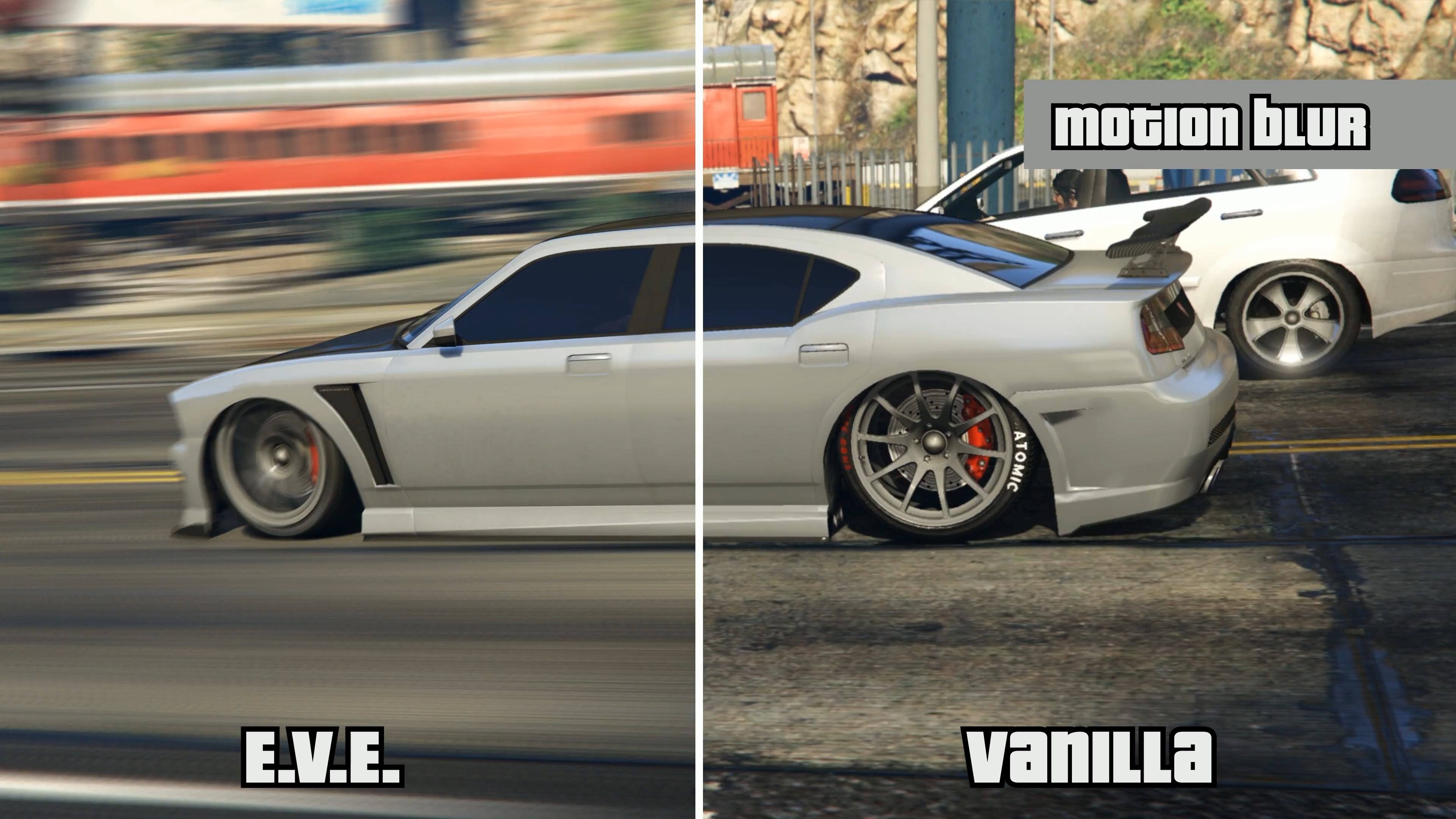
Videos can have high quality motion blur effect. Be careful when setting motion_blur_samples config, setting it too high will make the exporting take a very long time. As of version 0.5.0 of the mod, the motion blur is done on the GPU and should be generally much faster, especially with higher resolutions.
OpenEXR Export (High Dynamic Range):
Exporting of floating point R16G16B16 version of the scene is now possible in OpenEXR format. When enabled, the mod will create a new folder beside the exported video that contains one .exr file for each frame. This file also contains the depth buffer. These files are only usable in professional image and video manipulation programs. Enable this feature only if you know what you’re doing.
Important things to note:
- Exporting a video using this mod might take much longer times than the original export, especially towards the end. You might think that the process has frozen, but most probably it’s not.
Changelog
Changes in v0.5.2beta
- Crash fixes
Changes in v0.5.1beta
- Better Compatibility
- Support for render scaling
Changes in v0.5.0alpha
- Resumed the support for the original game with ScriptHookV
Changes in v0.5.0experimental
- Mod is now only compatible with FiveM. Regular usage with ScriptHookV is not supported anymore.
- Motion Blur uses GPU for accumulation and division of pixels. Should be much faster.
- Export is now performed using Voukoder.
Changes in v0.4.4beta
- Changed shutter position parameter to motion_blur_strength and made it work correctly. The value should be between 0 and 1. Zero means no motion blur and one means full frame length blur.
Changes in v0.4.3beta
- Fixed the problem with importing exported files into video editing applications (Sony Vegas, Adobe Premiere, ...). The default preset was tested with Sony Vegas 12
- Added shutter position parameter for motion blur.
Changes in v0.4.2beta
- Added GIF preset.
- Fixed some compatibility issues.
- Fixed presets again.
- Fixed some minor bugs.
Changes in v0.4.1beta
- Fixed missing/wrong presets.
Changes in v0.4.0beta
- Updated FFMPEG to v3.2.x. So "aac" codec is available now.
- Exported videos should have better compatibility with video editing software.
- Better audio/video syncing.
- Image sequence (JPG, PNG, ...) support added.
- Audio only or Video only exports possible now.
- Added a number of presets for common exporting scenarios.
Changes in v0.3.0beta
IMPORTANT: Remove old dlls, log, and ini file from the GTA directory. Here a list of files you have to delete:- ExtendedVideoExport.ini
- ExtendedVideoExport.log
- ExtendedVideoExport.txt
- avcodec-56.dll
- avdevice-56.dll
- avfilter-5.dll
- avformat-56.dll
- avutil-54.dll
- postproc-53.dll
- swresample-1.dll
- swscale-3.dll
- Moved dlls and config files to a folder.
- Separated config from format preset.
- Fixed a crash with MSAA set to off.
Changes in v0.2.2beta- Fixed crash when using DirectX 10 or DirectX 10.1
Changes in v0.2.1beta- Depth and stencil (mask) channels are now exported correctly in OpenEXR format
- Enabled multithreading on OpenEXR exports
- Removed unused hooks
Changes in v0.2.0beta- OpenEXR export added
- Reimplemented frame capturing logic. This solves some crashes and blank videos.
Changes in v0.1.6beta- Custom FPS and Motion Blur should now work in more recent versions of the game.
Changes in v0.1.5beta- Fixed a parsing error in .ini file that made the mod always export as .mkv
- Added auto use of custom fps is it is supported by the game version
Changes in v0.1.4beta (Experimental)- Added custom frame rate support
- Added motion blur support
Changes in v0.1.3beta- Added option to export mp4 and avi files too.
- Fixed a number of crashes.
Changes in v0.1.2beta- Fixed a bug where game freezed when exporting a video.
Changes in v0.1.1beta- ReShade/ENB support added.
- High resolution export added using Nvidia DSR
- Fixed some random crashes.
Changes in v0.1.0beta- Changed the way the frames are captures, so now full RGB exports are possible.
- Added configurable video and audio codecs support.
- Better memory management.
- Automatically reload the .ini file before each export.
- Different log levels.
- Experimental ENB/ReShade support removed since it was not good enough (actually it sucked).
Changes in v0.0.5alpha- Added experimental ReShade/ENB support
Changes in v0.0.4alpha- Added .ini configuration file support.
- Fixed a crash due to a race condition in the encoder.
Changes in v0.0.3alpha- Added audio to the exported video file (also lossless).
- Better memory management
Changes in v0.0.2alpha- Fixed crash in some resolutions/configurations.
Changes in v0.0.1alpha:- Lossless video export
Configuration
enable_mod- Description: If set to false, the script won’t be run.
- Values: true, false
- Warning: Auto reload feature does not update this value, you have to restart the game for it to take effect
- Example:
- enable_mod = true
auto_reload_config- Description: If set to true, this config file will be automatically reloaded whenever you export a new video. Especially useful if you want to toy with encoder settings
- Values: true, false
- Example:
- auto_reload_config = true
output_folder- Description: Videos will be exported to this folder. If left empty, current user’s videos directory will be used.
- Values: [empty] or a valid path
- Warning:
- Example:
- output_folder = D:\MyVideos\
log_level- Description: Sets the detail of the mod’s logging feature. Please use “trace” level to report bugs.
- Values: error, warn, info, debug, trace
- Example:
- log_level = trace
[EXPORT] Section
format- Description: Output file format.
- Values: mkv, mp4, avi
- Example:
- format = avi
fps- Description: FPS value.
- Values: It can be a floating point value (like 20.3), or a fraction (like 30000/1001)
- Warning:
- Examples:
- fps = 60
- fps = 23.976
- fps = 30000/1001
motion_blur_samples- Description: Number of motion blur samples. The higher the value, the higher the quality of motion blur, and higher exporting time. A value of zero means motion blur is disabled.
- Values: 0-255 (0 means disabled)
- Warning: Setting this to a high value will make export take a very long time.
- Example:
- motion_blur_samples = 10
export_openexr- Description: If enabled, each frame is exported as a floating point HDR OpenEXR file containing “RGBA” channels and “depth.Z”
- Values: true, false
- Warning: Enabling this slows the exporting process significantly
- Example:
- export_openexr = false
First Uploaded: November 22, 2016
Last Updated: January 09, 2024
Last Downloaded: 1 hour ago
All Versions
1,778 Comments
IMPORTANT: Due to the way this mod works, the original Rockstar Editor video file will NOT be saved to the disk (actually it does, but it will be empty). The complete video will be exported to the folder specified in the .ini file. The default location is your user's Videos folder.
NOTE: For high resolution exports without DSR, use this guide by Kravencedesign
Note that this is not tested with version 0.5.0 of the mod, please confirm it in the comments if you managed to make it work.
NOTE: Currently the mod only works in Windowed and Borderless Window mode. Your Graphics > Render Resolution and Advanced Graphics > Resolution settings MUST be the same value in game settings.
Source code for this mod is available on GitHub.
You can watch a showcase of some of the features here. Extended Video Export
Extended Video Export is an enhancement mod for GTA V, aimed at directors who want better export options from Rockstar editor.
Requirements
- ScriptHookV or FiveM
- Voukoder 13.3. Might work with other versions.
- Latest version of Microsoft Visual C++ 2015 - 2022 Redistributable
How to install:
If you have previously installed this mod, remove all the previous files and directories. Possible old locations:
- [GTAV_DIR]\EnhancedVideoExport.asi
- [GTAV_DIR]\EVE
- %localappdata%\FiveM\FiveM.app\plugins\EnhancedVideoExport.asi
- %localappdata%\FiveM\FiveM.app\plugins\EVE
- %localappdata%\FiveM\FiveM.app\data\cache\subprocess\EVE
Extract all files to your FiveM's plugins directory.
Configuration:
You can change the configuration by editing ExtendedVideoExport.ini file.
For encoding configuration use EncoderConfig.exe in EVE directory.
Current Features:
High Quality Export:
Whenever you export a video via Rockstar Editor, this script saves it with a custom quality in the current user’s video folder. The quality of the exported video can be configured using the preset.json file. Even lossless exports are possible too. Use the bundled EncoderConfig.exe to configure the encoder.
Custom Video Encoder:
Supported video encoders include (but not limited to) x264, x265, FFV1, VP8, VP9 and more.
Custom Audio Encoder:
Supported audio encoders include FLAC, AC3, Vorbis and more.
ReShade/ENB Support:
If you are using ReShade or ENB graphics mods, your exported videos will have the effects too.
Nvidia DSR Support:
You can now export higher resolution videos using Nvidia DSR. ATI VSR might work too, but it is not tested. You have to set the desktop resolution to your DSR resolution and use Borderless Windowed mode to be able to export high resolutions.
Custom frame rate:
You can now set the frame rate in the config file. If you set it too high the audio will be longer than the video. This is a limitation of the engine and I couldn't find a way to fix it.
Motion blur:
Videos can have high quality motion blur effect. Be careful when setting motion_blur_samples config, setting it too high will make the exporting take a very long time. As of version 0.5.0 of the mod, the motion blur is done on the GPU and should be generally much faster, especially with higher resolutions.
OpenEXR Export (High Dynamic Range):
Exporting of floating point R16G16B16 version of the scene is now possible in OpenEXR format. When enabled, the mod will create a new folder beside the exported video that contains one .exr file for each frame. This file also contains the depth buffer. These files are only usable in professional image and video manipulation programs. Enable this feature only if you know what you’re doing.
Important things to note:
- Exporting a video using this mod might take much longer times than the original export, especially towards the end. You might think that the process has frozen, but most probably it’s not.
Changelog
Changes in v0.5.2beta
- Crash fixes
Changes in v0.5.1beta
- Better Compatibility
- Support for render scaling
Changes in v0.5.0alpha
- Resumed the support for the original game with ScriptHookV
Changes in v0.5.0experimental
- Mod is now only compatible with FiveM. Regular usage with ScriptHookV is not supported anymore.
- Motion Blur uses GPU for accumulation and division of pixels. Should be much faster.
- Export is now performed using Voukoder.
Changes in v0.4.4beta
- Changed shutter position parameter to motion_blur_strength and made it work correctly. The value should be between 0 and 1. Zero means no motion blur and one means full frame length blur.
Changes in v0.4.3beta
- Fixed the problem with importing exported files into video editing applications (Sony Vegas, Adobe Premiere, ...). The default preset was tested with Sony Vegas 12
- Added shutter position parameter for motion blur.
Changes in v0.4.2beta
- Added GIF preset.
- Fixed some compatibility issues.
- Fixed presets again.
- Fixed some minor bugs.
Changes in v0.4.1beta
- Fixed missing/wrong presets.
Changes in v0.4.0beta
- Updated FFMPEG to v3.2.x. So "aac" codec is available now.
- Exported videos should have better compatibility with video editing software.
- Better audio/video syncing.
- Image sequence (JPG, PNG, ...) support added.
- Audio only or Video only exports possible now.
- Added a number of presets for common exporting scenarios.
Changes in v0.3.0beta
IMPORTANT: Remove old dlls, log, and ini file from the GTA directory. Here a list of files you have to delete:- ExtendedVideoExport.ini
- ExtendedVideoExport.log
- ExtendedVideoExport.txt
- avcodec-56.dll
- avdevice-56.dll
- avfilter-5.dll
- avformat-56.dll
- avutil-54.dll
- postproc-53.dll
- swresample-1.dll
- swscale-3.dll
- Moved dlls and config files to a folder.
- Separated config from format preset.
- Fixed a crash with MSAA set to off.
Changes in v0.2.2beta- Fixed crash when using DirectX 10 or DirectX 10.1
Changes in v0.2.1beta- Depth and stencil (mask) channels are now exported correctly in OpenEXR format
- Enabled multithreading on OpenEXR exports
- Removed unused hooks
Changes in v0.2.0beta- OpenEXR export added
- Reimplemented frame capturing logic. This solves some crashes and blank videos.
Changes in v0.1.6beta- Custom FPS and Motion Blur should now work in more recent versions of the game.
Changes in v0.1.5beta- Fixed a parsing error in .ini file that made the mod always export as .mkv
- Added auto use of custom fps is it is supported by the game version
Changes in v0.1.4beta (Experimental)- Added custom frame rate support
- Added motion blur support
Changes in v0.1.3beta- Added option to export mp4 and avi files too.
- Fixed a number of crashes.
Changes in v0.1.2beta- Fixed a bug where game freezed when exporting a video.
Changes in v0.1.1beta- ReShade/ENB support added.
- High resolution export added using Nvidia DSR
- Fixed some random crashes.
Changes in v0.1.0beta- Changed the way the frames are captures, so now full RGB exports are possible.
- Added configurable video and audio codecs support.
- Better memory management.
- Automatically reload the .ini file before each export.
- Different log levels.
- Experimental ENB/ReShade support removed since it was not good enough (actually it sucked).
Changes in v0.0.5alpha- Added experimental ReShade/ENB support
Changes in v0.0.4alpha- Added .ini configuration file support.
- Fixed a crash due to a race condition in the encoder.
Changes in v0.0.3alpha- Added audio to the exported video file (also lossless).
- Better memory management
Changes in v0.0.2alpha- Fixed crash in some resolutions/configurations.
Changes in v0.0.1alpha:- Lossless video export
Configuration
enable_mod- Description: If set to false, the script won’t be run.
- Values: true, false
- Warning: Auto reload feature does not update this value, you have to restart the game for it to take effect
- Example:
- enable_mod = true
auto_reload_config- Description: If set to true, this config file will be automatically reloaded whenever you export a new video. Especially useful if you want to toy with encoder settings
- Values: true, false
- Example:
- auto_reload_config = true
output_folder- Description: Videos will be exported to this folder. If left empty, current user’s videos directory will be used.
- Values: [empty] or a valid path
- Warning:
- Example:
- output_folder = D:\MyVideos\
log_level- Description: Sets the detail of the mod’s logging feature. Please use “trace” level to report bugs.
- Values: error, warn, info, debug, trace
- Example:
- log_level = trace
[EXPORT] Section
format- Description: Output file format.
- Values: mkv, mp4, avi
- Example:
- format = avi
fps- Description: FPS value.
- Values: It can be a floating point value (like 20.3), or a fraction (like 30000/1001)
- Warning:
- Examples:
- fps = 60
- fps = 23.976
- fps = 30000/1001
motion_blur_samples- Description: Number of motion blur samples. The higher the value, the higher the quality of motion blur, and higher exporting time. A value of zero means motion blur is disabled.
- Values: 0-255 (0 means disabled)
- Warning: Setting this to a high value will make export take a very long time.
- Example:
- motion_blur_samples = 10
export_openexr- Description: If enabled, each frame is exported as a floating point HDR OpenEXR file containing “RGBA” channels and “depth.Z”
- Values: true, false
- Warning: Enabling this slows the exporting process significantly
- Example:
- export_openexr = false
First Uploaded: November 22, 2016
Last Updated: January 09, 2024
Last Downloaded: 1 hour ago
 5mods on Discord

@bilal__38 https://archive.org/details/voukoder-13.4.1_202505 this works for me
The game is crashing on all of the versions. Has anyone been able to find a fix on the bug? I'm suspecting people leaving comments saying "worked great" and "this version mixed with that version worked for me? is pretty much bullshit. Please if anyone has a real solution to this, it would be greatly appreciated.
@triple b So the mod isn't crashing on you? It seems to be crashing on me and I've tried almost everything unless there's something I'm missing.
well game freezes on me when i open up gta 5 with eve
i tried fresh install, installed voukoder, and stuff and it still freezes. anybody know what causes this in 0.5.2?
so the first version somehow worked. how weird....
Please make this mod work in gta enhanced also please request
game crashes when loaded into story mode how to fix that im using 0.4.2 version
[Enhanced] Has anyone managed to make it work in GTA5 Enhanced?
Hey guys, I already figured out how to fix it.
You only need to install Microsoft Visual C++ 2015–2022 Redistributable (x64) - version 14.42.34438 (I’m using 64-bit).
If you have other versions installed, uninstall them first and then install this one.
I’m using EVE 0.4.4 and it works for me.
If you want to try a newer version of EVE, you might need to find the Microsoft Visual version that’s compatible with it. maybe it gonna be work.
(Sorry for my bad English I just wanted to help!)
I installed the mod, the vuokoder. I exported the video it took time but in the output folder I got A 277 bytes mp4 file. Am I doing something wrong? In the encoder I selected HEVC(x256) - losseless preset 10 bit. And I tried chaging the presets but the file size doesn't changes and the video is unplayable.
Hello, I have a problem. I downloaded a pirated copy of the previous version of GTA 5 because the renderer stopped working with the EVE mod on the new version. I record videos in GTA 5 with mods. The problem is that the pirated version isn't connected to Rockstar servers, and you need servers to run the renderer. That's why GTA keeps telling me there's an error connecting to Rockstar servers. Do you know a workaround for this? Maybe there's a mod that works around this and renders without servers?
@Deckard_killer88 Best fix would be buying the game, but have you tried the "No Editor Restrictions" mod?
@civilizedGnat53 I bought the legacy version of GTA 5 but the Rockstar editor is very buggy and the game settings are set to 2k. Is there a solution to this? I'm having trouble installing this mod. I need the vocoder core for version 0.5.2 and I can't find it because vocoder pro has been released.
@ramikgta5 The resolution can be altered by using this mod If you install an older version of EVE, it will still work, and doesn't require Vocoder. -- eg: 0.0.4.4. BETA
Hello everyone!
Me and another developer have developed a community edition of EVE called EVER. We have updated it to work with latest game builds as well as making changes to the mod to use FFMPEG and not Voukouder. Please check it out and report issues if you have any in Github: https://github.com/MiffedLyric559/EVER
We will not respond to EVER issues in this comment section on GTA5MODS.
I have applied the mod installation correctly on GTA V Legacy, but it doesn't work, does it have any effect on Scripthook V?
@MiffedLyric559 it's horrible I spent two hours tryna fix it. it won't start due to it loading itself before Reshade (even the addon version of reshade) am very dissapointed.
I get hit with a black screen when I launch the game. I installed Extended Video Export Revived (https://www.gta5-mods.com/tools/ever-extended-video-export-revived). I haven't tried it yet, but if it's more up to date than this mod, I think it's worth the install.
Oldest version works for me, with the d3d12 ENB fix.
@3milo Hey, can you tell me what is d3d12 ENB fix and how can i find or fix it
@botskiller im not sure but i believe it is just copying d3d11.dll and renaming it t o d3d12.dll. look it up