InstantRace(Rolling/Launch) 1.0.0


32
3
32
3
RivalHeat - Street Racing Challenge Script
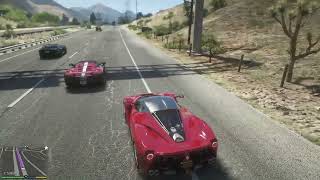
Encounter an opponent you fancy on the road? Honk three times for an impromptu street showdown!
This is a completely standalone .dll script that allows you to challenge nearby NPC drivers to a street race from any vehicle. Using the marker you set on the map as the finish line, go head-to-head with your opponent. Supports three modes: immediate start, launch start, and rolling start, with countdown lights, sound prompts, real-time speed display, and a smart cleanup system, making every street showdown smooth and thrilling.
【Important Prerequisite】
Before using this script to start a challenge, you must first select a target point on the map as the race finish line. If no finish marker is set, the script will not work and cannot start a challenge.
【Required Plugins】
ScriptHookV (http://www.dev-c.com/gta5/scripthookv)
dinput8.dll (provided with ScriptHookV)
ScriptHookVDotNet v3.7.0 or above, or the enhanced version SHVDNE (https://github.com/Chiheb-Bacha/scripthookvdotnetenhanced/releases)
.NET Framework 4.8 or higher
【Core Feature】Start a Challenge with One Key
First select a target point on the map as the finish line, then sit in any vehicle and honk three times in quick succession (default combo, completed within 1.5 seconds). The script will automatically search for the nearest drivable vehicle within 25 meters as the opponent.
If the opponent vehicle has no driver, the script will automatically generate a random driver for it.
After the challenge is initiated, operation prompts will pop up on screen in sequence to guide you through the selection.
During the waiting phase or the race, honk three times in quick succession again to cancel the current challenge.
【Three Start Modes】
Quick Start (Sprint Mode) — press the confirm key directly on the waiting/selection screen
No countdown; the opponent immediately sprints at full speed and the race starts directly. Suitable for players who want an immediate showdown.
Launch Start — press the Left Arrow key
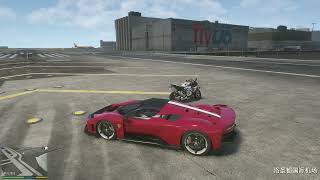
The opponent will wait in place. Park your vehicle in a reasonable position, then press Enter to start a 5-second countdown. During the countdown, both vehicles are frozen, red lights light up one by one, accompanied by sound prompts. When the countdown ends, both are unlocked simultaneously and the race begins.
Rolling Start — press the Right Arrow key
Use the Up/Down Arrow keys to adjust the target speed (default 15 m/s, i.e., 54 km/h, ±5 m/s each time, minimum 5 m/s). The opponent will first accelerate to the target speed, and only after reaching it will a 10-second countdown automatically start. When the countdown ends, the race begins.
【Countdown Lights and Sound Effects】
Five lights are displayed at the top center of the screen, lighting up one by one from right to left, each accompanied by a sound prompt.
The Launch Start countdown is 5 seconds (configurable), and the Rolling Start countdown is 10 seconds.
At the moment the race starts, all five lights flash green.
【Real-time Speed UI】
During the rolling start speed adjustment phase and the countdown phase, three lines of data are displayed at the bottom of the screen:
RIVAL SPEED: opponent's current speed (km/h)
TARGET SPEED: set target speed (km/h) — white during setup, red after locking
YOUR SPEED: player's current speed (km/h)
【Smart Cleanup System】(a helpless measure due to this game's idiotic AI driving intelligence)
During the race, the script checks the area in front of the rival's vehicle every 50 milliseconds.
Other vehicles and pedestrians within that area are automatically removed.
It will not remove the player, the player's current vehicle, or the rival itself.
Effectively prevents the AI rival from getting stuck on slow vehicles or pedestrians on the road, ensuring the race runs smoothly.
【Victory Determination】
Using the map marker as the finish line, the finish detection radius is 50 meters.
When either the player or the opponent enters the finish radius, the race is determined to be over, and whoever is closer to the finish line wins.
【Cancellation Mechanism】
The following situations will cancel the race and clear all markers:
Player leaves the race vehicle
Opponent dies or the opponent's vehicle is destroyed
Honk three times in quick succession again to actively cancel
【Operation Instructions】
Start Challenge / Cancel Race: Honk three times in quick succession inside the vehicle. Search for nearby rivals / cancel the current race.
Launch Start: Press the Left Arrow key (FrontendLeft). Select Launch Start mode.
Rolling Start: Press the Right Arrow key (FrontendRight). Select Rolling Start mode.
Adjust Rolling Start target speed: Press the Up/Down Arrow keys (FrontendUp/Down). ±5 m/s each time, minimum 5 m/s.
Start countdown / immediate race start: Press Enter (FrontendAccept). Confirm start.
Full Launch Start procedure:
First select a target point on the map as the finish line → wait for selection → press Left Arrow → park your vehicle next to the opponent → press Enter to freeze both parties → 5-second countdown → race starts
Full Rolling Start procedure:
First select a target point on the map as the finish line → wait for selection → press Right Arrow → use Up/Down keys to adjust speed → press Enter to let the opponent accelerate → opponent reaches target speed → 10-second countdown → race starts
【Installation and Usage】
Ensure ScriptHookV, ScriptHookVDotNet, and other required plugins are installed.
Place RivalHeat.dll into the game's scripts folder.
Launch the game and sit in any drivable vehicle.
First select a target point on the map as the race finish line (required, otherwise the challenge cannot be initiated).
Honk three times in quick succession; the nearest NPC vehicle within 25 meters will become your opponent.
Choose Launch Start or Rolling Start and follow the prompts to start the race.
First to the finish line wins!
【Changelog】
v1.0.0 (Initial Version)
-- Implemented honking three times to start / cancel a challenge
-- Supports Launch Start and Rolling Start modes
-- Rolling Start target speed can be customized (starting from 5 m/s, ±5 m/s each time)
-- Countdown lights and sound effects, 5 lights light up one by one, all green flashing at GO
-- Smart cleanup system automatically removes obstacles in front of the opponent
-- Finish determination and win/loss prompts
-- Opponent AI automatically generates a driver
-- Automatic cancellation and complete cleanup mechanism when the race is interrupted
Encounter an opponent you fancy on the road? Honk three times for an impromptu street showdown!
This is a completely standalone .dll script that allows you to challenge nearby NPC drivers to a street race from any vehicle. Using the marker you set on the map as the finish line, go head-to-head with your opponent. Supports three modes: immediate start, launch start, and rolling start, with countdown lights, sound prompts, real-time speed display, and a smart cleanup system, making every street showdown smooth and thrilling.
【Important Prerequisite】
Before using this script to start a challenge, you must first select a target point on the map as the race finish line. If no finish marker is set, the script will not work and cannot start a challenge.
【Required Plugins】
ScriptHookV (http://www.dev-c.com/gta5/scripthookv)
dinput8.dll (provided with ScriptHookV)
ScriptHookVDotNet v3.7.0 or above, or the enhanced version SHVDNE (https://github.com/Chiheb-Bacha/scripthookvdotnetenhanced/releases)
.NET Framework 4.8 or higher
【Core Feature】Start a Challenge with One Key
First select a target point on the map as the finish line, then sit in any vehicle and honk three times in quick succession (default combo, completed within 1.5 seconds). The script will automatically search for the nearest drivable vehicle within 25 meters as the opponent.
If the opponent vehicle has no driver, the script will automatically generate a random driver for it.
After the challenge is initiated, operation prompts will pop up on screen in sequence to guide you through the selection.
During the waiting phase or the race, honk three times in quick succession again to cancel the current challenge.
【Three Start Modes】
Quick Start (Sprint Mode) — press the confirm key directly on the waiting/selection screen
No countdown; the opponent immediately sprints at full speed and the race starts directly. Suitable for players who want an immediate showdown.
Launch Start — press the Left Arrow key
The opponent will wait in place. Park your vehicle in a reasonable position, then press Enter to start a 5-second countdown. During the countdown, both vehicles are frozen, red lights light up one by one, accompanied by sound prompts. When the countdown ends, both are unlocked simultaneously and the race begins.
Rolling Start — press the Right Arrow key
Use the Up/Down Arrow keys to adjust the target speed (default 15 m/s, i.e., 54 km/h, ±5 m/s each time, minimum 5 m/s). The opponent will first accelerate to the target speed, and only after reaching it will a 10-second countdown automatically start. When the countdown ends, the race begins.
【Countdown Lights and Sound Effects】
Five lights are displayed at the top center of the screen, lighting up one by one from right to left, each accompanied by a sound prompt.
The Launch Start countdown is 5 seconds (configurable), and the Rolling Start countdown is 10 seconds.
At the moment the race starts, all five lights flash green.
【Real-time Speed UI】
During the rolling start speed adjustment phase and the countdown phase, three lines of data are displayed at the bottom of the screen:
RIVAL SPEED: opponent's current speed (km/h)
TARGET SPEED: set target speed (km/h) — white during setup, red after locking
YOUR SPEED: player's current speed (km/h)
【Smart Cleanup System】(a helpless measure due to this game's idiotic AI driving intelligence)
During the race, the script checks the area in front of the rival's vehicle every 50 milliseconds.
Other vehicles and pedestrians within that area are automatically removed.
It will not remove the player, the player's current vehicle, or the rival itself.
Effectively prevents the AI rival from getting stuck on slow vehicles or pedestrians on the road, ensuring the race runs smoothly.
【Victory Determination】
Using the map marker as the finish line, the finish detection radius is 50 meters.
When either the player or the opponent enters the finish radius, the race is determined to be over, and whoever is closer to the finish line wins.
【Cancellation Mechanism】
The following situations will cancel the race and clear all markers:
Player leaves the race vehicle
Opponent dies or the opponent's vehicle is destroyed
Honk three times in quick succession again to actively cancel
【Operation Instructions】
Start Challenge / Cancel Race: Honk three times in quick succession inside the vehicle. Search for nearby rivals / cancel the current race.
Launch Start: Press the Left Arrow key (FrontendLeft). Select Launch Start mode.
Rolling Start: Press the Right Arrow key (FrontendRight). Select Rolling Start mode.
Adjust Rolling Start target speed: Press the Up/Down Arrow keys (FrontendUp/Down). ±5 m/s each time, minimum 5 m/s.
Start countdown / immediate race start: Press Enter (FrontendAccept). Confirm start.
Full Launch Start procedure:
First select a target point on the map as the finish line → wait for selection → press Left Arrow → park your vehicle next to the opponent → press Enter to freeze both parties → 5-second countdown → race starts
Full Rolling Start procedure:
First select a target point on the map as the finish line → wait for selection → press Right Arrow → use Up/Down keys to adjust speed → press Enter to let the opponent accelerate → opponent reaches target speed → 10-second countdown → race starts
【Installation and Usage】
Ensure ScriptHookV, ScriptHookVDotNet, and other required plugins are installed.
Place RivalHeat.dll into the game's scripts folder.
Launch the game and sit in any drivable vehicle.
First select a target point on the map as the race finish line (required, otherwise the challenge cannot be initiated).
Honk three times in quick succession; the nearest NPC vehicle within 25 meters will become your opponent.
Choose Launch Start or Rolling Start and follow the prompts to start the race.
First to the finish line wins!
【Changelog】
v1.0.0 (Initial Version)
-- Implemented honking three times to start / cancel a challenge
-- Supports Launch Start and Rolling Start modes
-- Rolling Start target speed can be customized (starting from 5 m/s, ±5 m/s each time)
-- Countdown lights and sound effects, 5 lights light up one by one, all green flashing at GO
-- Smart cleanup system automatically removes obstacles in front of the opponent
-- Finish determination and win/loss prompts
-- Opponent AI automatically generates a driver
-- Automatic cancellation and complete cleanup mechanism when the race is interrupted
First Uploaded: 3 hours ago
Last Updated: 3 hours ago
Last Downloaded: 8 minutes ago
1 Comment
More mods by Lisztdreams:
RivalHeat - Street Racing Challenge Script
Encounter an opponent you fancy on the road? Honk three times for an impromptu street showdown!
This is a completely standalone .dll script that allows you to challenge nearby NPC drivers to a street race from any vehicle. Using the marker you set on the map as the finish line, go head-to-head with your opponent. Supports three modes: immediate start, launch start, and rolling start, with countdown lights, sound prompts, real-time speed display, and a smart cleanup system, making every street showdown smooth and thrilling.
【Important Prerequisite】
Before using this script to start a challenge, you must first select a target point on the map as the race finish line. If no finish marker is set, the script will not work and cannot start a challenge.
【Required Plugins】
ScriptHookV (http://www.dev-c.com/gta5/scripthookv)
dinput8.dll (provided with ScriptHookV)
ScriptHookVDotNet v3.7.0 or above, or the enhanced version SHVDNE (https://github.com/Chiheb-Bacha/scripthookvdotnetenhanced/releases)
.NET Framework 4.8 or higher
【Core Feature】Start a Challenge with One Key
First select a target point on the map as the finish line, then sit in any vehicle and honk three times in quick succession (default combo, completed within 1.5 seconds). The script will automatically search for the nearest drivable vehicle within 25 meters as the opponent.
If the opponent vehicle has no driver, the script will automatically generate a random driver for it.
After the challenge is initiated, operation prompts will pop up on screen in sequence to guide you through the selection.
During the waiting phase or the race, honk three times in quick succession again to cancel the current challenge.
【Three Start Modes】
Quick Start (Sprint Mode) — press the confirm key directly on the waiting/selection screen
No countdown; the opponent immediately sprints at full speed and the race starts directly. Suitable for players who want an immediate showdown.
Launch Start — press the Left Arrow key
The opponent will wait in place. Park your vehicle in a reasonable position, then press Enter to start a 5-second countdown. During the countdown, both vehicles are frozen, red lights light up one by one, accompanied by sound prompts. When the countdown ends, both are unlocked simultaneously and the race begins.
Rolling Start — press the Right Arrow key
Use the Up/Down Arrow keys to adjust the target speed (default 15 m/s, i.e., 54 km/h, ±5 m/s each time, minimum 5 m/s). The opponent will first accelerate to the target speed, and only after reaching it will a 10-second countdown automatically start. When the countdown ends, the race begins.
【Countdown Lights and Sound Effects】
Five lights are displayed at the top center of the screen, lighting up one by one from right to left, each accompanied by a sound prompt.
The Launch Start countdown is 5 seconds (configurable), and the Rolling Start countdown is 10 seconds.
At the moment the race starts, all five lights flash green.
【Real-time Speed UI】
During the rolling start speed adjustment phase and the countdown phase, three lines of data are displayed at the bottom of the screen:
RIVAL SPEED: opponent's current speed (km/h)
TARGET SPEED: set target speed (km/h) — white during setup, red after locking
YOUR SPEED: player's current speed (km/h)
【Smart Cleanup System】(a helpless measure due to this game's idiotic AI driving intelligence)
During the race, the script checks the area in front of the rival's vehicle every 50 milliseconds.
Other vehicles and pedestrians within that area are automatically removed.
It will not remove the player, the player's current vehicle, or the rival itself.
Effectively prevents the AI rival from getting stuck on slow vehicles or pedestrians on the road, ensuring the race runs smoothly.
【Victory Determination】
Using the map marker as the finish line, the finish detection radius is 50 meters.
When either the player or the opponent enters the finish radius, the race is determined to be over, and whoever is closer to the finish line wins.
【Cancellation Mechanism】
The following situations will cancel the race and clear all markers:
Player leaves the race vehicle
Opponent dies or the opponent's vehicle is destroyed
Honk three times in quick succession again to actively cancel
【Operation Instructions】
Start Challenge / Cancel Race: Honk three times in quick succession inside the vehicle. Search for nearby rivals / cancel the current race.
Launch Start: Press the Left Arrow key (FrontendLeft). Select Launch Start mode.
Rolling Start: Press the Right Arrow key (FrontendRight). Select Rolling Start mode.
Adjust Rolling Start target speed: Press the Up/Down Arrow keys (FrontendUp/Down). ±5 m/s each time, minimum 5 m/s.
Start countdown / immediate race start: Press Enter (FrontendAccept). Confirm start.
Full Launch Start procedure:
First select a target point on the map as the finish line → wait for selection → press Left Arrow → park your vehicle next to the opponent → press Enter to freeze both parties → 5-second countdown → race starts
Full Rolling Start procedure:
First select a target point on the map as the finish line → wait for selection → press Right Arrow → use Up/Down keys to adjust speed → press Enter to let the opponent accelerate → opponent reaches target speed → 10-second countdown → race starts
【Installation and Usage】
Ensure ScriptHookV, ScriptHookVDotNet, and other required plugins are installed.
Place RivalHeat.dll into the game's scripts folder.
Launch the game and sit in any drivable vehicle.
First select a target point on the map as the race finish line (required, otherwise the challenge cannot be initiated).
Honk three times in quick succession; the nearest NPC vehicle within 25 meters will become your opponent.
Choose Launch Start or Rolling Start and follow the prompts to start the race.
First to the finish line wins!
【Changelog】
v1.0.0 (Initial Version)
-- Implemented honking three times to start / cancel a challenge
-- Supports Launch Start and Rolling Start modes
-- Rolling Start target speed can be customized (starting from 5 m/s, ±5 m/s each time)
-- Countdown lights and sound effects, 5 lights light up one by one, all green flashing at GO
-- Smart cleanup system automatically removes obstacles in front of the opponent
-- Finish determination and win/loss prompts
-- Opponent AI automatically generates a driver
-- Automatic cancellation and complete cleanup mechanism when the race is interrupted
Encounter an opponent you fancy on the road? Honk three times for an impromptu street showdown!
This is a completely standalone .dll script that allows you to challenge nearby NPC drivers to a street race from any vehicle. Using the marker you set on the map as the finish line, go head-to-head with your opponent. Supports three modes: immediate start, launch start, and rolling start, with countdown lights, sound prompts, real-time speed display, and a smart cleanup system, making every street showdown smooth and thrilling.
【Important Prerequisite】
Before using this script to start a challenge, you must first select a target point on the map as the race finish line. If no finish marker is set, the script will not work and cannot start a challenge.
【Required Plugins】
ScriptHookV (http://www.dev-c.com/gta5/scripthookv)
dinput8.dll (provided with ScriptHookV)
ScriptHookVDotNet v3.7.0 or above, or the enhanced version SHVDNE (https://github.com/Chiheb-Bacha/scripthookvdotnetenhanced/releases)
.NET Framework 4.8 or higher
【Core Feature】Start a Challenge with One Key
First select a target point on the map as the finish line, then sit in any vehicle and honk three times in quick succession (default combo, completed within 1.5 seconds). The script will automatically search for the nearest drivable vehicle within 25 meters as the opponent.
If the opponent vehicle has no driver, the script will automatically generate a random driver for it.
After the challenge is initiated, operation prompts will pop up on screen in sequence to guide you through the selection.
During the waiting phase or the race, honk three times in quick succession again to cancel the current challenge.
【Three Start Modes】
Quick Start (Sprint Mode) — press the confirm key directly on the waiting/selection screen
No countdown; the opponent immediately sprints at full speed and the race starts directly. Suitable for players who want an immediate showdown.
Launch Start — press the Left Arrow key
The opponent will wait in place. Park your vehicle in a reasonable position, then press Enter to start a 5-second countdown. During the countdown, both vehicles are frozen, red lights light up one by one, accompanied by sound prompts. When the countdown ends, both are unlocked simultaneously and the race begins.
Rolling Start — press the Right Arrow key
Use the Up/Down Arrow keys to adjust the target speed (default 15 m/s, i.e., 54 km/h, ±5 m/s each time, minimum 5 m/s). The opponent will first accelerate to the target speed, and only after reaching it will a 10-second countdown automatically start. When the countdown ends, the race begins.
【Countdown Lights and Sound Effects】
Five lights are displayed at the top center of the screen, lighting up one by one from right to left, each accompanied by a sound prompt.
The Launch Start countdown is 5 seconds (configurable), and the Rolling Start countdown is 10 seconds.
At the moment the race starts, all five lights flash green.
【Real-time Speed UI】
During the rolling start speed adjustment phase and the countdown phase, three lines of data are displayed at the bottom of the screen:
RIVAL SPEED: opponent's current speed (km/h)
TARGET SPEED: set target speed (km/h) — white during setup, red after locking
YOUR SPEED: player's current speed (km/h)
【Smart Cleanup System】(a helpless measure due to this game's idiotic AI driving intelligence)
During the race, the script checks the area in front of the rival's vehicle every 50 milliseconds.
Other vehicles and pedestrians within that area are automatically removed.
It will not remove the player, the player's current vehicle, or the rival itself.
Effectively prevents the AI rival from getting stuck on slow vehicles or pedestrians on the road, ensuring the race runs smoothly.
【Victory Determination】
Using the map marker as the finish line, the finish detection radius is 50 meters.
When either the player or the opponent enters the finish radius, the race is determined to be over, and whoever is closer to the finish line wins.
【Cancellation Mechanism】
The following situations will cancel the race and clear all markers:
Player leaves the race vehicle
Opponent dies or the opponent's vehicle is destroyed
Honk three times in quick succession again to actively cancel
【Operation Instructions】
Start Challenge / Cancel Race: Honk three times in quick succession inside the vehicle. Search for nearby rivals / cancel the current race.
Launch Start: Press the Left Arrow key (FrontendLeft). Select Launch Start mode.
Rolling Start: Press the Right Arrow key (FrontendRight). Select Rolling Start mode.
Adjust Rolling Start target speed: Press the Up/Down Arrow keys (FrontendUp/Down). ±5 m/s each time, minimum 5 m/s.
Start countdown / immediate race start: Press Enter (FrontendAccept). Confirm start.
Full Launch Start procedure:
First select a target point on the map as the finish line → wait for selection → press Left Arrow → park your vehicle next to the opponent → press Enter to freeze both parties → 5-second countdown → race starts
Full Rolling Start procedure:
First select a target point on the map as the finish line → wait for selection → press Right Arrow → use Up/Down keys to adjust speed → press Enter to let the opponent accelerate → opponent reaches target speed → 10-second countdown → race starts
【Installation and Usage】
Ensure ScriptHookV, ScriptHookVDotNet, and other required plugins are installed.
Place RivalHeat.dll into the game's scripts folder.
Launch the game and sit in any drivable vehicle.
First select a target point on the map as the race finish line (required, otherwise the challenge cannot be initiated).
Honk three times in quick succession; the nearest NPC vehicle within 25 meters will become your opponent.
Choose Launch Start or Rolling Start and follow the prompts to start the race.
First to the finish line wins!
【Changelog】
v1.0.0 (Initial Version)
-- Implemented honking three times to start / cancel a challenge
-- Supports Launch Start and Rolling Start modes
-- Rolling Start target speed can be customized (starting from 5 m/s, ±5 m/s each time)
-- Countdown lights and sound effects, 5 lights light up one by one, all green flashing at GO
-- Smart cleanup system automatically removes obstacles in front of the opponent
-- Finish determination and win/loss prompts
-- Opponent AI automatically generates a driver
-- Automatic cancellation and complete cleanup mechanism when the race is interrupted
First Uploaded: 3 hours ago
Last Updated: 3 hours ago
Last Downloaded: 8 minutes ago
 5mods on Discord

This file has been approved automatically. If you think this file should not be here for any reason please report it.