Inventory V 1.0



![Minecraft Steve Passthrough [Enhanced]](https://img.gta5-mods.com/q75-w500-h333-cfill/images/gta-v-enhanced-minecraft-steve-passthrough-mod-files/03e491-GTA5_Enhanced2026-10-04-13-05-45_1.png "Minecraft Steve Passthrough [Enhanced]")


13
2
13
2
TRUNK INVENTORY WITH SAVE SYSTEM
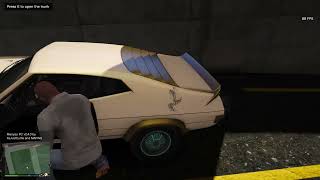
Store your weapons in the trunk of any car and find them there the next time you play. Walk up to a car, open the trunk, and manage your stash through a clean menu in the style of GTA, with weapon icons.
FEATURES
- Trunk storage for weapons. Store the weapon you are holding, take one out, or take everything at once.
- Weapon icons. Every row in the menu shows the weapon's icon, and the highlighted weapon also gets a large icon card with its name and ammo.
- Automatic saving. Your trunks are saved every time you store or take a weapon. Close the game, come back later, and your weapons are still in the car.
- Saved per vehicle. Each trunk is tied to the car's model and license plate, so every car keeps its own stash.
- Keeps your weapon setup. Ammo, tints, and attachments are saved and restored.
- Unlocked cars only. Locked cars stay locked.
- Easy installation. It is a single script file, and it does not need LemonUI.
CONTROLS
ACTION KEY
Open the trunk E (can be changed in the .ini file)
Move up Up Arrow
Move down Down Arrow
Select Enter
Close the menu Backspace
Stand next to the trunk of an unlocked car to open it. The directional pad, select, and back buttons on a controller also work inside the menu. (controllers can not open trunk)
TRUNK SIZES
VEHICLE CLASS WEAPON SLOTS
Compacts 4
Super 6
Sports, Sports Classics 9
Sedans, Coupes, Muscle 12
Emergency, Off Road, Utility, Service 12
SUVs, Vans 16
Motorcycles, bicycles, boats, aircraft, and other vehicles without a trunk are not supported.
REQUIREMENTS
REQUIREMENT
Grand Theft Auto V Legacy edition
Script Hook V Required
ScriptHookVDotNet v3 Required
INSTALLATION
1. Copy the file TrunkInventory.cs into the scripts folder inside your GTA V folder.
2. Start the game. The script compiles itself when the game loads.
On the first run, the mod creates a file called TrunkInventory.ini in the scripts folder, which holds the open key. Your saved trunks are stored in a file called trunks.txt, inside a folder named TrunkInventory in the scripts folder.
NOTES
- A car must have the same model and license plate to find its stash again. Cars you own and keep work best, because random traffic cars have plates you will rarely see twice.
- If something goes wrong, the mod writes the error to a file called error.log, in that same TrunkInventory folder, instead of crashing.
Store your weapons in the trunk of any car and find them there the next time you play. Walk up to a car, open the trunk, and manage your stash through a clean menu in the style of GTA, with weapon icons.
FEATURES
- Trunk storage for weapons. Store the weapon you are holding, take one out, or take everything at once.
- Weapon icons. Every row in the menu shows the weapon's icon, and the highlighted weapon also gets a large icon card with its name and ammo.
- Automatic saving. Your trunks are saved every time you store or take a weapon. Close the game, come back later, and your weapons are still in the car.
- Saved per vehicle. Each trunk is tied to the car's model and license plate, so every car keeps its own stash.
- Keeps your weapon setup. Ammo, tints, and attachments are saved and restored.
- Unlocked cars only. Locked cars stay locked.
- Easy installation. It is a single script file, and it does not need LemonUI.
CONTROLS
ACTION KEY
Open the trunk E (can be changed in the .ini file)
Move up Up Arrow
Move down Down Arrow
Select Enter
Close the menu Backspace
Stand next to the trunk of an unlocked car to open it. The directional pad, select, and back buttons on a controller also work inside the menu. (controllers can not open trunk)
TRUNK SIZES
VEHICLE CLASS WEAPON SLOTS
Compacts 4
Super 6
Sports, Sports Classics 9
Sedans, Coupes, Muscle 12
Emergency, Off Road, Utility, Service 12
SUVs, Vans 16
Motorcycles, bicycles, boats, aircraft, and other vehicles without a trunk are not supported.
REQUIREMENTS
REQUIREMENT
Grand Theft Auto V Legacy edition
Script Hook V Required
ScriptHookVDotNet v3 Required
INSTALLATION
1. Copy the file TrunkInventory.cs into the scripts folder inside your GTA V folder.
2. Start the game. The script compiles itself when the game loads.
On the first run, the mod creates a file called TrunkInventory.ini in the scripts folder, which holds the open key. Your saved trunks are stored in a file called trunks.txt, inside a folder named TrunkInventory in the scripts folder.
NOTES
- A car must have the same model and license plate to find its stash again. Cars you own and keep work best, because random traffic cars have plates you will rarely see twice.
- If something goes wrong, the mod writes the error to a file called error.log, in that same TrunkInventory folder, instead of crashing.
First Uploaded: 2 days ago
Last Updated: 1 hour ago
Last Downloaded: 2 minutes ago
0 Comments
TRUNK INVENTORY WITH SAVE SYSTEM
Store your weapons in the trunk of any car and find them there the next time you play. Walk up to a car, open the trunk, and manage your stash through a clean menu in the style of GTA, with weapon icons.
FEATURES
- Trunk storage for weapons. Store the weapon you are holding, take one out, or take everything at once.
- Weapon icons. Every row in the menu shows the weapon's icon, and the highlighted weapon also gets a large icon card with its name and ammo.
- Automatic saving. Your trunks are saved every time you store or take a weapon. Close the game, come back later, and your weapons are still in the car.
- Saved per vehicle. Each trunk is tied to the car's model and license plate, so every car keeps its own stash.
- Keeps your weapon setup. Ammo, tints, and attachments are saved and restored.
- Unlocked cars only. Locked cars stay locked.
- Easy installation. It is a single script file, and it does not need LemonUI.
CONTROLS
ACTION KEY
Open the trunk E (can be changed in the .ini file)
Move up Up Arrow
Move down Down Arrow
Select Enter
Close the menu Backspace
Stand next to the trunk of an unlocked car to open it. The directional pad, select, and back buttons on a controller also work inside the menu. (controllers can not open trunk)
TRUNK SIZES
VEHICLE CLASS WEAPON SLOTS
Compacts 4
Super 6
Sports, Sports Classics 9
Sedans, Coupes, Muscle 12
Emergency, Off Road, Utility, Service 12
SUVs, Vans 16
Motorcycles, bicycles, boats, aircraft, and other vehicles without a trunk are not supported.
REQUIREMENTS
REQUIREMENT
Grand Theft Auto V Legacy edition
Script Hook V Required
ScriptHookVDotNet v3 Required
INSTALLATION
1. Copy the file TrunkInventory.cs into the scripts folder inside your GTA V folder.
2. Start the game. The script compiles itself when the game loads.
On the first run, the mod creates a file called TrunkInventory.ini in the scripts folder, which holds the open key. Your saved trunks are stored in a file called trunks.txt, inside a folder named TrunkInventory in the scripts folder.
NOTES
- A car must have the same model and license plate to find its stash again. Cars you own and keep work best, because random traffic cars have plates you will rarely see twice.
- If something goes wrong, the mod writes the error to a file called error.log, in that same TrunkInventory folder, instead of crashing.
Store your weapons in the trunk of any car and find them there the next time you play. Walk up to a car, open the trunk, and manage your stash through a clean menu in the style of GTA, with weapon icons.
FEATURES
- Trunk storage for weapons. Store the weapon you are holding, take one out, or take everything at once.
- Weapon icons. Every row in the menu shows the weapon's icon, and the highlighted weapon also gets a large icon card with its name and ammo.
- Automatic saving. Your trunks are saved every time you store or take a weapon. Close the game, come back later, and your weapons are still in the car.
- Saved per vehicle. Each trunk is tied to the car's model and license plate, so every car keeps its own stash.
- Keeps your weapon setup. Ammo, tints, and attachments are saved and restored.
- Unlocked cars only. Locked cars stay locked.
- Easy installation. It is a single script file, and it does not need LemonUI.
CONTROLS
ACTION KEY
Open the trunk E (can be changed in the .ini file)
Move up Up Arrow
Move down Down Arrow
Select Enter
Close the menu Backspace
Stand next to the trunk of an unlocked car to open it. The directional pad, select, and back buttons on a controller also work inside the menu. (controllers can not open trunk)
TRUNK SIZES
VEHICLE CLASS WEAPON SLOTS
Compacts 4
Super 6
Sports, Sports Classics 9
Sedans, Coupes, Muscle 12
Emergency, Off Road, Utility, Service 12
SUVs, Vans 16
Motorcycles, bicycles, boats, aircraft, and other vehicles without a trunk are not supported.
REQUIREMENTS
REQUIREMENT
Grand Theft Auto V Legacy edition
Script Hook V Required
ScriptHookVDotNet v3 Required
INSTALLATION
1. Copy the file TrunkInventory.cs into the scripts folder inside your GTA V folder.
2. Start the game. The script compiles itself when the game loads.
On the first run, the mod creates a file called TrunkInventory.ini in the scripts folder, which holds the open key. Your saved trunks are stored in a file called trunks.txt, inside a folder named TrunkInventory in the scripts folder.
NOTES
- A car must have the same model and license plate to find its stash again. Cars you own and keep work best, because random traffic cars have plates you will rarely see twice.
- If something goes wrong, the mod writes the error to a file called error.log, in that same TrunkInventory folder, instead of crashing.
First Uploaded: 2 days ago
Last Updated: 1 hour ago
Last Downloaded: 2 minutes ago
Join the conversation! Log In or register for an account to be able to comment.
 5mods on Discord
