N.O.S. - Nitro Overdrive System 1.0

![Quick Dialogue System [Legacy + Enhanced]](https://img.gta5-mods.com/q75-w500-h333-cfill/images/quick-dialogue-system/fcfa5b-GrandTheft2.jpg "Quick Dialogue System [Legacy + Enhanced]")


38
4
38
4
N.O.S. - Nitro Overdrive System 1.0
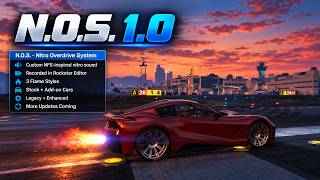
N.O.S. is a standalone Nitro / NOS system for GTA V Legacy and GTA V Enhanced, focused on smooth acceleration, native in-game audio, configurable exhaust effects and compatibility with other mods.
KEY FEATURES
GRAPHICS MOD NOTE
With NaturalVision Evolved (NVE) installed, Nitro exhaust flames may appear blue or cyan depending on the selected visual setup.
This is a visual difference caused by NVE and does not affect N.O.S. functionality.
AUDIO NOTE
The Nitro sound uses source audio from Need for Speed: Underground 2.
I recreated and mixed the final Nitro sequence manually by ear, so it is not intended to be a 100% exact reproduction of the original NFSU2 sound mix.
PUBLIC API / MOD INTEGRATION
N.O.S. includes a small public API that allows other mods to read Nitro state and react to N.O.S. events without accessing its internal physics or gameplay systems.
The API is intended for HUDs, speedometers, machinima tools and other optional integrations. Developer documentation and a basic integration example are included in the archive.
For detailed API, compatibility or integration discussions, you can contact me on Discord. My Discord server is linked in my GTA5-Mods profile.
LEGACY SPEEDOMETER INTEGRATION
The Legacy version includes built-in support for Need for Speed Underground 2 Speedometer.
When the integration is enabled, its N2O gauge can display the current N.O.S. charge.
The speedometer itself is not included with N.O.S.
REQUIREMENTS
Both Legacy and Enhanced:
GTA V Enhanced:
GTA V Legacy:
INSTALLATION
Legacy:
Open the Legacy OIV package with OpenIV Package Installer and install it to the mods folder.
Enhanced:
Install OpenRPF, then open the Enhanced OIV package with OIV Package Installer and select your GTA V Enhanced folder.
Manual installation instructions are also included in the archive.
LONG-TERM PLANS
Roadmap features, priorities and version numbers may change during development.
IMPORTANT
Dependencies are not included with N.O.S.
Use the package made for your game edition. Do not install the Legacy OIV into Enhanced or the Enhanced OIV into Legacy.
N.O.S. is a standalone Nitro / NOS system for GTA V Legacy and GTA V Enhanced, focused on smooth acceleration, native in-game audio, configurable exhaust effects and compatibility with other mods.
KEY FEATURES
- Support for GTA V Legacy + Enhanced
- Custom Nitro boost with smooth acceleration and release
- Custom Nitro audio based on sounds from Need for Speed: Underground 2
- Native GTA V audio playback
- Rockstar Editor audio support
- 3 exhaust flame styles
- Infinite or regenerating N2O reserve
- Per-vehicle Nitro charge
- Stock and add-on vehicle support
- Optional San Andreas-style speed screen effect
- In-game settings menu
- Public N.O.S. API for integration with HUDs, speedometers, machinima tools and other mods
- More features and integrations planned for future updates
GRAPHICS MOD NOTE
With NaturalVision Evolved (NVE) installed, Nitro exhaust flames may appear blue or cyan depending on the selected visual setup.
This is a visual difference caused by NVE and does not affect N.O.S. functionality.
AUDIO NOTE
The Nitro sound uses source audio from Need for Speed: Underground 2.
I recreated and mixed the final Nitro sequence manually by ear, so it is not intended to be a 100% exact reproduction of the original NFSU2 sound mix.
PUBLIC API / MOD INTEGRATION
N.O.S. includes a small public API that allows other mods to read Nitro state and react to N.O.S. events without accessing its internal physics or gameplay systems.
The API is intended for HUDs, speedometers, machinima tools and other optional integrations. Developer documentation and a basic integration example are included in the archive.
For detailed API, compatibility or integration discussions, you can contact me on Discord. My Discord server is linked in my GTA5-Mods profile.
LEGACY SPEEDOMETER INTEGRATION
The Legacy version includes built-in support for Need for Speed Underground 2 Speedometer.
When the integration is enabled, its N2O gauge can display the current N.O.S. charge.
The speedometer itself is not included with N.O.S.
REQUIREMENTS
Both Legacy and Enhanced:
- Script Hook V
- .NET Framework 4.8
GTA V Enhanced:
- ScriptHookVDotNet Enhanced
- OpenRPF for the mods folder
- OIV Package Installer for automatic installation of the Enhanced OIV package
GTA V Legacy:
- ScriptHookVDotNet Enhanced [Legacy + Enhanced]
or - ScriptHookVDotNet v3.7.0-nightly.94 - tested with N.O.S.
- OpenIV / OpenIV.asi for the mods folder and OIV installation
INSTALLATION
Legacy:
Open the Legacy OIV package with OpenIV Package Installer and install it to the mods folder.
Enhanced:
Install OpenRPF, then open the Enhanced OIV package with OIV Package Installer and select your GTA V Enhanced folder.
Manual installation instructions are also included in the archive.
LONG-TERM PLANS
- Expanded public API for third-party mods
- Additional HUD and speedometer integrations
- More visual and audio customization
- Further vehicle-specific Nitro behavior
- Additional compatibility and quality-of-life improvements
Roadmap features, priorities and version numbers may change during development.
IMPORTANT
Dependencies are not included with N.O.S.
Use the package made for your game edition. Do not install the Legacy OIV into Enhanced or the Enhanced OIV into Legacy.
First Uploaded: 5 hours ago
Last Updated: 4 hours ago
Last Downloaded: 19 minutes ago
1 Comment
More mods by VirtuOzZ:

- .Net
- Vehicles
- Player
4.88
755
34
0.9.5 [BETA] Legacy
By VirtuOzZ
N.O.S. - Nitro Overdrive System 1.0
N.O.S. is a standalone Nitro / NOS system for GTA V Legacy and GTA V Enhanced, focused on smooth acceleration, native in-game audio, configurable exhaust effects and compatibility with other mods.
KEY FEATURES
GRAPHICS MOD NOTE
With NaturalVision Evolved (NVE) installed, Nitro exhaust flames may appear blue or cyan depending on the selected visual setup.
This is a visual difference caused by NVE and does not affect N.O.S. functionality.
AUDIO NOTE
The Nitro sound uses source audio from Need for Speed: Underground 2.
I recreated and mixed the final Nitro sequence manually by ear, so it is not intended to be a 100% exact reproduction of the original NFSU2 sound mix.
PUBLIC API / MOD INTEGRATION
N.O.S. includes a small public API that allows other mods to read Nitro state and react to N.O.S. events without accessing its internal physics or gameplay systems.
The API is intended for HUDs, speedometers, machinima tools and other optional integrations. Developer documentation and a basic integration example are included in the archive.
For detailed API, compatibility or integration discussions, you can contact me on Discord. My Discord server is linked in my GTA5-Mods profile.
LEGACY SPEEDOMETER INTEGRATION
The Legacy version includes built-in support for Need for Speed Underground 2 Speedometer.
When the integration is enabled, its N2O gauge can display the current N.O.S. charge.
The speedometer itself is not included with N.O.S.
REQUIREMENTS
Both Legacy and Enhanced:
GTA V Enhanced:
GTA V Legacy:
INSTALLATION
Legacy:
Open the Legacy OIV package with OpenIV Package Installer and install it to the mods folder.
Enhanced:
Install OpenRPF, then open the Enhanced OIV package with OIV Package Installer and select your GTA V Enhanced folder.
Manual installation instructions are also included in the archive.
LONG-TERM PLANS
Roadmap features, priorities and version numbers may change during development.
IMPORTANT
Dependencies are not included with N.O.S.
Use the package made for your game edition. Do not install the Legacy OIV into Enhanced or the Enhanced OIV into Legacy.
N.O.S. is a standalone Nitro / NOS system for GTA V Legacy and GTA V Enhanced, focused on smooth acceleration, native in-game audio, configurable exhaust effects and compatibility with other mods.
KEY FEATURES
- Support for GTA V Legacy + Enhanced
- Custom Nitro boost with smooth acceleration and release
- Custom Nitro audio based on sounds from Need for Speed: Underground 2
- Native GTA V audio playback
- Rockstar Editor audio support
- 3 exhaust flame styles
- Infinite or regenerating N2O reserve
- Per-vehicle Nitro charge
- Stock and add-on vehicle support
- Optional San Andreas-style speed screen effect
- In-game settings menu
- Public N.O.S. API for integration with HUDs, speedometers, machinima tools and other mods
- More features and integrations planned for future updates
GRAPHICS MOD NOTE
With NaturalVision Evolved (NVE) installed, Nitro exhaust flames may appear blue or cyan depending on the selected visual setup.
This is a visual difference caused by NVE and does not affect N.O.S. functionality.
AUDIO NOTE
The Nitro sound uses source audio from Need for Speed: Underground 2.
I recreated and mixed the final Nitro sequence manually by ear, so it is not intended to be a 100% exact reproduction of the original NFSU2 sound mix.
PUBLIC API / MOD INTEGRATION
N.O.S. includes a small public API that allows other mods to read Nitro state and react to N.O.S. events without accessing its internal physics or gameplay systems.
The API is intended for HUDs, speedometers, machinima tools and other optional integrations. Developer documentation and a basic integration example are included in the archive.
For detailed API, compatibility or integration discussions, you can contact me on Discord. My Discord server is linked in my GTA5-Mods profile.
LEGACY SPEEDOMETER INTEGRATION
The Legacy version includes built-in support for Need for Speed Underground 2 Speedometer.
When the integration is enabled, its N2O gauge can display the current N.O.S. charge.
The speedometer itself is not included with N.O.S.
REQUIREMENTS
Both Legacy and Enhanced:
- Script Hook V
- .NET Framework 4.8
GTA V Enhanced:
- ScriptHookVDotNet Enhanced
- OpenRPF for the mods folder
- OIV Package Installer for automatic installation of the Enhanced OIV package
GTA V Legacy:
- ScriptHookVDotNet Enhanced [Legacy + Enhanced]
or - ScriptHookVDotNet v3.7.0-nightly.94 - tested with N.O.S.
- OpenIV / OpenIV.asi for the mods folder and OIV installation
INSTALLATION
Legacy:
Open the Legacy OIV package with OpenIV Package Installer and install it to the mods folder.
Enhanced:
Install OpenRPF, then open the Enhanced OIV package with OIV Package Installer and select your GTA V Enhanced folder.
Manual installation instructions are also included in the archive.
LONG-TERM PLANS
- Expanded public API for third-party mods
- Additional HUD and speedometer integrations
- More visual and audio customization
- Further vehicle-specific Nitro behavior
- Additional compatibility and quality-of-life improvements
Roadmap features, priorities and version numbers may change during development.
IMPORTANT
Dependencies are not included with N.O.S.
Use the package made for your game edition. Do not install the Legacy OIV into Enhanced or the Enhanced OIV into Legacy.
First Uploaded: 5 hours ago
Last Updated: 4 hours ago
Last Downloaded: 19 minutes ago
 5mods on Discord

This mod work in Fivem?