Nightmare Protocol [Legacy/Enhanced] 1.0

![Extended Visual Camera [Legacy & Enhanced]](https://img.gta5-mods.com/q75-w500-h333-cfill/images/extended-visual-camera-legacy-enhanced-v1-0/28476f-cover.png "Extended Visual Camera [Legacy & Enhanced]")
![BikeLifeMenu [Legacy Version]](https://img.gta5-mods.com/q75-w500-h333-cfill/images/bikelifemenu-legacy-version/4d1f58-cover.png "BikeLifeMenu [Legacy Version]")
![DriveStyle [Legacy]](https://img.gta5-mods.com/q75-w500-h333-cfill/images/drivestyle-legacy-version/9e8060-cover.png "DriveStyle [Legacy]")
![DanceStyle Menu [Legacy]](https://img.gta5-mods.com/q75-w500-h333-cfill/images/dancestyle-menu-1-0-legacy-version/641b9f-39826.png "DanceStyle Menu [Legacy]")
![Los Santos "Vice Style" Radar Map [Legacy]](https://img.gta5-mods.com/q75-w500-h333-cfill/images/los-santos-vice-map-legacy/a3f9dd-cover.png "Los Santos \"Vice Style\" Radar Map [Legacy]")


19
1
19
1
NIGHTMARE PROTOCOL (Legacy and Enhanced Version)
DESCRIPTION:
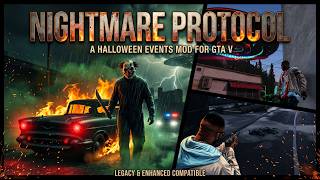
Nightmare Protocol brings the terrifying atmosphere of Halloween to Grand Theft Auto V single-player mode.
When night falls over San Andreas, unexplained supernatural phenomena and relentless pursuers will hunt you down.
Active Hours: 21:00 - 05:00 in-game time.
This Version 1.0 is just the starting point: I’ll soon be back at work to expand the mod, adding new activities and exclusive events, including full support for GTA V Enhanced!
Stay tuned—you’re in for a treat!
FEATURES:
- Randomized Night-Time Encounters (every 90 seconds by default)
- Manual Trigger Catalog Menu (LemonUI interface, Key: F10)
- Christine Phantom Car (flaming aggressive pursuit vehicle)
- Cerberus Apocalypse Truck (heavy ramming tanker)
- Ghost Driverless Car (stealth ramming vehicle with headlights off)
- Hostile Slasher Killers (Clown, Hillbilly, Undead with melee weapons)
- The Doppelgänger (hostile evil clone armed with a sawed-off shotgun)
- Graveyard Awakening (creeping undead walkers rising from the ground)
- Possessed Beasts (aggressive wild animal ambushes)
- The Ghostly Apparition (translucent phantom watcher)
- Altruist Cultist Ambush (Molotov-throwing fanatical squad)
- Alien UFO Sighting (hovering vessel with active tractor beam abduction)
- Clean Atmospheric Controls (Natural Night, Dark Fog, Thunderstorm)
PREVIEW VIDEO:
Want to see the mod in action before installing? Check out the showcase video:
https://youtu.be/UUyJC9BsMrs
IMPORTANT NOTES:
- Always keep a backup of your original files before modifying game archives.
- Always install inside the "mods" folder in OpenIV!
AUTHORS AND CREDITS:
- Original 3D / Texture Work: DaveMods
- Conversion & Optimization for GTA V: DaveMods
Special thanks to the community and tool creators:
- OpenIV Team (https://openiv.com/)
- dexyfex for CodeWalker (https://it.gta5-mods.com/users/dexyfex)
- NCH Software for PhotoPad (https://www.nchsoftware.com)
- Visual Studio Code (https://code.visualstudio.com/)
PREREQUISITES:
Make sure you have the following installed before proceeding:
1. ScriptHook V (https://it.gta5-mods.com/tools/script-hook-v)
2. ScriptHookV .NET (https://it.gta5-mods.com/tools/scripthookv-net)
3. OpenIV (https://openiv.com/)
4. LemonUI for SHVDN3 (v2.2.0 or newer)
HOW TO INSTALL (AUTOMATIC VIA OPENIV):
Inside the download package, you will find two automated installer files:
- OIV Nightmare Protocol (script)
- OIV Nightmare Protocol (dlc Menu)
Method A (Package Installer):
1. Extract the downloaded archive to a convenient folder.
2. Launch OpenIV and turn on "Edit Mode".
3. Go to Tools > Package Installer.
4. Select the .oiv package file.
5. When prompted, choose the "mods" (for dlc) or "game" (for script) folder to install!
6. Done!
Method B (Drag & Drop):
1. Launch OpenIV and enable "Edit Mode".
2. Drag and drop the .oiv file directly into the OpenIV window.
3. Select the "mods" (for dlc) and "game" (for script) folder and click Install.
4. Done!
HOW TO UNINSTALL:
To remove the mod, simply delete the "n_protocol_menu" DLC folder from your dlcpacks folder and
delete NightmareProtocol.dll along with ProtocolSettings.ini from your scripts folder.
IN-GAME CONTROLS:
In the game, use the following controls:
- Press [F10] to open the Nightmare Protocol Control Panel.
- Settings can be customized in "scripts\ProtocolSettings.ini":
* MenuKey: Toggle key for the menu (default: F10)
* EventCheckInterval: Time in seconds between random event checks
* EventChance: Percentage probability of an event spawning
* NightStartHour / NightEndHour: Active timeframe (default: 21 to 5)
* WeatherPreset: NATURAL, OVERCAST, or THUNDER
COMMUNITY AND SUPPORT:
Join our community and follow future releases:
- Patreon: https://www.patreon.com/DaveMods
- YouTube: https://www.youtube.com/@DaveMods76
- Discord: https://discord.gg/qmtesc8MSV
MODS by DaveMods - HAVE FUN!
DESCRIPTION:
Nightmare Protocol brings the terrifying atmosphere of Halloween to Grand Theft Auto V single-player mode.
When night falls over San Andreas, unexplained supernatural phenomena and relentless pursuers will hunt you down.
Active Hours: 21:00 - 05:00 in-game time.
This Version 1.0 is just the starting point: I’ll soon be back at work to expand the mod, adding new activities and exclusive events, including full support for GTA V Enhanced!
Stay tuned—you’re in for a treat!
FEATURES:
- Randomized Night-Time Encounters (every 90 seconds by default)
- Manual Trigger Catalog Menu (LemonUI interface, Key: F10)
- Christine Phantom Car (flaming aggressive pursuit vehicle)
- Cerberus Apocalypse Truck (heavy ramming tanker)
- Ghost Driverless Car (stealth ramming vehicle with headlights off)
- Hostile Slasher Killers (Clown, Hillbilly, Undead with melee weapons)
- The Doppelgänger (hostile evil clone armed with a sawed-off shotgun)
- Graveyard Awakening (creeping undead walkers rising from the ground)
- Possessed Beasts (aggressive wild animal ambushes)
- The Ghostly Apparition (translucent phantom watcher)
- Altruist Cultist Ambush (Molotov-throwing fanatical squad)
- Alien UFO Sighting (hovering vessel with active tractor beam abduction)
- Clean Atmospheric Controls (Natural Night, Dark Fog, Thunderstorm)
PREVIEW VIDEO:
Want to see the mod in action before installing? Check out the showcase video:
https://youtu.be/UUyJC9BsMrs
IMPORTANT NOTES:
- Always keep a backup of your original files before modifying game archives.
- Always install inside the "mods" folder in OpenIV!
AUTHORS AND CREDITS:
- Original 3D / Texture Work: DaveMods
- Conversion & Optimization for GTA V: DaveMods
Special thanks to the community and tool creators:
- OpenIV Team (https://openiv.com/)
- dexyfex for CodeWalker (https://it.gta5-mods.com/users/dexyfex)
- NCH Software for PhotoPad (https://www.nchsoftware.com)
- Visual Studio Code (https://code.visualstudio.com/)
PREREQUISITES:
Make sure you have the following installed before proceeding:
1. ScriptHook V (https://it.gta5-mods.com/tools/script-hook-v)
2. ScriptHookV .NET (https://it.gta5-mods.com/tools/scripthookv-net)
3. OpenIV (https://openiv.com/)
4. LemonUI for SHVDN3 (v2.2.0 or newer)
HOW TO INSTALL (AUTOMATIC VIA OPENIV):
Inside the download package, you will find two automated installer files:
- OIV Nightmare Protocol (script)
- OIV Nightmare Protocol (dlc Menu)
Method A (Package Installer):
1. Extract the downloaded archive to a convenient folder.
2. Launch OpenIV and turn on "Edit Mode".
3. Go to Tools > Package Installer.
4. Select the .oiv package file.
5. When prompted, choose the "mods" (for dlc) or "game" (for script) folder to install!
6. Done!
Method B (Drag & Drop):
1. Launch OpenIV and enable "Edit Mode".
2. Drag and drop the .oiv file directly into the OpenIV window.
3. Select the "mods" (for dlc) and "game" (for script) folder and click Install.
4. Done!
HOW TO UNINSTALL:
To remove the mod, simply delete the "n_protocol_menu" DLC folder from your dlcpacks folder and
delete NightmareProtocol.dll along with ProtocolSettings.ini from your scripts folder.
IN-GAME CONTROLS:
In the game, use the following controls:
- Press [F10] to open the Nightmare Protocol Control Panel.
- Settings can be customized in "scripts\ProtocolSettings.ini":
* MenuKey: Toggle key for the menu (default: F10)
* EventCheckInterval: Time in seconds between random event checks
* EventChance: Percentage probability of an event spawning
* NightStartHour / NightEndHour: Active timeframe (default: 21 to 5)
* WeatherPreset: NATURAL, OVERCAST, or THUNDER
COMMUNITY AND SUPPORT:
Join our community and follow future releases:
- Patreon: https://www.patreon.com/DaveMods
- YouTube: https://www.youtube.com/@DaveMods76
- Discord: https://discord.gg/qmtesc8MSV
MODS by DaveMods - HAVE FUN!
First Uploaded: 2 hours ago
Last Updated: 1 hour ago
Last Downloaded: 13 minutes ago
2 Comments
NIGHTMARE PROTOCOL (Legacy and Enhanced Version)
DESCRIPTION:
Nightmare Protocol brings the terrifying atmosphere of Halloween to Grand Theft Auto V single-player mode.
When night falls over San Andreas, unexplained supernatural phenomena and relentless pursuers will hunt you down.
Active Hours: 21:00 - 05:00 in-game time.
This Version 1.0 is just the starting point: I’ll soon be back at work to expand the mod, adding new activities and exclusive events, including full support for GTA V Enhanced!
Stay tuned—you’re in for a treat!
FEATURES:
- Randomized Night-Time Encounters (every 90 seconds by default)
- Manual Trigger Catalog Menu (LemonUI interface, Key: F10)
- Christine Phantom Car (flaming aggressive pursuit vehicle)
- Cerberus Apocalypse Truck (heavy ramming tanker)
- Ghost Driverless Car (stealth ramming vehicle with headlights off)
- Hostile Slasher Killers (Clown, Hillbilly, Undead with melee weapons)
- The Doppelgänger (hostile evil clone armed with a sawed-off shotgun)
- Graveyard Awakening (creeping undead walkers rising from the ground)
- Possessed Beasts (aggressive wild animal ambushes)
- The Ghostly Apparition (translucent phantom watcher)
- Altruist Cultist Ambush (Molotov-throwing fanatical squad)
- Alien UFO Sighting (hovering vessel with active tractor beam abduction)
- Clean Atmospheric Controls (Natural Night, Dark Fog, Thunderstorm)
PREVIEW VIDEO:
Want to see the mod in action before installing? Check out the showcase video:
https://youtu.be/UUyJC9BsMrs
IMPORTANT NOTES:
- Always keep a backup of your original files before modifying game archives.
- Always install inside the "mods" folder in OpenIV!
AUTHORS AND CREDITS:
- Original 3D / Texture Work: DaveMods
- Conversion & Optimization for GTA V: DaveMods
Special thanks to the community and tool creators:
- OpenIV Team (https://openiv.com/)
- dexyfex for CodeWalker (https://it.gta5-mods.com/users/dexyfex)
- NCH Software for PhotoPad (https://www.nchsoftware.com)
- Visual Studio Code (https://code.visualstudio.com/)
PREREQUISITES:
Make sure you have the following installed before proceeding:
1. ScriptHook V (https://it.gta5-mods.com/tools/script-hook-v)
2. ScriptHookV .NET (https://it.gta5-mods.com/tools/scripthookv-net)
3. OpenIV (https://openiv.com/)
4. LemonUI for SHVDN3 (v2.2.0 or newer)
HOW TO INSTALL (AUTOMATIC VIA OPENIV):
Inside the download package, you will find two automated installer files:
- OIV Nightmare Protocol (script)
- OIV Nightmare Protocol (dlc Menu)
Method A (Package Installer):
1. Extract the downloaded archive to a convenient folder.
2. Launch OpenIV and turn on "Edit Mode".
3. Go to Tools > Package Installer.
4. Select the .oiv package file.
5. When prompted, choose the "mods" (for dlc) or "game" (for script) folder to install!
6. Done!
Method B (Drag & Drop):
1. Launch OpenIV and enable "Edit Mode".
2. Drag and drop the .oiv file directly into the OpenIV window.
3. Select the "mods" (for dlc) and "game" (for script) folder and click Install.
4. Done!
HOW TO UNINSTALL:
To remove the mod, simply delete the "n_protocol_menu" DLC folder from your dlcpacks folder and
delete NightmareProtocol.dll along with ProtocolSettings.ini from your scripts folder.
IN-GAME CONTROLS:
In the game, use the following controls:
- Press [F10] to open the Nightmare Protocol Control Panel.
- Settings can be customized in "scripts\ProtocolSettings.ini":
* MenuKey: Toggle key for the menu (default: F10)
* EventCheckInterval: Time in seconds between random event checks
* EventChance: Percentage probability of an event spawning
* NightStartHour / NightEndHour: Active timeframe (default: 21 to 5)
* WeatherPreset: NATURAL, OVERCAST, or THUNDER
COMMUNITY AND SUPPORT:
Join our community and follow future releases:
- Patreon: https://www.patreon.com/DaveMods
- YouTube: https://www.youtube.com/@DaveMods76
- Discord: https://discord.gg/qmtesc8MSV
MODS by DaveMods - HAVE FUN!
DESCRIPTION:
Nightmare Protocol brings the terrifying atmosphere of Halloween to Grand Theft Auto V single-player mode.
When night falls over San Andreas, unexplained supernatural phenomena and relentless pursuers will hunt you down.
Active Hours: 21:00 - 05:00 in-game time.
This Version 1.0 is just the starting point: I’ll soon be back at work to expand the mod, adding new activities and exclusive events, including full support for GTA V Enhanced!
Stay tuned—you’re in for a treat!
FEATURES:
- Randomized Night-Time Encounters (every 90 seconds by default)
- Manual Trigger Catalog Menu (LemonUI interface, Key: F10)
- Christine Phantom Car (flaming aggressive pursuit vehicle)
- Cerberus Apocalypse Truck (heavy ramming tanker)
- Ghost Driverless Car (stealth ramming vehicle with headlights off)
- Hostile Slasher Killers (Clown, Hillbilly, Undead with melee weapons)
- The Doppelgänger (hostile evil clone armed with a sawed-off shotgun)
- Graveyard Awakening (creeping undead walkers rising from the ground)
- Possessed Beasts (aggressive wild animal ambushes)
- The Ghostly Apparition (translucent phantom watcher)
- Altruist Cultist Ambush (Molotov-throwing fanatical squad)
- Alien UFO Sighting (hovering vessel with active tractor beam abduction)
- Clean Atmospheric Controls (Natural Night, Dark Fog, Thunderstorm)
PREVIEW VIDEO:
Want to see the mod in action before installing? Check out the showcase video:
https://youtu.be/UUyJC9BsMrs
IMPORTANT NOTES:
- Always keep a backup of your original files before modifying game archives.
- Always install inside the "mods" folder in OpenIV!
AUTHORS AND CREDITS:
- Original 3D / Texture Work: DaveMods
- Conversion & Optimization for GTA V: DaveMods
Special thanks to the community and tool creators:
- OpenIV Team (https://openiv.com/)
- dexyfex for CodeWalker (https://it.gta5-mods.com/users/dexyfex)
- NCH Software for PhotoPad (https://www.nchsoftware.com)
- Visual Studio Code (https://code.visualstudio.com/)
PREREQUISITES:
Make sure you have the following installed before proceeding:
1. ScriptHook V (https://it.gta5-mods.com/tools/script-hook-v)
2. ScriptHookV .NET (https://it.gta5-mods.com/tools/scripthookv-net)
3. OpenIV (https://openiv.com/)
4. LemonUI for SHVDN3 (v2.2.0 or newer)
HOW TO INSTALL (AUTOMATIC VIA OPENIV):
Inside the download package, you will find two automated installer files:
- OIV Nightmare Protocol (script)
- OIV Nightmare Protocol (dlc Menu)
Method A (Package Installer):
1. Extract the downloaded archive to a convenient folder.
2. Launch OpenIV and turn on "Edit Mode".
3. Go to Tools > Package Installer.
4. Select the .oiv package file.
5. When prompted, choose the "mods" (for dlc) or "game" (for script) folder to install!
6. Done!
Method B (Drag & Drop):
1. Launch OpenIV and enable "Edit Mode".
2. Drag and drop the .oiv file directly into the OpenIV window.
3. Select the "mods" (for dlc) and "game" (for script) folder and click Install.
4. Done!
HOW TO UNINSTALL:
To remove the mod, simply delete the "n_protocol_menu" DLC folder from your dlcpacks folder and
delete NightmareProtocol.dll along with ProtocolSettings.ini from your scripts folder.
IN-GAME CONTROLS:
In the game, use the following controls:
- Press [F10] to open the Nightmare Protocol Control Panel.
- Settings can be customized in "scripts\ProtocolSettings.ini":
* MenuKey: Toggle key for the menu (default: F10)
* EventCheckInterval: Time in seconds between random event checks
* EventChance: Percentage probability of an event spawning
* NightStartHour / NightEndHour: Active timeframe (default: 21 to 5)
* WeatherPreset: NATURAL, OVERCAST, or THUNDER
COMMUNITY AND SUPPORT:
Join our community and follow future releases:
- Patreon: https://www.patreon.com/DaveMods
- YouTube: https://www.youtube.com/@DaveMods76
- Discord: https://discord.gg/qmtesc8MSV
MODS by DaveMods - HAVE FUN!
First Uploaded: 2 hours ago
Last Updated: 1 hour ago
Last Downloaded: 13 minutes ago
 5mods on Discord

📌 A QUICK NOTE FROM DAVEMODS
Thanks for all the support! 🌴 Just wanted to give you a quick heads-up: the next upcoming update will feature plenty of new additions, including full support for GTA V Enhanced! Stay tuned! 🚀🎮
Constructive feedback, genuine suggestions, and detailed bug reports are always welcome—they are the best way to help improve my mods and keep updates coming. That said, please keep the comment section productive:
If you run into an issue or crash, don't just drop a 1-star rating. Explain what happened, your setup, and check your prerequisites first.
Trolling, sterile arguments, and toxic comments will be ignored.
Let’s keep the community clean and collaborative. Enjoy the game!
DaveMods
This file has been approved automatically. If you think this file should not be here for any reason please report it.