Support for InfamousSabre's Pickups 1.70.3

44,400
163
44,400
163
support-pickups
Support for InfamousSabre's Pickups GTA V Mod - v1.70.3 GitHub
Features
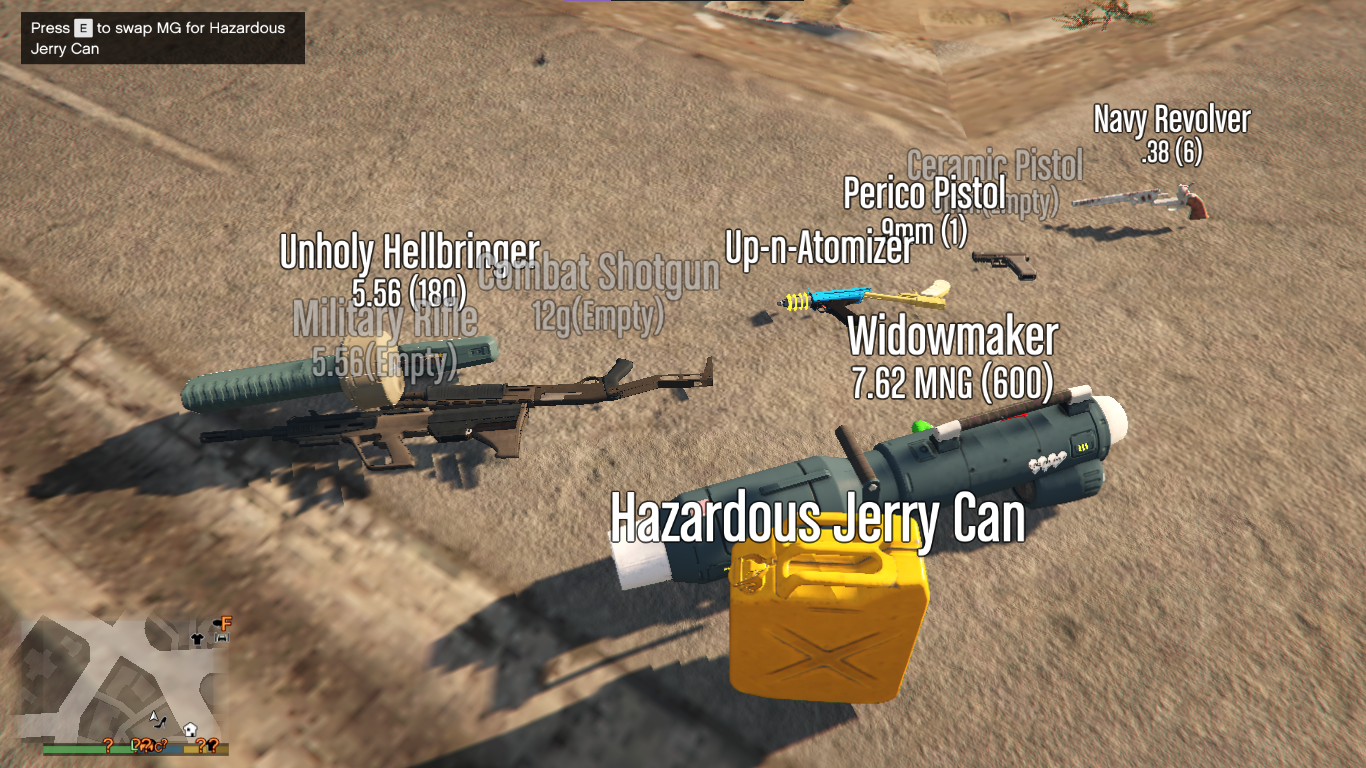
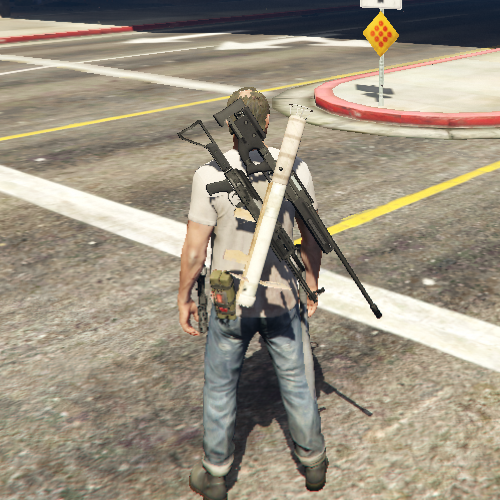
Remember InfamousSabre's Pickups mod? Unfortunately his mod does not support the latest DLC weapons so I tried continuing his work.
+ Updating 26 DLC weapons and their bullet speeds up to GTA V 1.70.
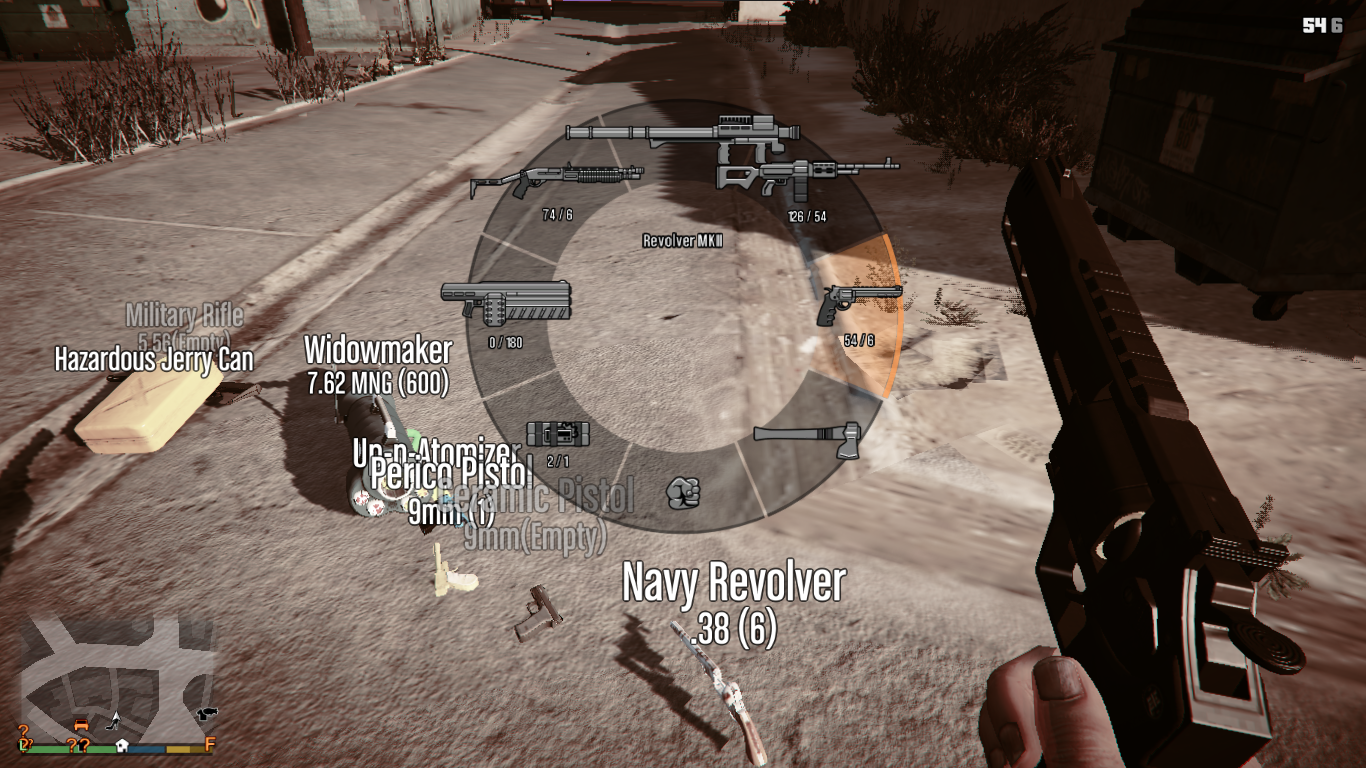
+ Customized number of slots: 8 slots and 4 slots
+ Simplified installation and uninstallation.
Installation
1. REQUIRED: Pickups 2.2 by InfamousSabre. I only update the new weapons, which WILL NOT WORK WITHOUT HIS MOD (AND BREAK YOUR GAME).
2. Backup your two files: `GTA V/mods/update/update.rpf/common/data/ai/weapons.meta` and `GTA V/mods/update/update.rpf/common/data/pickups.meta`
3. Download Pickups 2.2 by InfamousSabre. DO NOT INSTALL THROUGH OPENIV BUT EXTRACT AS ARCHIVE.
4. Move the folder `Pickups` and the files `Pickups.asi`, `Pickups.ini` to GTA V folder
5. DO NOT INSTALL ANYTHING ELSE FROM PICKUPS. Now we move on to my update.
6. Extract my Support for InfamousSabre's Pickups mod
7. Move the folder `./composed/mod/Pickups` to `GTA V/Pickups`
8. Move everything inside `./weapon-merger/composed/merged/update/update.rpf/dlc_patch` to `GTA V/mods/update/update.rpf/dlc_patch`
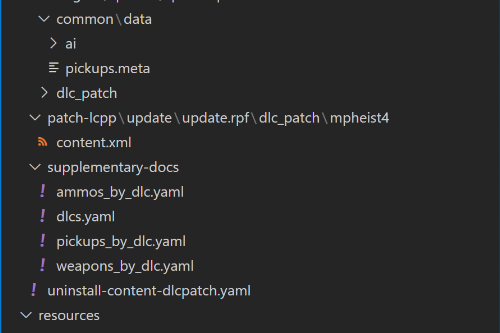
9. (Optional) Patch for LCPP: Move `./composed/patch-lcpp/update/update.rpf/dlc_patch/mpheist4/content.xml` to `GTA V/mods/update/update.rpf/dlc_patch/mpheist4`
10. Move everything inside `./composed/mod/update/update.rpf` to `GTA V/mods/update/update.rpf`
11. Optional 4 slots: move the files `pickups.xml` and `slots.xml` from `./composed/optional-4-slots` to `GTA V/Pickups`.
Uninstallation
1. Delete `Pickups/`, `Pickups.asi`, `Pickups.ini`
2. Extract `./weapon-merger/weapons-pickups-meta-uninstall-1.70.7z` to current folder (same level as this file).
3. Open the `./weapon-merger/composed/uninstall-content-dlcpatch.yaml` - This is the instruction to handle `content.xml` in each `dlc_patch`
4. Copy everything in `./uninstall/update/update.rpf` to `GTA V/mods/update/update.rpf`
____+ These should have reverted the DLCs under `to-patch` in `./composed/uninstall-content-dlcpatch.yaml`
5. For the remaining DLCs, i.e. under `to-delete` in `./weapon-merger/composed/uninstall-content-dlcpatch.yaml`, you can safely delete the `content.xml` file manually.
____+ Originally these files do not exist in the vanilla version
Changelog
+ 1.70.3 (GTA V v1.69 Bottom Dollar Bounties - 1.70 Agents of Sabotage)
____+ Add 2 new DLC weapons
____+ Add Python script to merge all weapon-.meta and pickups.meta
____+ Add supplementary resources and documents.
____+ Add patch for LCPP.
Credits
+ InfamousSabre for the mod Pickups
+ michelangelo777 for 7 Visible Weapons on Player
+ sjaak327 for Simple Trainer used in testing
+ RAGE Multiplayer Wiki and GTA Wiki for the weapons icons and references
Disclaimer
+ Do not upload elsewhere. Do not used for commercial, financial, or personal gain.
+ Respect the work of former authors as well, as my work is based on theirs.
+ You are free to improve upon mine so long as I and former authors are properly credited and original mod pages are linked.
+ I've also included an XLSX workbook in details of my work. I think it'd might anyhow help someone and the community in general.
Support for InfamousSabre's Pickups GTA V Mod - v1.70.3 GitHub
Features
Remember InfamousSabre's Pickups mod? Unfortunately his mod does not support the latest DLC weapons so I tried continuing his work.
+ Updating 26 DLC weapons and their bullet speeds up to GTA V 1.70.
+ Customized number of slots: 8 slots and 4 slots
+ Simplified installation and uninstallation.
Installation
1. REQUIRED: Pickups 2.2 by InfamousSabre. I only update the new weapons, which WILL NOT WORK WITHOUT HIS MOD (AND BREAK YOUR GAME).
2. Backup your two files: `GTA V/mods/update/update.rpf/common/data/ai/weapons.meta` and `GTA V/mods/update/update.rpf/common/data/pickups.meta`
3. Download Pickups 2.2 by InfamousSabre. DO NOT INSTALL THROUGH OPENIV BUT EXTRACT AS ARCHIVE.
4. Move the folder `Pickups` and the files `Pickups.asi`, `Pickups.ini` to GTA V folder
5. DO NOT INSTALL ANYTHING ELSE FROM PICKUPS. Now we move on to my update.
6. Extract my Support for InfamousSabre's Pickups mod
7. Move the folder `./composed/mod/Pickups` to `GTA V/Pickups`
8. Move everything inside `./weapon-merger/composed/merged/update/update.rpf/dlc_patch` to `GTA V/mods/update/update.rpf/dlc_patch`
9. (Optional) Patch for LCPP: Move `./composed/patch-lcpp/update/update.rpf/dlc_patch/mpheist4/content.xml` to `GTA V/mods/update/update.rpf/dlc_patch/mpheist4`
10. Move everything inside `./composed/mod/update/update.rpf` to `GTA V/mods/update/update.rpf`
11. Optional 4 slots: move the files `pickups.xml` and `slots.xml` from `./composed/optional-4-slots` to `GTA V/Pickups`.
Uninstallation
1. Delete `Pickups/`, `Pickups.asi`, `Pickups.ini`
2. Extract `./weapon-merger/weapons-pickups-meta-uninstall-1.70.7z` to current folder (same level as this file).
3. Open the `./weapon-merger/composed/uninstall-content-dlcpatch.yaml` - This is the instruction to handle `content.xml` in each `dlc_patch`
4. Copy everything in `./uninstall/update/update.rpf` to `GTA V/mods/update/update.rpf`
____+ These should have reverted the DLCs under `to-patch` in `./composed/uninstall-content-dlcpatch.yaml`
5. For the remaining DLCs, i.e. under `to-delete` in `./weapon-merger/composed/uninstall-content-dlcpatch.yaml`, you can safely delete the `content.xml` file manually.
____+ Originally these files do not exist in the vanilla version
Changelog
+ 1.70.3 (GTA V v1.69 Bottom Dollar Bounties - 1.70 Agents of Sabotage)
____+ Add 2 new DLC weapons
____+ Add Python script to merge all weapon-.meta and pickups.meta
____+ Add supplementary resources and documents.
____+ Add patch for LCPP.
Credits
+ InfamousSabre for the mod Pickups
+ michelangelo777 for 7 Visible Weapons on Player
+ sjaak327 for Simple Trainer used in testing
+ RAGE Multiplayer Wiki and GTA Wiki for the weapons icons and references
Disclaimer
+ Do not upload elsewhere. Do not used for commercial, financial, or personal gain.
+ Respect the work of former authors as well, as my work is based on theirs.
+ You are free to improve upon mine so long as I and former authors are properly credited and original mod pages are linked.
+ I've also included an XLSX workbook in details of my work. I think it'd might anyhow help someone and the community in general.
First Uploaded: February 22, 2021
Last Updated: February 02, 2025
Last Downloaded: 1 hour ago
238 Comments
More mods by votrinhan88:
support-pickups
Support for InfamousSabre's Pickups GTA V Mod - v1.70.3 GitHub
Features
Remember InfamousSabre's Pickups mod? Unfortunately his mod does not support the latest DLC weapons so I tried continuing his work.
+ Updating 26 DLC weapons and their bullet speeds up to GTA V 1.70.
+ Customized number of slots: 8 slots and 4 slots
+ Simplified installation and uninstallation.
Installation
1. REQUIRED: Pickups 2.2 by InfamousSabre. I only update the new weapons, which WILL NOT WORK WITHOUT HIS MOD (AND BREAK YOUR GAME).
2. Backup your two files: `GTA V/mods/update/update.rpf/common/data/ai/weapons.meta` and `GTA V/mods/update/update.rpf/common/data/pickups.meta`
3. Download Pickups 2.2 by InfamousSabre. DO NOT INSTALL THROUGH OPENIV BUT EXTRACT AS ARCHIVE.
4. Move the folder `Pickups` and the files `Pickups.asi`, `Pickups.ini` to GTA V folder
5. DO NOT INSTALL ANYTHING ELSE FROM PICKUPS. Now we move on to my update.
6. Extract my Support for InfamousSabre's Pickups mod
7. Move the folder `./composed/mod/Pickups` to `GTA V/Pickups`
8. Move everything inside `./weapon-merger/composed/merged/update/update.rpf/dlc_patch` to `GTA V/mods/update/update.rpf/dlc_patch`
9. (Optional) Patch for LCPP: Move `./composed/patch-lcpp/update/update.rpf/dlc_patch/mpheist4/content.xml` to `GTA V/mods/update/update.rpf/dlc_patch/mpheist4`
10. Move everything inside `./composed/mod/update/update.rpf` to `GTA V/mods/update/update.rpf`
11. Optional 4 slots: move the files `pickups.xml` and `slots.xml` from `./composed/optional-4-slots` to `GTA V/Pickups`.
Uninstallation
1. Delete `Pickups/`, `Pickups.asi`, `Pickups.ini`
2. Extract `./weapon-merger/weapons-pickups-meta-uninstall-1.70.7z` to current folder (same level as this file).
3. Open the `./weapon-merger/composed/uninstall-content-dlcpatch.yaml` - This is the instruction to handle `content.xml` in each `dlc_patch`
4. Copy everything in `./uninstall/update/update.rpf` to `GTA V/mods/update/update.rpf`
____+ These should have reverted the DLCs under `to-patch` in `./composed/uninstall-content-dlcpatch.yaml`
5. For the remaining DLCs, i.e. under `to-delete` in `./weapon-merger/composed/uninstall-content-dlcpatch.yaml`, you can safely delete the `content.xml` file manually.
____+ Originally these files do not exist in the vanilla version
Changelog
+ 1.70.3 (GTA V v1.69 Bottom Dollar Bounties - 1.70 Agents of Sabotage)
____+ Add 2 new DLC weapons
____+ Add Python script to merge all weapon-.meta and pickups.meta
____+ Add supplementary resources and documents.
____+ Add patch for LCPP.
Credits
+ InfamousSabre for the mod Pickups
+ michelangelo777 for 7 Visible Weapons on Player
+ sjaak327 for Simple Trainer used in testing
+ RAGE Multiplayer Wiki and GTA Wiki for the weapons icons and references
Disclaimer
+ Do not upload elsewhere. Do not used for commercial, financial, or personal gain.
+ Respect the work of former authors as well, as my work is based on theirs.
+ You are free to improve upon mine so long as I and former authors are properly credited and original mod pages are linked.
+ I've also included an XLSX workbook in details of my work. I think it'd might anyhow help someone and the community in general.
Support for InfamousSabre's Pickups GTA V Mod - v1.70.3 GitHub
Features
Remember InfamousSabre's Pickups mod? Unfortunately his mod does not support the latest DLC weapons so I tried continuing his work.
+ Updating 26 DLC weapons and their bullet speeds up to GTA V 1.70.
+ Customized number of slots: 8 slots and 4 slots
+ Simplified installation and uninstallation.
Installation
1. REQUIRED: Pickups 2.2 by InfamousSabre. I only update the new weapons, which WILL NOT WORK WITHOUT HIS MOD (AND BREAK YOUR GAME).
2. Backup your two files: `GTA V/mods/update/update.rpf/common/data/ai/weapons.meta` and `GTA V/mods/update/update.rpf/common/data/pickups.meta`
3. Download Pickups 2.2 by InfamousSabre. DO NOT INSTALL THROUGH OPENIV BUT EXTRACT AS ARCHIVE.
4. Move the folder `Pickups` and the files `Pickups.asi`, `Pickups.ini` to GTA V folder
5. DO NOT INSTALL ANYTHING ELSE FROM PICKUPS. Now we move on to my update.
6. Extract my Support for InfamousSabre's Pickups mod
7. Move the folder `./composed/mod/Pickups` to `GTA V/Pickups`
8. Move everything inside `./weapon-merger/composed/merged/update/update.rpf/dlc_patch` to `GTA V/mods/update/update.rpf/dlc_patch`
9. (Optional) Patch for LCPP: Move `./composed/patch-lcpp/update/update.rpf/dlc_patch/mpheist4/content.xml` to `GTA V/mods/update/update.rpf/dlc_patch/mpheist4`
10. Move everything inside `./composed/mod/update/update.rpf` to `GTA V/mods/update/update.rpf`
11. Optional 4 slots: move the files `pickups.xml` and `slots.xml` from `./composed/optional-4-slots` to `GTA V/Pickups`.
Uninstallation
1. Delete `Pickups/`, `Pickups.asi`, `Pickups.ini`
2. Extract `./weapon-merger/weapons-pickups-meta-uninstall-1.70.7z` to current folder (same level as this file).
3. Open the `./weapon-merger/composed/uninstall-content-dlcpatch.yaml` - This is the instruction to handle `content.xml` in each `dlc_patch`
4. Copy everything in `./uninstall/update/update.rpf` to `GTA V/mods/update/update.rpf`
____+ These should have reverted the DLCs under `to-patch` in `./composed/uninstall-content-dlcpatch.yaml`
5. For the remaining DLCs, i.e. under `to-delete` in `./weapon-merger/composed/uninstall-content-dlcpatch.yaml`, you can safely delete the `content.xml` file manually.
____+ Originally these files do not exist in the vanilla version
Changelog
+ 1.70.3 (GTA V v1.69 Bottom Dollar Bounties - 1.70 Agents of Sabotage)
____+ Add 2 new DLC weapons
____+ Add Python script to merge all weapon-.meta and pickups.meta
____+ Add supplementary resources and documents.
____+ Add patch for LCPP.
Credits
+ InfamousSabre for the mod Pickups
+ michelangelo777 for 7 Visible Weapons on Player
+ sjaak327 for Simple Trainer used in testing
+ RAGE Multiplayer Wiki and GTA Wiki for the weapons icons and references
Disclaimer
+ Do not upload elsewhere. Do not used for commercial, financial, or personal gain.
+ Respect the work of former authors as well, as my work is based on theirs.
+ You are free to improve upon mine so long as I and former authors are properly credited and original mod pages are linked.
+ I've also included an XLSX workbook in details of my work. I think it'd might anyhow help someone and the community in general.
First Uploaded: February 22, 2021
Last Updated: February 02, 2025
Last Downloaded: 1 hour ago
 5mods on Discord

Updated to 1.70.3, should be good now :) Tested slightly with both 1.70+RDE and 1.70+LCPP. Please let me know if there's still any problems.
@NolianMau Found a fix after some testing, firstly,
Install the original pickups mod. Open the .OIV and copy the .ASI, ini, and pickup folder into your GTA 5 directory. Dont take out anything else.
Next, step is a quite complicated: go back into the pickups OIV file and go to:
update>updaterpf>common>data
Once there, copy the pickups.meta file to your GTA 5 following the same directory
Now, go to
update>updaterpf>dlc_patch>mpgunnrunning>common>data>
Once there, get that pickups.meta file as well and copy it to your GTA 5 following the same directory.
You can do this with each DLC until you eventually get all of them added
@itsyaboi0008 yea if I have to do all that just for 1 mod then its not even worth doing. His mod just doesn't work anymore especially when trying to make it the 8slot wheel. I thought I figured it out but it just corrupted my game. The creator is also completely useless cause whenever someone asks him for clearer instructions he ignores them and just regurgitates the same "change the values in the pickups.xml file to make ot 8 wheel" but doesnt explain how to do it
@ScordModerat Yeah it really sucks, took me a while to figure out myself
@itsyaboi0008 could you make a youtube video showing how to do this? im braindead and cooked my game cause I moved the wrong files
@brokebum Yeah gimmie a sec
@brokebum https://www.youtube.com/watch?v=Kk6Yvr0ZiGU
Dropped a tutorial, sorry for the late reply. Its a bit complicated but quite simple if you're not new to modding
the 'auto weapon pickup' option no longer works for me. i set it to zero but weapons are automatically picked up which results in spam (weapon drop and immediate swap) when walking over a weapon i already have a slot filled for. any fix?
lol nvm i figured that out but unfortunately i get an error EVERY time i play, saying "an exception occured when executing 'pickups.asi'"
Does anyone have the files for the recently removed original mod?
Mod is amazing, but do you know how to fix the glitch where non-vanilla weapon clips are not placed where they should be? It also glitches my Marksman rifle, where the scope is inside the rifle. I don't think the solution is in the weapons.meta
@votrinhan88 Pickups mod has been removed.
a ơi
guys how to get pickups mod?
@budy-belgium I'm having the same issue with Enhanced, apparently it's reading files differently than the Legacy version.
Currently looking to fix it, I will keep you updated.
@budy-belgium Alright so I'm quite sure the issue is in the Asi but I'm still wondering why it does function properly on Legacy
@votrinhan88 Do you have the source code?
Issue: offset magazines for DLC used for the mod Weapon Pickupsa
Let's take SNS pistol as an example
Belongs to the Mpbeach DLC but has been in dlcpacks patchdays (2,3 and 8) as well
Animation offsets works fine
Not x y z offset in pickups.meta from DLC patch folders
WAPClip is the attachment bone on the weapon model
COMPONENT_SNSPISTOL_CLIP_01 is the magazine component
WAPClip bone position/orientation in w_pi_sns_pistol.ydr likely the culprit
COMPONENT_SNSPISTOL_CLIP_01
COMPONENT_SNSPISTOL_CLIP_02
Enhanced is reading attachpoints differently???
It's not reading WAPClip from update>update.rpf>dlc_patch>mpbeach>common>data>ai in weaponsnspistol.meta
There's also a weaponsnspistolmeta in x64w.rpf>dlcpacks>mpbeach>common>data>ai but it's untouched / encrypted
Should I?
Okay, well that obviously also isn't the culprit.
WAPClip Components RULED OUT
weaponsnspistol.meta RULED OUT
pickups.meta from DLC Folder RULED OUT
Pickups.meta (merged one)
<AttachmentBone>BONETAG_ROOT</AttachmentBone>
<AttachmentOffset x="0.000000" y="0.000000" z="0.000000" />
<AttachmentRotation x="0.000000" y="0.000000" z="0.000000" />
Changing these values does nothing as it's for the entire weapon when you pick it up lmao
weapons.meta can't find anything relevant to this issue.
Something noteworthy, for the sns pistol the mag is more forwards, for the autopistol more backwards meaning they have a fixed position it seems
This probably means is not attached to the weapon anymore but to a fixed x.y.z position
So it's not in the installed files.
I checked the data files from the folder, also nothing.
Well well well, time to script
No source code, great!
Can't do anything but decompile and find prove that it's being altered by the Asi
AttachBone
Offset
Rotation
These are being altered in the Asi multiple times, basically confirming that the Asi is changing attachment positions.
The relevant code is around 0x18001D919 onward. It checks for "AttachBone" and then later checks for "Offset" and "Rotation".
For Offset, the code reads three float values using FUN_18000AB00 and stores them as X/Y/Z:
0x18001D987 → value at DAT_18004E814
0x18001D9A4 → value at DAT_18004E82C
0x18001D9C1 → value at DAT_18004E83C
Then it does the same for Rotation:
0x18001DA11 → DAT_18004E874
0x18001DA2E → DAT_18004E894
0x18001DA4B → DAT_18004E8A4
Then one question remains, why does it work correctly on Legacy but not on Enhanced?
@itsyaboi0008 Hey bro, you said you found a fix by using an earlier build regarding misplaced attachments.
I added you on discord, can you please share the link?
pickups got removed
@The_Little_Spyro can i get that link too? ive tried 2.1 and cant find 2.0 or below
I didn't get it broski @tmquiz
I ended up following @itsyaboi0008 his tutorial
Is anyone getting that pickups bug where everything goes slow mo when equipping a weapon?