Forza Styled Speedometer 1.3 [Legacy + Enhanced]


![Reshade Preset For NVE + Quantv [ColourFul]](https://img.gta5-mods.com/q75-w500-h333-cfill/images/reshade-preset-for-nve-quantv-colourful/5c161b-Comp-min.png "Reshade Preset For NVE + Quantv [ColourFul]")



7,542
61
7,542
61
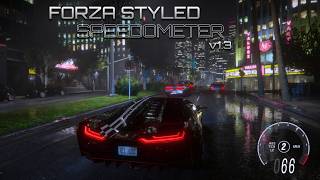
Forza Horizon 5 Inspired Speedometer for GTA V Single Player
A fully customizable HUD featuring realistic gauge animations, optional driving assists, and extensive layout customization.
Features
Required Dependencies
Please read the included HTML Installation Guide carefully before installing the mod. The guide contains separate installation instructions and troubleshooting steps for both GTA V Legacy and GTA V Enhanced.
GTA V Legacy
GTA V Enhanced
Important: Please follow the installation steps provided in the included HTML documentation. The guide contains separate instructions for both GTA V Legacy and GTA V Enhanced, as well as troubleshooting information if textures fail to load or the game crashes after installation.
Special thanks to:
Changelog
v1.3
v1.2 Legacy & Enhanced support
v1.1
A fully customizable HUD featuring realistic gauge animations, optional driving assists, and extensive layout customization.
Features
- Needle sweeps once, like turning on the ignition, after entering a car.
- The needle wobbles at redline and assist icons blink when active.
- Comes with driving aids you can toggle with numpad keys (or disable car control in the menu):
- ABS (Assisted Braking): Slim or Aggressive modes for better braking.
- Traction Control: Sport or Aggressive modes to manage wheelspin.
- Launch Control: Manages wheelspin when throttling from 0.
- Manual reverse toggle with the L key.
Required Dependencies
Please read the included HTML Installation Guide carefully before installing the mod. The guide contains separate installation instructions and troubleshooting steps for both GTA V Legacy and GTA V Enhanced.
GTA V Legacy
- Script Hook V
- Script Hook V .NET
- LemonUI
- OpenIV (required for installing the HUD textures)
GTA V Enhanced
Important: Please follow the installation steps provided in the included HTML documentation. The guide contains separate instructions for both GTA V Legacy and GTA V Enhanced, as well as troubleshooting information if textures fail to load or the game crashes after installation.
Special thanks to:
- Alexander Blade
- Chiheb-Bacha
- justalemon
- alloc8or
- JulioNIB
Changelog
v1.3
- New Features
- Dynamic RPM gauge tiers from 7,000 to 11,000 RPM to dynamically match individual vehicle redlines.
- IKT's Manual Transmission support: Seamlessly switch the gear data source between native Game detection and IKT's MT.
- Turn indicators: Added left, right and hazard light signals with a toggle to enable or disable them.
- Manual engine start audio: Added support to use the native engine start audio during manual engine start.
- Interruptible ignition sweep: You can now start the engine immediately without waiting for the gauge sweep to complete its full rotation.
- Reset to Default: Quickly restore your HUD configuration values to their factory settings.
- Custom license plate: Optional setting configurable directly through FSS.ini.
- Improvements/Changes
- Refined ABS and TCS intervention behaviour and reorganized their assist modes.
- Launch Control is now processed internally by the script and no longer requires separate modes in the menu.
- Corrected ABS brake-light behaviour so brake lights illuminate normally while braking, even when ABS is active.
- Improved Center Hub and gear indicator redline syncing across all supported RPM tiers.
- Smarter vehicle-state handling: Parked vehicles remain off by default, while NPC-stolen vehicles stay active.
- Enhanced overall layout handling and configuration stability for the HUD.
- Stability & Known Limitations
- Extensively Tested: This build has undergone prolonged gameplay testing (high-speed driving, hard braking, rapid acceleration, engine cycling, menu usage) across both GTA V Legacy and GTA V Enhanced editions.
- 8-Speed Transmission Skip (Limitation): On some upgraded 8-speed vehicles, GTA V's native gear detection may skip 7th gear (jumping from 6th to 8th, or 7th showing briefly for 0.5s). This is a native game limitation rather than a speedometer issue. It is recommended to use IKT's Custom Gear Ratio as a workaround for affected vehicles.
v1.2 Legacy & Enhanced support
- New Features
- Controller vibration at the redline is adjustable or can be turned off [Experimental]
- Gamepad menu control opens the menu with a controller [Experimental]
- Two speed display modes: classic text or crisp texture digits (both movable and scalable)
- Hide vanilla HUD removes the default street/vehicle name for a clean view
- Reload Configuration button applies .ini changes without restarting the game
- Improved logging with performance profiler
- Welcome Guide shows your keybinds and file locations the first time you use the mod, reopen it anytime from the menu
- Improvements
- Better ignition sweep
- Smoother engine-off needle fallback
- More layout options
- Gear indicator no longer flickers during quick gear changes
- Stability
- Better optimized
- Fixed the micro stutters that used to happen when moving sliders or changing settings rapidly
v1.1
- Added support to change between KM/H and MPH modes.
- Improved font for gear position indicator and gauge dials.
- Better Redline Wobble: Needle vibrates like a real fuel cut limiter when you hit max RPM.
- Class Based Sweep Speeds: Supercars sweep faster, normal cars take medium and heavy trucks slower.
- Two Needle Motor Modes: "PMDC" makes the needle fall slowly (old school feel). "Stepper" tracks RPM more precisely.
- Smooth Engine Off Glide: The needle now slides gently back to zero instead of jumping.
- Burnout Mode: Hold accelerate & brake at very low speed and all assists will be disabled temporarily so you can spin the tires freely.
- Refined TCS & Launch Control: Sport mode allows light wheelspin for an aggressive feel. Aggressive mode gives maximum grip.
- Manual Engine Trigger: If you use other realism mods that handle ignition, you can turn off manual start option.
- Cleaner Menu & Logging: Menu labels are now simpler.
First Uploaded: May 23, 2026
Last Updated: August 20, 2026
Last Downloaded: 26 minutes ago
68 Comments
More mods by REX MODS:
Forza Horizon 5 Inspired Speedometer for GTA V Single Player
A fully customizable HUD featuring realistic gauge animations, optional driving assists, and extensive layout customization.
Features
Required Dependencies
Please read the included HTML Installation Guide carefully before installing the mod. The guide contains separate installation instructions and troubleshooting steps for both GTA V Legacy and GTA V Enhanced.
GTA V Legacy
GTA V Enhanced
Important: Please follow the installation steps provided in the included HTML documentation. The guide contains separate instructions for both GTA V Legacy and GTA V Enhanced, as well as troubleshooting information if textures fail to load or the game crashes after installation.
Special thanks to:
Changelog
v1.3
v1.2 Legacy & Enhanced support
v1.1
A fully customizable HUD featuring realistic gauge animations, optional driving assists, and extensive layout customization.
Features
- Needle sweeps once, like turning on the ignition, after entering a car.
- The needle wobbles at redline and assist icons blink when active.
- Comes with driving aids you can toggle with numpad keys (or disable car control in the menu):
- ABS (Assisted Braking): Slim or Aggressive modes for better braking.
- Traction Control: Sport or Aggressive modes to manage wheelspin.
- Launch Control: Manages wheelspin when throttling from 0.
- Manual reverse toggle with the L key.
Required Dependencies
Please read the included HTML Installation Guide carefully before installing the mod. The guide contains separate installation instructions and troubleshooting steps for both GTA V Legacy and GTA V Enhanced.
GTA V Legacy
- Script Hook V
- Script Hook V .NET
- LemonUI
- OpenIV (required for installing the HUD textures)
GTA V Enhanced
Important: Please follow the installation steps provided in the included HTML documentation. The guide contains separate instructions for both GTA V Legacy and GTA V Enhanced, as well as troubleshooting information if textures fail to load or the game crashes after installation.
Special thanks to:
- Alexander Blade
- Chiheb-Bacha
- justalemon
- alloc8or
- JulioNIB
Changelog
v1.3
- New Features
- Dynamic RPM gauge tiers from 7,000 to 11,000 RPM to dynamically match individual vehicle redlines.
- IKT's Manual Transmission support: Seamlessly switch the gear data source between native Game detection and IKT's MT.
- Turn indicators: Added left, right and hazard light signals with a toggle to enable or disable them.
- Manual engine start audio: Added support to use the native engine start audio during manual engine start.
- Interruptible ignition sweep: You can now start the engine immediately without waiting for the gauge sweep to complete its full rotation.
- Reset to Default: Quickly restore your HUD configuration values to their factory settings.
- Custom license plate: Optional setting configurable directly through FSS.ini.
- Improvements/Changes
- Refined ABS and TCS intervention behaviour and reorganized their assist modes.
- Launch Control is now processed internally by the script and no longer requires separate modes in the menu.
- Corrected ABS brake-light behaviour so brake lights illuminate normally while braking, even when ABS is active.
- Improved Center Hub and gear indicator redline syncing across all supported RPM tiers.
- Smarter vehicle-state handling: Parked vehicles remain off by default, while NPC-stolen vehicles stay active.
- Enhanced overall layout handling and configuration stability for the HUD.
- Stability & Known Limitations
- Extensively Tested: This build has undergone prolonged gameplay testing (high-speed driving, hard braking, rapid acceleration, engine cycling, menu usage) across both GTA V Legacy and GTA V Enhanced editions.
- 8-Speed Transmission Skip (Limitation): On some upgraded 8-speed vehicles, GTA V's native gear detection may skip 7th gear (jumping from 6th to 8th, or 7th showing briefly for 0.5s). This is a native game limitation rather than a speedometer issue. It is recommended to use IKT's Custom Gear Ratio as a workaround for affected vehicles.
v1.2 Legacy & Enhanced support
- New Features
- Controller vibration at the redline is adjustable or can be turned off [Experimental]
- Gamepad menu control opens the menu with a controller [Experimental]
- Two speed display modes: classic text or crisp texture digits (both movable and scalable)
- Hide vanilla HUD removes the default street/vehicle name for a clean view
- Reload Configuration button applies .ini changes without restarting the game
- Improved logging with performance profiler
- Welcome Guide shows your keybinds and file locations the first time you use the mod, reopen it anytime from the menu
- Improvements
- Better ignition sweep
- Smoother engine-off needle fallback
- More layout options
- Gear indicator no longer flickers during quick gear changes
- Stability
- Better optimized
- Fixed the micro stutters that used to happen when moving sliders or changing settings rapidly
v1.1
- Added support to change between KM/H and MPH modes.
- Improved font for gear position indicator and gauge dials.
- Better Redline Wobble: Needle vibrates like a real fuel cut limiter when you hit max RPM.
- Class Based Sweep Speeds: Supercars sweep faster, normal cars take medium and heavy trucks slower.
- Two Needle Motor Modes: "PMDC" makes the needle fall slowly (old school feel). "Stepper" tracks RPM more precisely.
- Smooth Engine Off Glide: The needle now slides gently back to zero instead of jumping.
- Burnout Mode: Hold accelerate & brake at very low speed and all assists will be disabled temporarily so you can spin the tires freely.
- Refined TCS & Launch Control: Sport mode allows light wheelspin for an aggressive feel. Aggressive mode gives maximum grip.
- Manual Engine Trigger: If you use other realism mods that handle ignition, you can turn off manual start option.
- Cleaner Menu & Logging: Menu labels are now simpler.
First Uploaded: May 23, 2026
Last Updated: August 20, 2026
Last Downloaded: 26 minutes ago
 5mods on Discord

can you add the forza horizon 4 speedometer aswell?
@DriftApe This mod is actually an upgraded version of the Forza Horizon 4 design i made back in 2021 (I just never released it). I still have the old files, so I can make them work with the current SHVDN and upload them to my website or 5mods. But it's going to be just a simple one right now with only speed, RPM and gear. I'll polish it up properly but i'll need to finish my other two projects first. So you can expect something to drop in a week.
@REX MODS
I've been using this mod for the past few days, and I absolutely love it. I also really liked your Motorfest Speedometer mod, but I guess you took it down. That mod was awesome too
I have one suggestion. Could you add manual transmission support? Similar to how LeFix Speedometer does it with a checkbox option for manual transmission compatibility. I think it might just be a matter of removing the condition that only displays the current gear when the vehicle is going above 0, but I'm not sure if it's more complicated than that. Either way, I'd love to see this feature added
Thanks again for this amazing mod. It's a refreshing change from the speedometer mod I've been using for years xd
@EzX_GTA Thanks a lot man really appreciate the feedback and yeah i took down the Motorfest speedometer because there was a bug that could cause crashes with some menu elements. Since then ive made a lot of changes and cleaned up the whole thing so it works much smoother. I'm planning to put out a beta version in a few days once im done testing it.
As for manual transmission support I can definitely look into it. I first need to check how the manual transmission mod handles gears and then ill see what changes I need to make on my side. If everything works ill post a test build in my Discord first and if people don't run into any issues ill polish it up and include it in the next update 🙂.
@REX MODS Sounds great, man! 😄
Btw, if you need anyone to test the manual transmission support, I'd be happy to help. I've been using the mod for years and have probably explored around 70–75% of its features and I'll join your dc server too
This is honestly the only feature missing for people who use manual transmission. Other than that, the mod is all sunshine, lollipops, and rainbows xd
@EzX_GTA Nice! :) When you join the Discord server, send me a message as well. I'm currently wrapping up The Crew Motorfest speedometer mod for release tomorrow. After that, ill look into manual transmission support. I'm hoping it's just a few simple changes to add support and if so ill release a test build soon.
@REX MODS
I’m unable to send you a message or a friend request
It appears that you've disabled friend requests
I don't think there are many changes required other than removing the condition that only displays the current gear when the vehicle's speed is greater than 0
Hey!
I've been using this mod for about a month and I've encountered no problems except one. The vehicle sure has the ignition switch [Z] but when the vehicle is turning on, it doesn't make any ignition sound and directly starts as if it's the silent start, which is kind of boring. Please add back the ignition sound feature.
Thankyou!
The mod is already excellent on its own and doesn't need to use the Forza Horizon 5 speedometer skin to become popular. Honestly, I've never seen a GTA V speedometer mod that comes close to this level of quality. That's why I'd really love to see it have its own original design instead of reusing the FH5 skin. I think a simply, minimalistic/clean or unique skin would help give the mod its own identity and make it stand out even more.
@privatexunderdog
Thanks for the kind words i really appreciate it and yes i do have plans for an original designed gauge system and work on that will begin once I wrap up the current projects, which include FSS, Motorfest and the FH3, FH4, FH6 speedometers. That said, FH6 will likely be delayed, so i might start working on the original design sooner.
做的太好了,如果能多更新几个好看的样式就更好了
它和卫星地图文件好像有冲突,安装了卫星地图文件之后仪表盘就变成白色方块了
哦哦我解决了这个问题,是卸载卫星地图的时候他会把fss.ytd文件给删掉,就会导致仪表盘空白,再加回来就好了。作者的mod没有bug,厉害
@redemption Thank You : )
@REX MODS
you able to implement size (very small to big) and positions for the speedometer on the menu please
@eldrin Do you mean a preset layout system that changes everything with one switch rather than tweaking each setting individually?
@REX MODS like where we can move all the individual stuff that comes with speedo like that numbers, texts and the speedo. have to resize them and move them to better with our own styles
@eldrin You can already adjust and reposition everything using the menu btw.
@REX MODS i went back and check, i missed that part, thanks
Cool, if you want to run this with NVE simply drop the ytd into onigiri\platform\textures\script_txds.rpf using codewalker, in my opinion way too much shit to move around, im on ultrawide i just want to make the speedo look normal not squished, and i want to move it right, now sit there and guess all the numbers for the next 30 minutes. idk if im missing something but this is ultra tedious.