Kill The NVE Onigiri pop-up 0.1


![Quick Dialogue System [Legacy + Enhanced]](https://img.gta5-mods.com/q75-w500-h333-cfill/images/quick-dialogue-system/fcfa5b-GrandTheft2.jpg "Quick Dialogue System [Legacy + Enhanced]")

5,464
25
5,464
25
插件介绍
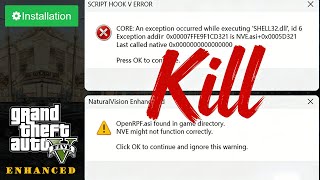
Using onigiri with OpenRPF results in error pop-ups. While gameplay is not affected, you need to manually close the pop-ups every time you launch the game. This plugin solves this issue successfully.
Author: Fanqieshu233
Reproduction without permission is prohibited
// ┌───────────────────────────────────────────────────┐
// │ GTA5 DialogBlocker ASI Plugin Installation Guide │
// └───────────────────────────────────────────────────┘
Using onigiri with OpenRPF results in error pop-ups. While gameplay is not affected, you need to manually close the pop-ups every time you launch the game. This plugin solves this issue successfully.
Author: Fanqieshu233
Reproduction without permission is prohibited
// ┌───────────────────────────────────────────────────┐
// │ GTA5 DialogBlocker ASI Plugin Installation Guide │
// └───────────────────────────────────────────────────┘
- Pre-requisite Installation
- Download and install a ScriptHookV version compatible with your current game build, then place its core files into the GTA5 Enhanced game root directory.
- Install OpenRPF and ensure all its components are correctly deployed to provide runtime support for ASI plugins.
- Plugin Deployment
- Download the DialogBlocker.asi file.
- Place this file directly into the GTA5 Enhanced root directory.
- Launch to Activate
- Run GTA5 Enhanced directly. DialogBlocker will be loaded automatically and block the corresponding pop-ups without any additional configuration required.
First Uploaded: January 05, 2026
Last Updated: January 05, 2026
Last Downloaded: 2 hours ago
20 Comments
插件介绍
Using onigiri with OpenRPF results in error pop-ups. While gameplay is not affected, you need to manually close the pop-ups every time you launch the game. This plugin solves this issue successfully.
Author: Fanqieshu233
Reproduction without permission is prohibited
// ┌───────────────────────────────────────────────────┐
// │ GTA5 DialogBlocker ASI Plugin Installation Guide │
// └───────────────────────────────────────────────────┘
Using onigiri with OpenRPF results in error pop-ups. While gameplay is not affected, you need to manually close the pop-ups every time you launch the game. This plugin solves this issue successfully.
Author: Fanqieshu233
Reproduction without permission is prohibited
// ┌───────────────────────────────────────────────────┐
// │ GTA5 DialogBlocker ASI Plugin Installation Guide │
// └───────────────────────────────────────────────────┘
- Pre-requisite Installation
- Download and install a ScriptHookV version compatible with your current game build, then place its core files into the GTA5 Enhanced game root directory.
- Install OpenRPF and ensure all its components are correctly deployed to provide runtime support for ASI plugins.
- Plugin Deployment
- Download the DialogBlocker.asi file.
- Place this file directly into the GTA5 Enhanced root directory.
- Launch to Activate
- Run GTA5 Enhanced directly. DialogBlocker will be loaded automatically and block the corresponding pop-ups without any additional configuration required.
First Uploaded: January 05, 2026
Last Updated: January 05, 2026
Last Downloaded: 2 hours ago
 5mods on Discord

@prisoner1354 I understand that changing the file name can indeed resolve the error pop-up. However, please don't forget about the "SCRIPT HOOK V ERROR" pop-up error that appears during the loading process before entering the game every time
完美5星
The mod is nice, but it only automatically turns off the warning message. Could you please remove the warning message completely?
@gtav-fan Aww, u totally overestimate me. sorry!
@a012345 感谢,您的评价
Nice!!!
@InfamousSabre Seriously? That game looks amazing with NVE. I've been following it for years - he's got like 4.5Gb of texture improvements and makes the game look incredible.
That's a terrible solution... a really terrible solution.
Instead, I will delete the OpenRPF.asi file and reinstall it if necessary...So you don't need your mod...
if u want to remove the pop-up just simply rename openrpf.asi,i think this mod is unnecessary
@prisoner1354 Please take a look at the images on my module introduction page
@prisoner1354 Without closing this pop-up window, you cannot enter the game, so I created this ASI
NoValueExpected
dont get scammed!
@InfamousSabre Didn't even say that... I said your supposed 'solution' was a terrible idea.
NVE is great.
@MaxLuk How did I cheat you?
@MaxLuk I believe this can be considered as a solution
@Fanqieshu233 i said dont get scammed by buying nve
not targeting to you or your mod
@MaxLuk sorry
@Fanqieshu233 lovely
Im running NVE on enhanced and openiv is installed properly and everything but i still get this pop up while openrpf.asi is in my game directory.. even with this mod installed, anyone help plz?? Game runs fine if openrpf isnt in it :/
@Sub_0 You renamed openrpf.asi to xxx.asi