TDU Solar Crown Speedometer HUD 1.0


![BYD Yuan Plus China Edition [Add-On]](https://img.gta5-mods.com/q75-w500-h333-cfill/images/byd-yuan-plus-china-edition-add-on/bbb722-EVE-20240910161002.021.jpg "BYD Yuan Plus China Edition [Add-On]")
![Takumi Fujiwara 藤原 拓海 from Initial D [Add-On Ped]](https://img.gta5-mods.com/q75-w500-h333-cfill/images/takumi-fujiwara-from-initial-d-add-on-ped/ee3e10-EVE-20220601163004.015.jpg "Takumi Fujiwara 藤原 拓海 from Initial D [Add-On Ped]")


5
0
5
0
Test Drive Unlimited Solar Crown Speedometer HUD
Description
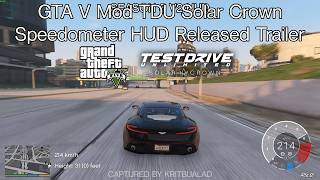
This is my first attempt at creating a mod script specifically, a Speedometer HUD mod for Test Drive Unlimited Solar Crown.
(10 years ago, I wasn't very skilled with scripting, But now, I have succeeded.)
Features
- Version HUD ( Demo , Release , Season 5 V1 , Season 5 V2 )
- Rev RPM
- Drift HUD for Demo HUD only
- Handbrake HUD
- Turn Signal HUD
- Gear HUD
- Throttle and Brake HUD for Season 5 V2 only
- Headlight HUD for Season 5 only
- Units
- Language Units ( Default , Denmark / Norway , Nederlands , Russian , Turkish , Ukriane , Vietnamese )
- ABS HUD
- TCS HUD
- Show Debug Name Cars
- Added support for custom Max RPM configuration.
Requirement
- GTA V Legacy Version 1.0.3889.0 or Latest
- .NET Framework 4.8
- Script Hook V
- Script Hook V Dot net
- OpenIV
- NativeUI
- LemonUI ( SHVDN3 )
- Resource Adjuster ( Fix issue where maps were loading abnormally. )
(I haven't tried the Enhanced version yet, but I'd recommend the Legacy version for now.)
How to Install
scripts folder.
Place it in the main GTA V game folder.
script_txds folder.
Open OpenIV > Select GTA V. Go to mods\update\update.rpf\x64\textures\script_txds.rpf.
Using the Max RPM add-on is very easy.
You do not need to exit the game. you simply need to activate the Console first. ScriptHookVDotNet.ini > ConsoleKeyBinding (Default F4)
Go to scripts\TDUSCSpeedometerGTAVSetRPM\Example.cfg.
Then, add the desired line.
Example:
Pfister Comet\comet2\8000
Pfister Comet = Custom Vehicle Name
comet2 = Spawn Name
8000 = Max RPM
Save the file.
Then, open the in-game console, type Reload(), and press Enter.
Once the script has reloaded, open the TDUSCSpeedoV menu and check the Show Debug Name Cars option.
TDUSCSpeedoV Menu
Menu Key = K
PLEASE DO NOT UPLOAD THIS FILE TO ANY OTHER WEBSITE WITHOUT MY SPECIFIC CONSENT.
Changelog
Version 1.0
- Initial Release
Description
This is my first attempt at creating a mod script specifically, a Speedometer HUD mod for Test Drive Unlimited Solar Crown.
(10 years ago, I wasn't very skilled with scripting, But now, I have succeeded.)
Features
- Version HUD ( Demo , Release , Season 5 V1 , Season 5 V2 )
- Rev RPM
- Drift HUD for Demo HUD only
- Handbrake HUD
- Turn Signal HUD
- Gear HUD
- Throttle and Brake HUD for Season 5 V2 only
- Headlight HUD for Season 5 only
- Units
- Language Units ( Default , Denmark / Norway , Nederlands , Russian , Turkish , Ukriane , Vietnamese )
- ABS HUD
- TCS HUD
- Show Debug Name Cars
- Added support for custom Max RPM configuration.
Requirement
- GTA V Legacy Version 1.0.3889.0 or Latest
- .NET Framework 4.8
- Script Hook V
- Script Hook V Dot net
- OpenIV
- NativeUI
- LemonUI ( SHVDN3 )
- Resource Adjuster ( Fix issue where maps were loading abnormally. )
(I haven't tried the Enhanced version yet, but I'd recommend the Legacy version for now.)
How to Install
scripts folder.
Place it in the main GTA V game folder.
script_txds folder.
Open OpenIV > Select GTA V. Go to mods\update\update.rpf\x64\textures\script_txds.rpf.
Using the Max RPM add-on is very easy.
You do not need to exit the game. you simply need to activate the Console first. ScriptHookVDotNet.ini > ConsoleKeyBinding (Default F4)
Go to scripts\TDUSCSpeedometerGTAVSetRPM\Example.cfg.
Then, add the desired line.
Example:
Pfister Comet\comet2\8000
Pfister Comet = Custom Vehicle Name
comet2 = Spawn Name
8000 = Max RPM
Save the file.
Then, open the in-game console, type Reload(), and press Enter.
Once the script has reloaded, open the TDUSCSpeedoV menu and check the Show Debug Name Cars option.
TDUSCSpeedoV Menu
Menu Key = K
PLEASE DO NOT UPLOAD THIS FILE TO ANY OTHER WEBSITE WITHOUT MY SPECIFIC CONSENT.
Changelog
Version 1.0
- Initial Release
First Uploaded: 1 hour ago
Last Updated: 1 hour ago
Last Downloaded: 40 minutes ago
3 Comments
More mods by kritbualad:
Test Drive Unlimited Solar Crown Speedometer HUD
Description
This is my first attempt at creating a mod script specifically, a Speedometer HUD mod for Test Drive Unlimited Solar Crown.
(10 years ago, I wasn't very skilled with scripting, But now, I have succeeded.)
Features
- Version HUD ( Demo , Release , Season 5 V1 , Season 5 V2 )
- Rev RPM
- Drift HUD for Demo HUD only
- Handbrake HUD
- Turn Signal HUD
- Gear HUD
- Throttle and Brake HUD for Season 5 V2 only
- Headlight HUD for Season 5 only
- Units
- Language Units ( Default , Denmark / Norway , Nederlands , Russian , Turkish , Ukriane , Vietnamese )
- ABS HUD
- TCS HUD
- Show Debug Name Cars
- Added support for custom Max RPM configuration.
Requirement
- GTA V Legacy Version 1.0.3889.0 or Latest
- .NET Framework 4.8
- Script Hook V
- Script Hook V Dot net
- OpenIV
- NativeUI
- LemonUI ( SHVDN3 )
- Resource Adjuster ( Fix issue where maps were loading abnormally. )
(I haven't tried the Enhanced version yet, but I'd recommend the Legacy version for now.)
How to Install
scripts folder.
Place it in the main GTA V game folder.
script_txds folder.
Open OpenIV > Select GTA V. Go to mods\update\update.rpf\x64\textures\script_txds.rpf.
Using the Max RPM add-on is very easy.
You do not need to exit the game. you simply need to activate the Console first. ScriptHookVDotNet.ini > ConsoleKeyBinding (Default F4)
Go to scripts\TDUSCSpeedometerGTAVSetRPM\Example.cfg.
Then, add the desired line.
Example:
Pfister Comet\comet2\8000
Pfister Comet = Custom Vehicle Name
comet2 = Spawn Name
8000 = Max RPM
Save the file.
Then, open the in-game console, type Reload(), and press Enter.
Once the script has reloaded, open the TDUSCSpeedoV menu and check the Show Debug Name Cars option.
TDUSCSpeedoV Menu
Menu Key = K
PLEASE DO NOT UPLOAD THIS FILE TO ANY OTHER WEBSITE WITHOUT MY SPECIFIC CONSENT.
Changelog
Version 1.0
- Initial Release
Description
This is my first attempt at creating a mod script specifically, a Speedometer HUD mod for Test Drive Unlimited Solar Crown.
(10 years ago, I wasn't very skilled with scripting, But now, I have succeeded.)
Features
- Version HUD ( Demo , Release , Season 5 V1 , Season 5 V2 )
- Rev RPM
- Drift HUD for Demo HUD only
- Handbrake HUD
- Turn Signal HUD
- Gear HUD
- Throttle and Brake HUD for Season 5 V2 only
- Headlight HUD for Season 5 only
- Units
- Language Units ( Default , Denmark / Norway , Nederlands , Russian , Turkish , Ukriane , Vietnamese )
- ABS HUD
- TCS HUD
- Show Debug Name Cars
- Added support for custom Max RPM configuration.
Requirement
- GTA V Legacy Version 1.0.3889.0 or Latest
- .NET Framework 4.8
- Script Hook V
- Script Hook V Dot net
- OpenIV
- NativeUI
- LemonUI ( SHVDN3 )
- Resource Adjuster ( Fix issue where maps were loading abnormally. )
(I haven't tried the Enhanced version yet, but I'd recommend the Legacy version for now.)
How to Install
scripts folder.
Place it in the main GTA V game folder.
script_txds folder.
Open OpenIV > Select GTA V. Go to mods\update\update.rpf\x64\textures\script_txds.rpf.
Using the Max RPM add-on is very easy.
You do not need to exit the game. you simply need to activate the Console first. ScriptHookVDotNet.ini > ConsoleKeyBinding (Default F4)
Go to scripts\TDUSCSpeedometerGTAVSetRPM\Example.cfg.
Then, add the desired line.
Example:
Pfister Comet\comet2\8000
Pfister Comet = Custom Vehicle Name
comet2 = Spawn Name
8000 = Max RPM
Save the file.
Then, open the in-game console, type Reload(), and press Enter.
Once the script has reloaded, open the TDUSCSpeedoV menu and check the Show Debug Name Cars option.
TDUSCSpeedoV Menu
Menu Key = K
PLEASE DO NOT UPLOAD THIS FILE TO ANY OTHER WEBSITE WITHOUT MY SPECIFIC CONSENT.
Changelog
Version 1.0
- Initial Release
First Uploaded: 1 hour ago
Last Updated: 1 hour ago
Last Downloaded: 40 minutes ago
 5mods on Discord

This file has been approved automatically. If you think this file should not be here for any reason please report it.
Why are speedometers so often placed in the same location as the character selection?
@IreBurn I've tried it; you have to enter a vehicle.