






8,355
118
8,355
118
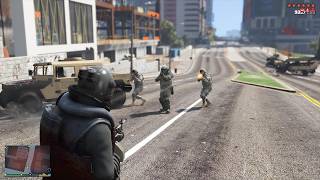
This script a wanted system inspired by what has been shown of GTA VI.
Everything described below is in the free version, and every fix and game patch update goes there first. Since I released the mod, an extended look at GTA VI revealed more details about how its wanted system works, so I kept building. Patreon Subscribers get a refined version with three additional ways for the police to identify you: CCTV camera footage, the weapons you used, and an accomplice in your car. Patrons also get a new 6-star wanted level.
Now, after you receive wanted stars, the police will remember the player's face, clothing, and vehicle. Once the wanted level is cleared, the cops will continue searching for the player based on these descriptions. A portion of the map will be marked with a red circle, dark red wanted stars will appear on the screen, and just below them will be the description of the player's appearance. Any encounter with law enforcement in the red zone will result in the wanted level being reactivated.
To minimize the risk of being put back on the wanted list, the player needs to switch vehicles and change clothes. However, this does not remove the facial recognition alert: it expires automatically, taking anywhere from one in-game day to a week, depending on the number of stars received. The size of the zone also depends on the number of stars.
If an encounter with a police officer does occur in the red zone, the player has a brief window of time to escape. If the player remains in the officer's line of sight for an extended period, the wanted level will be fully restored, and the player's wanted profile will be updated.
Each character has their own wanted level. If Michael is wanted by the police, switching to Franklin will not display the wanted stars earned by the other character.
Requirements:
Installation
The archive contains three folders — pick one, whichever suits you. Each folder also has an INSTALL.txt with the same steps.
1. OIV Installer — the easiest way, installs everything at once.
Important: install into mods only. Editing the game's original archives breaks the file integrity check.
2. Easy mod Loader — for those who use it.
3. Manual — full control over what goes where.
Changelog:
3.0:
2.0:
Everything described below is in the free version, and every fix and game patch update goes there first. Since I released the mod, an extended look at GTA VI revealed more details about how its wanted system works, so I kept building. Patreon Subscribers get a refined version with three additional ways for the police to identify you: CCTV camera footage, the weapons you used, and an accomplice in your car. Patrons also get a new 6-star wanted level.
Now, after you receive wanted stars, the police will remember the player's face, clothing, and vehicle. Once the wanted level is cleared, the cops will continue searching for the player based on these descriptions. A portion of the map will be marked with a red circle, dark red wanted stars will appear on the screen, and just below them will be the description of the player's appearance. Any encounter with law enforcement in the red zone will result in the wanted level being reactivated.
To minimize the risk of being put back on the wanted list, the player needs to switch vehicles and change clothes. However, this does not remove the facial recognition alert: it expires automatically, taking anywhere from one in-game day to a week, depending on the number of stars received. The size of the zone also depends on the number of stars.
If an encounter with a police officer does occur in the red zone, the player has a brief window of time to escape. If the player remains in the officer's line of sight for an extended period, the wanted level will be fully restored, and the player's wanted profile will be updated.
Each character has their own wanted level. If Michael is wanted by the police, switching to Franklin will not display the wanted stars earned by the other character.
Requirements:
- GTA V (Legacy or Enhanced)
- ScriptHookDotNet 3.6.0 or later
Installation
The archive contains three folders — pick one, whichever suits you. Each folder also has an INSTALL.txt with the same steps.
1. OIV Installer — the easiest way, installs everything at once.
- Open OpenIV and enable Edit mode (top right corner). If there is no mods folder yet, OpenIV will offer to create it — accept.
- Go to Tools → Package installer and select the .oiv file.
- Click Install and choose mods folder when asked where to install.
Important: install into mods only. Editing the game's original archives breaks the file integrity check.
2. Easy mod Loader — for those who use it.
- Copy the mods and scripts folders from the game directory.
- Start the game. The structure is already correct, nothing needs to be renamed.
3. Manual — full control over what goes where.
- Copy VIWantedSystem.dll and the VIWantedSystem folder into the scripts folder in your game directory. If there is no scripts folder, create one next to GTA5.exe. At this point the mod already works.
- Install hud.gfx with OpenIV in Edit mode, into:
mods\update\update.rpf\x64\data\cdimages\scaleform_generic.rpf
Copying it into scripts does nothing — the game reads the HUD only from its own archives.
Changelog:
3.0:
- Fixed an issue where icons and red stars were overlapping the weapon ammo and money interface
- Added translations for 13 languages (selected automatically based on the game's language)
- Added a 6-star wanted system (Patreon Edition only)
2.0:
- Added new icons
- Added real-time updates to descriptions, not just after the wanted level drops
- Added detection progress scale: one description = a 25% chance of being spotted. Two descriptions = 50%, three descriptions = 100%.
- Fixed a bug where the number of rounds was overlaid on the description icons
First Uploaded: August 23, 2026
Last Updated: September 22, 2026
Last Downloaded: 28 minutes ago
77 Comments
More mods by andre500:
This script a wanted system inspired by what has been shown of GTA VI.
Everything described below is in the free version, and every fix and game patch update goes there first. Since I released the mod, an extended look at GTA VI revealed more details about how its wanted system works, so I kept building. Patreon Subscribers get a refined version with three additional ways for the police to identify you: CCTV camera footage, the weapons you used, and an accomplice in your car. Patrons also get a new 6-star wanted level.
Now, after you receive wanted stars, the police will remember the player's face, clothing, and vehicle. Once the wanted level is cleared, the cops will continue searching for the player based on these descriptions. A portion of the map will be marked with a red circle, dark red wanted stars will appear on the screen, and just below them will be the description of the player's appearance. Any encounter with law enforcement in the red zone will result in the wanted level being reactivated.
To minimize the risk of being put back on the wanted list, the player needs to switch vehicles and change clothes. However, this does not remove the facial recognition alert: it expires automatically, taking anywhere from one in-game day to a week, depending on the number of stars received. The size of the zone also depends on the number of stars.
If an encounter with a police officer does occur in the red zone, the player has a brief window of time to escape. If the player remains in the officer's line of sight for an extended period, the wanted level will be fully restored, and the player's wanted profile will be updated.
Each character has their own wanted level. If Michael is wanted by the police, switching to Franklin will not display the wanted stars earned by the other character.
Requirements:
Installation
The archive contains three folders — pick one, whichever suits you. Each folder also has an INSTALL.txt with the same steps.
1. OIV Installer — the easiest way, installs everything at once.
Important: install into mods only. Editing the game's original archives breaks the file integrity check.
2. Easy mod Loader — for those who use it.
3. Manual — full control over what goes where.
Changelog:
3.0:
2.0:
Everything described below is in the free version, and every fix and game patch update goes there first. Since I released the mod, an extended look at GTA VI revealed more details about how its wanted system works, so I kept building. Patreon Subscribers get a refined version with three additional ways for the police to identify you: CCTV camera footage, the weapons you used, and an accomplice in your car. Patrons also get a new 6-star wanted level.
Now, after you receive wanted stars, the police will remember the player's face, clothing, and vehicle. Once the wanted level is cleared, the cops will continue searching for the player based on these descriptions. A portion of the map will be marked with a red circle, dark red wanted stars will appear on the screen, and just below them will be the description of the player's appearance. Any encounter with law enforcement in the red zone will result in the wanted level being reactivated.
To minimize the risk of being put back on the wanted list, the player needs to switch vehicles and change clothes. However, this does not remove the facial recognition alert: it expires automatically, taking anywhere from one in-game day to a week, depending on the number of stars received. The size of the zone also depends on the number of stars.
If an encounter with a police officer does occur in the red zone, the player has a brief window of time to escape. If the player remains in the officer's line of sight for an extended period, the wanted level will be fully restored, and the player's wanted profile will be updated.
Each character has their own wanted level. If Michael is wanted by the police, switching to Franklin will not display the wanted stars earned by the other character.
Requirements:
- GTA V (Legacy or Enhanced)
- ScriptHookDotNet 3.6.0 or later
Installation
The archive contains three folders — pick one, whichever suits you. Each folder also has an INSTALL.txt with the same steps.
1. OIV Installer — the easiest way, installs everything at once.
- Open OpenIV and enable Edit mode (top right corner). If there is no mods folder yet, OpenIV will offer to create it — accept.
- Go to Tools → Package installer and select the .oiv file.
- Click Install and choose mods folder when asked where to install.
Important: install into mods only. Editing the game's original archives breaks the file integrity check.
2. Easy mod Loader — for those who use it.
- Copy the mods and scripts folders from the game directory.
- Start the game. The structure is already correct, nothing needs to be renamed.
3. Manual — full control over what goes where.
- Copy VIWantedSystem.dll and the VIWantedSystem folder into the scripts folder in your game directory. If there is no scripts folder, create one next to GTA5.exe. At this point the mod already works.
- Install hud.gfx with OpenIV in Edit mode, into:
mods\update\update.rpf\x64\data\cdimages\scaleform_generic.rpf
Copying it into scripts does nothing — the game reads the HUD only from its own archives.
Changelog:
3.0:
- Fixed an issue where icons and red stars were overlapping the weapon ammo and money interface
- Added translations for 13 languages (selected automatically based on the game's language)
- Added a 6-star wanted system (Patreon Edition only)
2.0:
- Added new icons
- Added real-time updates to descriptions, not just after the wanted level drops
- Added detection progress scale: one description = a 25% chance of being spotted. Two descriptions = 50%, three descriptions = 100%.
- Fixed a bug where the number of rounds was overlaid on the description icons
First Uploaded: August 23, 2026
Last Updated: September 22, 2026
Last Downloaded: 28 minutes ago
 5mods on Discord

@andre500 Hi, this is a great mod! But is it possible to add translations for other languages? Maybe you could create an XML file, and I could translate everything into Russian myself?
@Vitalezzzz Hi, I've added support for Russian and 12 other languages in the new version of the mod :) The language is selected automatically based on the game's language.
🔥🔥👌
How do you know what GTA 6's wanted system is like? Also kind of ballsy to lock the main version behind Patreon, especially with the recent Rockstar policy change.
@Unsearchably The wanted system was shown in an extended look and in leaked footage. I don't know all the details, but I've reconstructed what was definitely shown.
The main version is available for download here, and it's free. Only a few additional features are available on Patreon.
@andre500 That’s great!! Do you plan to add tizers and the option to surrender by pressing a key?
@Vitalezzzz Yes, that's part of the plan
@andre500 Is it compatible with Community HUD?
@Matthew Liddell Unfortunately, no. But you can choose not to install hud.gfx from VI Wanted System. The icons will still appear, and the red stars will be superimposed on the ammo counter. But the mod will still work properly, though.
@andre500 But can you add it in future updates?
@Matthew Liddell I can't promise anything just yet. If I manage to find a way to move interface elements without editing hud.gfx, I'll definitely do it.
Community Hud also modifies hud.gfx, so it's technically impossible to combine the two.
I tested it out, it's excellent.
Thanks for creating this great mod; we look forward to your future updates!🔥🔥🌹👏
@andre500 Me again lol... was considering paying for the six star addon to this on patreon. I wanted to know exactly how nice this will play with World of Variety Enhanced 1.0.3 first. Currently testing out your online workshops mod and your all MP vehicles mod. I also have another question... sometimes I'll be driving a car I stole, then I will get out to go check another car out, but when I turn around, the car I just exited disappears. Happens once in a while. Do you know of the best fix for this? I'm using heap adjuster and mod kit adjuster and have set them to the following, but it still happens from time to time....
heap adjuster set to 3000
mod kit limit adjuster set to 2048
@theyesman2077 The area cleaner may not be working properly in the script. I'll look into it.
@andre500 Oh no I don't think it's because of this mod, it was happening before I installed it lol. I was just wondering if there is a common knowledge trick to prevent that from happening?
Hi. Is this compatible with RDE and GTA 6 Hud mods?
@andre500 Please make the six stars free, but make high details paid access. Everything but not the six stars locked :(
btw W mod, this one is awesome and my fav mod!
is it compatible with RDE?
@chrislourenco92 I've tried with GTA 6 Hud mod and it's not compatible, it will make you crash after getting wanted.
But about RDE, i didn't tried.
Man, release the full version for free pls