Dashboard Telemetry Linkage 0.2



![Community Script Hook V .NET Core for Legacy & Enhanced [.NET Core]](https://img.gta5-mods.com/q75-w500-h333-cfill/images/community-script-hook-v-net-core-legacy-enhanced/b29ffa-workshop.jpg "Community Script Hook V .NET Core for Legacy & Enhanced [.NET Core]")


81
1
81
1
GTA5 Realistic Speedometer · User Guide
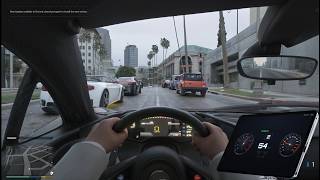
Project real-time speed, RPM, gear, and other data from the game onto a browser page, displaying a racing-style dual-dial dashboard.
GTA5 Mod ──UDP──▶ Node Server ──WebSocket──▶ Browser Dashboard
(C# Script) (server/) (Any device)
File Structure
Dashboard Telemetry Linkage
├── run.bat ← One-click launch (just double-click)
├── README.md ← This file
├── mod/
│ └── SpeedTelemetry.3.cs ← GTA5 mod script (put in the game's scripts folder)
├── server/
│ └── server.js ← Node server (receives data and serves web pages)
1. First-Time Installation
(1). Game Mod Side
(requires Script Hook V and ScriptHookVDotNet )
Copy modSpeedTelemetry.3.cs into the scripts folder in the game root directory (create if missing).
(2). Server Side
Double-click "run.bat" (automatically installs dependencies, starts the server, and opens the browser)
Manual way: inside the server folder, run npm start, then open http://localhost:8080 in your browser (for other devices, replace localhost with the host’s IP).
To stop the server: just close the "GTAV Dashboard Server" command window.
2. Common Issues
Project real-time speed, RPM, gear, and other data from the game onto a browser page, displaying a racing-style dual-dial dashboard.
GTA5 Mod ──UDP──▶ Node Server ──WebSocket──▶ Browser Dashboard
(C# Script) (server/) (Any device)
File Structure
Dashboard Telemetry Linkage
├── run.bat ← One-click launch (just double-click)
├── README.md ← This file
├── mod/
│ └── SpeedTelemetry.3.cs ← GTA5 mod script (put in the game's scripts folder)
├── server/
│ └── server.js ← Node server (receives data and serves web pages)
1. First-Time Installation
(1). Game Mod Side
(requires Script Hook V and ScriptHookVDotNet )
Copy modSpeedTelemetry.3.cs into the scripts folder in the game root directory (create if missing).
(2). Server Side
Double-click "run.bat" (automatically installs dependencies, starts the server, and opens the browser)
Manual way: inside the server folder, run npm start, then open http://localhost:8080 in your browser (for other devices, replace localhost with the host’s IP).
To stop the server: just close the "GTAV Dashboard Server" command window.
2. Common Issues
- Can I view it on a phone/tablet?
Yes. Connect your phone to the same Wi-Fi and visit the "LAN access" address printed when the server starts. If a firewall prompt appears on first run, choose "Allow". - No data on the dashboard after entering the game?
- Make sure the server is running (browser shows a green "Connected" dot).
- You must be in a vehicle ("Waiting for game data" while on foot is normal).
- Check ScriptHookVDotNet.log in the game root; if it says "Started script SpeedTelemetry" the mod is working correctly.
- Left dial (RPM) needle isn’t moving?
Fixed (v1.1): Previously the unit conversion in app.js was wrong (dividing 0~8000 rpm by dial scale 8 made the needle always full). Refresh the page (Ctrl F5) and it will display correctly. - Don’t see the green "Started" prompt?
It doesn’t affect usage. The prompt shows up at the main menu, but notifications aren’t displayed there. - Mod stopped working after a game update?
Update Script Hook V and ScriptHookVDotNet to the matching versions. - Change port: Default webpage 8080, UDP 20877. If occupied, change HTTP_PORT/UDP_PORT in server/server.js and PORT in the mod (both must match).
First Uploaded: 3 days ago
Last Updated: 2 days ago
Last Downloaded: 24 minutes ago
0 Comments
GTA5 Realistic Speedometer · User Guide
Project real-time speed, RPM, gear, and other data from the game onto a browser page, displaying a racing-style dual-dial dashboard.
GTA5 Mod ──UDP──▶ Node Server ──WebSocket──▶ Browser Dashboard
(C# Script) (server/) (Any device)
File Structure
Dashboard Telemetry Linkage
├── run.bat ← One-click launch (just double-click)
├── README.md ← This file
├── mod/
│ └── SpeedTelemetry.3.cs ← GTA5 mod script (put in the game's scripts folder)
├── server/
│ └── server.js ← Node server (receives data and serves web pages)
1. First-Time Installation
(1). Game Mod Side
(requires Script Hook V and ScriptHookVDotNet )
Copy modSpeedTelemetry.3.cs into the scripts folder in the game root directory (create if missing).
(2). Server Side
Double-click "run.bat" (automatically installs dependencies, starts the server, and opens the browser)
Manual way: inside the server folder, run npm start, then open http://localhost:8080 in your browser (for other devices, replace localhost with the host’s IP).
To stop the server: just close the "GTAV Dashboard Server" command window.
2. Common Issues
Project real-time speed, RPM, gear, and other data from the game onto a browser page, displaying a racing-style dual-dial dashboard.
GTA5 Mod ──UDP──▶ Node Server ──WebSocket──▶ Browser Dashboard
(C# Script) (server/) (Any device)
File Structure
Dashboard Telemetry Linkage
├── run.bat ← One-click launch (just double-click)
├── README.md ← This file
├── mod/
│ └── SpeedTelemetry.3.cs ← GTA5 mod script (put in the game's scripts folder)
├── server/
│ └── server.js ← Node server (receives data and serves web pages)
1. First-Time Installation
(1). Game Mod Side
(requires Script Hook V and ScriptHookVDotNet )
Copy modSpeedTelemetry.3.cs into the scripts folder in the game root directory (create if missing).
(2). Server Side
Double-click "run.bat" (automatically installs dependencies, starts the server, and opens the browser)
Manual way: inside the server folder, run npm start, then open http://localhost:8080 in your browser (for other devices, replace localhost with the host’s IP).
To stop the server: just close the "GTAV Dashboard Server" command window.
2. Common Issues
- Can I view it on a phone/tablet?
Yes. Connect your phone to the same Wi-Fi and visit the "LAN access" address printed when the server starts. If a firewall prompt appears on first run, choose "Allow". - No data on the dashboard after entering the game?
- Make sure the server is running (browser shows a green "Connected" dot).
- You must be in a vehicle ("Waiting for game data" while on foot is normal).
- Check ScriptHookVDotNet.log in the game root; if it says "Started script SpeedTelemetry" the mod is working correctly.
- Left dial (RPM) needle isn’t moving?
Fixed (v1.1): Previously the unit conversion in app.js was wrong (dividing 0~8000 rpm by dial scale 8 made the needle always full). Refresh the page (Ctrl F5) and it will display correctly. - Don’t see the green "Started" prompt?
It doesn’t affect usage. The prompt shows up at the main menu, but notifications aren’t displayed there. - Mod stopped working after a game update?
Update Script Hook V and ScriptHookVDotNet to the matching versions. - Change port: Default webpage 8080, UDP 20877. If occupied, change HTTP_PORT/UDP_PORT in server/server.js and PORT in the mod (both must match).
First Uploaded: 3 days ago
Last Updated: 2 days ago
Last Downloaded: 24 minutes ago
Join the conversation! Log In or register for an account to be able to comment.
 5mods on Discord
