

22,566
302
22,566
302
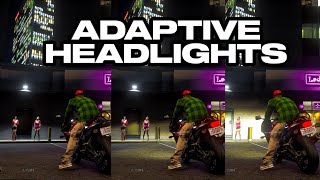
Adaptive Headlights
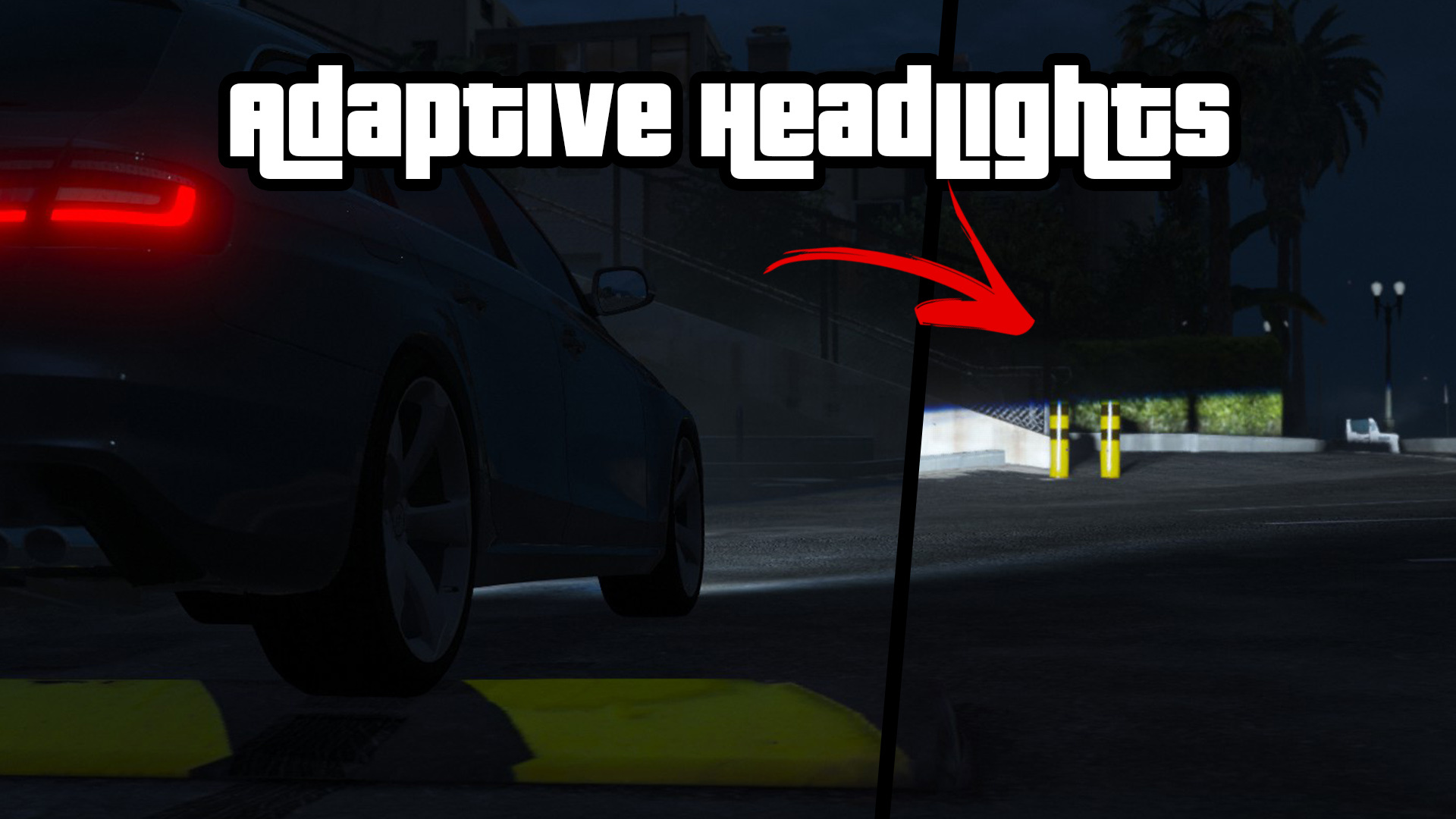
Something I worked on a while ago but never released - but I found some time to polish it up a bit.
Features:
Requirements and installation
Grand Theft Auto V (b2372 and higher)
ScriptHookV
To install, drag and drop the AdaptiveHeadlights.asi file and
AdaptiveHeadlights folder to the GTA V folder.
C:/Users/(User)/AppData/Local/ikt/AdaptiveHeadlights may also be used, if the GTA V folder is not writeable.
Open the management menu with the ah cheat (use tilde to open the cheat
console).
Please consult the included README.pdf or README.md for further instructions.
Notes
Shadow Quality should be Very High for both headlights to cast their own lights, otherwise only one light is cast and some effects won't look right.
The headlight bone moves around, which may result in clipping or movement of the headlight housing for a number of vehicles.
@Vehicle authors: it would be awesome if newly created vehicles only had the headlight projector unit be marked as the headlight bone - or if existing vehicles setup permit, update them to look less wonky with this script.
Recommended
InfamousSabre's Headlights++
Credits
Special thanks to AlexGuirre for the bone manipulation bits, and GVMA for testing.
Changelog
1.1.0
* Support GTA V Enhanced
* Support Legacy 3788.0, Enhanced 1013.33
1.0.2
Fix broken cornering headlights functionality
Limit cornering headlights rotation rate
1.0.1
Fix crash if headlight bone doesn't exist on car.
1.0.0
Initial release
Something I worked on a while ago but never released - but I found some time to polish it up a bit.
Features:
- Adaptive headlights: headlights stay level with the road
- With a start-up animation when turning on for the first time
- Cornering assist: headlights beam into the steering direction
- Correct wrongly aimed headlights
- With separate low and high beam settings
Requirements and installation
Grand Theft Auto V (b2372 and higher)
ScriptHookV
To install, drag and drop the AdaptiveHeadlights.asi file and
AdaptiveHeadlights folder to the GTA V folder.
C:/Users/(User)/AppData/Local/ikt/AdaptiveHeadlights may also be used, if the GTA V folder is not writeable.
Open the management menu with the ah cheat (use tilde to open the cheat
console).
Please consult the included README.pdf or README.md for further instructions.
Notes
Shadow Quality should be Very High for both headlights to cast their own lights, otherwise only one light is cast and some effects won't look right.
The headlight bone moves around, which may result in clipping or movement of the headlight housing for a number of vehicles.
@Vehicle authors: it would be awesome if newly created vehicles only had the headlight projector unit be marked as the headlight bone - or if existing vehicles setup permit, update them to look less wonky with this script.
Recommended
InfamousSabre's Headlights++
Credits
Special thanks to AlexGuirre for the bone manipulation bits, and GVMA for testing.
Changelog
1.1.0
* Support GTA V Enhanced
* Support Legacy 3788.0, Enhanced 1013.33
1.0.2
Fix broken cornering headlights functionality
Limit cornering headlights rotation rate
1.0.1
Fix crash if headlight bone doesn't exist on car.
1.0.0
Initial release
First Uploaded: June 04, 2023
Last Updated: May 22, 2026
Last Downloaded: 30 minutes ago
77 Comments
Adaptive Headlights
Something I worked on a while ago but never released - but I found some time to polish it up a bit.
Features:
Requirements and installation
Grand Theft Auto V (b2372 and higher)
ScriptHookV
To install, drag and drop the AdaptiveHeadlights.asi file and
AdaptiveHeadlights folder to the GTA V folder.
C:/Users/(User)/AppData/Local/ikt/AdaptiveHeadlights may also be used, if the GTA V folder is not writeable.
Open the management menu with the ah cheat (use tilde to open the cheat
console).
Please consult the included README.pdf or README.md for further instructions.
Notes
Shadow Quality should be Very High for both headlights to cast their own lights, otherwise only one light is cast and some effects won't look right.
The headlight bone moves around, which may result in clipping or movement of the headlight housing for a number of vehicles.
@Vehicle authors: it would be awesome if newly created vehicles only had the headlight projector unit be marked as the headlight bone - or if existing vehicles setup permit, update them to look less wonky with this script.
Recommended
InfamousSabre's Headlights++
Credits
Special thanks to AlexGuirre for the bone manipulation bits, and GVMA for testing.
Changelog
1.1.0
* Support GTA V Enhanced
* Support Legacy 3788.0, Enhanced 1013.33
1.0.2
Fix broken cornering headlights functionality
Limit cornering headlights rotation rate
1.0.1
Fix crash if headlight bone doesn't exist on car.
1.0.0
Initial release
Something I worked on a while ago but never released - but I found some time to polish it up a bit.
Features:
- Adaptive headlights: headlights stay level with the road
- With a start-up animation when turning on for the first time
- Cornering assist: headlights beam into the steering direction
- Correct wrongly aimed headlights
- With separate low and high beam settings
Requirements and installation
Grand Theft Auto V (b2372 and higher)
ScriptHookV
To install, drag and drop the AdaptiveHeadlights.asi file and
AdaptiveHeadlights folder to the GTA V folder.
C:/Users/(User)/AppData/Local/ikt/AdaptiveHeadlights may also be used, if the GTA V folder is not writeable.
Open the management menu with the ah cheat (use tilde to open the cheat
console).
Please consult the included README.pdf or README.md for further instructions.
Notes
Shadow Quality should be Very High for both headlights to cast their own lights, otherwise only one light is cast and some effects won't look right.
The headlight bone moves around, which may result in clipping or movement of the headlight housing for a number of vehicles.
@Vehicle authors: it would be awesome if newly created vehicles only had the headlight projector unit be marked as the headlight bone - or if existing vehicles setup permit, update them to look less wonky with this script.
Recommended
InfamousSabre's Headlights++
Credits
Special thanks to AlexGuirre for the bone manipulation bits, and GVMA for testing.
Changelog
1.1.0
* Support GTA V Enhanced
* Support Legacy 3788.0, Enhanced 1013.33
1.0.2
Fix broken cornering headlights functionality
Limit cornering headlights rotation rate
1.0.1
Fix crash if headlight bone doesn't exist on car.
1.0.0
Initial release
First Uploaded: June 04, 2023
Last Updated: May 22, 2026
Last Downloaded: 30 minutes ago
 5mods on Discord

its the asi if anyyone else knows how to fix that
Will be awesome to make it possible to to high beam tailgating too.
can you update this so it doesn't have key conflicts. whenever I press V it opens the menu even if I have it set too none.
@ikt
Thanks for the update. Unfortunately, my game freezes immediately when a character enters a vehicle. I don't get any errors.
If I can send you any logs or debugging information, please let me know where to get them, and I'll send them for diagnosis.
It works and i love it, wondering if i can permanetly enable it for every single car that i get into? so i dont have to enable it in the menu over and over again
good
@RemixPL1994
Legacy, Enhanced...? Which vehicle? Sometimes it can't find the bone but... that shouldn't make the game crash.
@ikt
Enhanced, the latest original version from the Rockstar Games Launcher. Franklin's character is in the Buffalo S, but it also happens with another vehicle in the garage next to the house—I don't remember the name right now.
I uninstalled other scripts, and no change. Once, it froze for a moment and the game continued, but the headlight leveling wasn't visible, so it seems it's not a vehicle-specific issue, but something else.
Script Hook V shows ASI errors if things are set to true in the Default.ini, if they are false no errors show and can play the game
@BerkshireMods @RemixPL1994
Could you please upload the log file? It's AdaptiveHeadlights.log in the AdaptiveHeadlights folder.
@ikt
[2026-05-23T08:42:30.769Z] [ INFO ] Adaptive Headlights v1.0.2 (built Jan 23 2025 21:49:28)
[2026-05-23T08:42:30.769Z] [ INFO ] Game version: 1011
[2026-05-23T08:42:30.769Z] [ INFO ] Data path: C:\Program Files\Rockstar Games\Grand Theft Auto V Enhanced\AdaptiveHeadlights
[2026-05-23T08:42:30.770Z] [ INFO ] Script registered
[2026-05-23T08:43:22.165Z] [ INFO ] Script started
[2026-05-23T08:43:22.165Z] [ INFO ] Settings loaded
[2026-05-23T08:43:22.165Z] [ INFO ] Configs loaded: 1
[2026-05-23T08:43:22.231Z] [ ERROR ] Couldn't find GetAddressOfEntity
[2026-05-23T08:43:22.292Z] [ ERROR ] Couldn't find GetModelInfo (v58+)
[2026-05-23T08:43:22.356Z] [WARNING] Indicator timing offset: 0x000
[2026-05-23T08:43:22.481Z] [WARNING] Lights Broken Offset: 0x0
[2026-05-23T08:43:22.481Z] [WARNING] Lights Visually Broken Offset: 0x0
[2026-05-23T08:43:22.540Z] [WARNING] Handling Offset: 0x0
[2026-05-23T08:43:22.673Z] [WARNING] Light States Offset: 0x0
[2026-05-23T08:43:22.746Z] [WARNING] Steering Input Offset: 0x0
[2026-05-23T08:43:22.746Z] [WARNING] Steering Angle Offset: 0x0
[2026-05-23T08:43:22.813Z] [WARNING] Wheels Pointer Offset: 0x0
[2026-05-23T08:43:22.813Z] [WARNING] Wheel Count Offset: 0x0
[2026-05-23T08:43:22.890Z] [WARNING] Wheel Suspension Compression Offset: 0x0
[2026-05-23T08:43:23.111Z] [ ERROR ] Failed to find CVehicleStreamRenderGfx_GetModFragType pattern.
@ikt I’ve had to reinstall ScriptHookV for the 3rd time in under two weeks. I had an issue with ELS first, and reinstalling SHV fixed it. Then the same thing happened with this mod, and again, reinstalling SHV sorted it out.
I’ve seen the same thing before back on 3258 with ELS as well, where the game would randomly pop up “Check for ScriptHookV updates” even though everything was already up to date. Reinstalling SHV always seemed to clear it temporarily.
Feels like there’s some kind of weird corruption or bug with ScriptHookV that only really gets fixed properly after a fresh reinstall.
@RemixPL1994 Try V1.1.0 as you are on 1.0.2
[2026-05-25T12:06:42.719Z] [ INFO ] Adaptive Headlights v1.0.2 (built Mar 27 2026 19:59:38)
[2026-05-25T12:06:42.719Z] [ INFO ] Game version: Enhanced - Unknown 11 (Names: 11)
[2026-05-25T12:06:42.719Z] [ INFO ] Data path: C:\Program Files\Rockstar Games\Grand Theft Auto V Enhanced\AdaptiveHeadlights
[2026-05-25T12:06:42.720Z] [ INFO ] Script registered
[2026-05-25T12:07:37.245Z] [ INFO ] Script started
[2026-05-25T12:07:37.245Z] [ INFO ] Settings loaded
[2026-05-25T12:07:37.246Z] [ INFO ] Configs loaded: 1
[2026-05-25T12:07:37.308Z] [ DEBUG ] Indicator timing offset: 0x0DC
[2026-05-25T12:07:37.369Z] [ DEBUG ] Lights Broken Offset: 0x85C
[2026-05-25T12:07:37.370Z] [ DEBUG ] Lights Visually Broken Offset: 0x864
[2026-05-25T12:07:37.428Z] [ DEBUG ] Handling Offset: 0x960
[2026-05-25T12:07:37.487Z] [ DEBUG ] Light States Offset: 0x970
[2026-05-25T12:07:37.565Z] [ DEBUG ] Steering Input Offset: 0x9D4
[2026-05-25T12:07:37.565Z] [ DEBUG ] Steering Angle Offset: 0x9DC
[2026-05-25T12:07:37.635Z] [ DEBUG ] Wheels Pointer Offset: 0xC30
[2026-05-25T12:07:37.635Z] [ DEBUG ] Wheel Count Offset: 0xC38
[2026-05-25T12:07:37.703Z] [ DEBUG ] Wheel Suspension Compression Offset: 0x160
[2026-05-25T12:07:38.160Z] [ ERROR ] Failed to find CVehicleStreamRenderGfx_GetModFragType pattern.
@RemixPL1994
That one shouldn't crash. It does fail to find tuned additional headlights but that shouldn't harm functionality nor crash. Also oops, I forgot to update the version string.
@BerkshireMods
Odd. I've never experienced things breaking en masse. Could be something writes to ScriptHookV.dll to invalidate it? Maybe an overzealous AV?
@ikt
What original GTA V car can I use to test if it works properly? Can you tell me the name? I'll check it again.
@RemixPL1994
Seems to work fine with the Buffalo S.
@ikt
I checked it again, and I was indeed using the old version v1.0.2, which is why the game was crashing, and it was my fault. The game doesn't crash on v1.1.0, but it still doesn't work on the Buffalo S, Baller, or any other vehicle. I don't know why, but I don't see any light animations, auto-leveling, etc., so I'm guessing that aligning the lights while driving isn't working either.
Can I provide any additional information to help me determine what the problem is?
@RemixPL1994
You do need to turn the option on per vehicle you intend to enable it for.
@ikt
I already know how it works, thank you