Dead Eye 1.0


458
8
-
 March 24, 2026
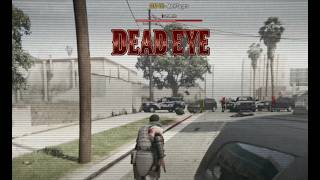
Bring the iconic Dead Eye mechanic from Red Dead Redemption 2 to GTA 5 Story Mode!
So here's the thing I made this mod entirely for fun.
I was just messing around thought "wouldn't it be cool to have RDR2's Dead Eye in GTA 5?" . It was never meant to be released. Just a personal project to have fun with. So if it doesn't work or there's bugs etc there is nothing i can Do since i am not working on this mod anymore.
So I figured why not share it? Maybe someone else will fun using also don't expect much from it since like i said , it was supposed only to be a personal mod.
Enjoy!
Features
- Slow Motion Targeting - Time slows down allowing you to carefully mark your targets
- Mark Multiple Targets - Tag up to 12 enemies
- Cinematic Execution - Watch your character fire at each marked target
- Visual Effects - Screen filters, vignette effects, and UI indicators
- Sound Effects - Audio feedback for marking and executing
- Cooldown System - 2 second cooldown between uses for balance
- Works On Foot and In Vehicles
Controls
- NOTE: EVERYTIME YOU ACTIVATE DEAD EYE YOU NEED TO WAIT 2 TO 3 SECONDS
- CAPS LOCK - Activate Dead Eye
- LEFT MOUSE (while in Dead Eye) - Mark target
- CAPS LOCK (with marks) - Execute all marks
- E - Execute all marks (alternative)
- Q - Cancel Dead Eye
How To Use
- Equip any firearm
- Press CAPS LOCK to activate Dead Eye
- Aim at enemies and click LEFT MOUSE to mark them
- Press CAPS LOCK or E to execute
- Watch your character eliminate each target
Installation
- Make sure you have ScriptHookV and ScriptHookVDotNet 3 installed
- Download the DeadEye.dll file
- Place it in your Grand Theft Auto V/scripts/ folder
- Launch GTA 5 and enjoy
Requirements
- ScriptHookV
- ScriptHookVDotNet 3
Important Notes
- Only works with firearms equipped
- You can mark the same enemy multiple times
- 15 second time limit while marking
Credits
Created by Vlaati
This was just a fun personal project that I decided to share.
First Uploaded: March 24, 2026
Last Updated: March 24, 2026
Last Downloaded: 1 hour ago
10 Comments
More mods by vlaati:
Bring the iconic Dead Eye mechanic from Red Dead Redemption 2 to GTA 5 Story Mode!
So here's the thing I made this mod entirely for fun.
I was just messing around thought "wouldn't it be cool to have RDR2's Dead Eye in GTA 5?" . It was never meant to be released. Just a personal project to have fun with. So if it doesn't work or there's bugs etc there is nothing i can Do since i am not working on this mod anymore.
So I figured why not share it? Maybe someone else will fun using also don't expect much from it since like i said , it was supposed only to be a personal mod.
Enjoy!
Features
- Slow Motion Targeting - Time slows down allowing you to carefully mark your targets
- Mark Multiple Targets - Tag up to 12 enemies
- Cinematic Execution - Watch your character fire at each marked target
- Visual Effects - Screen filters, vignette effects, and UI indicators
- Sound Effects - Audio feedback for marking and executing
- Cooldown System - 2 second cooldown between uses for balance
- Works On Foot and In Vehicles
Controls
- NOTE: EVERYTIME YOU ACTIVATE DEAD EYE YOU NEED TO WAIT 2 TO 3 SECONDS
- CAPS LOCK - Activate Dead Eye
- LEFT MOUSE (while in Dead Eye) - Mark target
- CAPS LOCK (with marks) - Execute all marks
- E - Execute all marks (alternative)
- Q - Cancel Dead Eye
How To Use
- Equip any firearm
- Press CAPS LOCK to activate Dead Eye
- Aim at enemies and click LEFT MOUSE to mark them
- Press CAPS LOCK or E to execute
- Watch your character eliminate each target
Installation
- Make sure you have ScriptHookV and ScriptHookVDotNet 3 installed
- Download the DeadEye.dll file
- Place it in your Grand Theft Auto V/scripts/ folder
- Launch GTA 5 and enjoy
Requirements
- ScriptHookV
- ScriptHookVDotNet 3
Important Notes
- Only works with firearms equipped
- You can mark the same enemy multiple times
- 15 second time limit while marking
Credits
Created by Vlaati
This was just a fun personal project that I decided to share.
First Uploaded: March 24, 2026
Last Updated: March 24, 2026
Last Downloaded: 1 hour ago
-

dope concept broski, going to be super sick once you can remember each input your ui makes on the target location, add those targets to a temporary bank, and than turn the charachters LOS/orientation to each of those banked targets in order, while the character uses the aim input . than reset after completed. looking forward to the final project
March 24, 2026 -

@vlaati thats some good shit bro also if youre planning to not update this anymore why ot give the source code
March 24, 2026 -
oh snap i didnt see he said he was done with modding . bett let one of the bys take over
March 24, 2026 -
@Aztecz8798 that's actually a good idea i definetly can and also thank you bro for the kind words
@DonDonny thank you so much bro i really appreciate it like i said i just did this for fun im probably not gonna work on this mod anymore , but thank you man means a lot!
March 24, 2026 -

-

-

This is great, once you improve the animation and the aiming direction it will be a perfect mod
March 24, 2026 -
@TRIXEMZ yes just use shvdne by chiheb bacha link -https://www.gta5-mods.com/tools/script-hook-v-net-enhanced
March 27, 2026 -
 5mods on Discord

NOTE: The character doesn't bother with aiming animations they just shoot. Also, bullets apparently ignore walls and cover, so marked enemies die no matter where they hide. It's either a bug or your character is just THAT good. I'm calling it a feature.