TurnSignals [Enhanced] 1.6


![VehicleAccess [Legacy]](https://img.gta5-mods.com/q75-w500-h333-cfill/images/vehicleaccess-only-legacy/d8bd6b-Openall.png "VehicleAccess [Legacy]")
![Center Steering [Enhanced]](https://img.gta5-mods.com/q75-w500-h333-cfill/images/centersteering_01-only-enhanced-edition/261f2b-tO0SuGEXZh5d9lEET4lfN1gytnL85rHTO0cRQmfSE67fYO0_ukxYg9GBqvfEP4B_CoyR-KeX2AXpb3FugBQlX4j3V0klpYbezAkzqlY3YkslHePBHqK_UfFf0vH5m0f2YoewqxhX12V1n1AWI2YeBwuGndLj5G93ltMn7vLMos9bv8KLYWbAwJAEybzoErop.jpg "Center Steering [Enhanced]")


910
14
910
14
TurnSignals GTA V Enhanced Edition
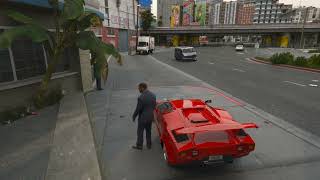
A lightweight vehicle turn-signal and hazard-light system for GTA V. It adds realistic left/right indicators, hazard lights, automatic cancellation, and a vehicle alarm with remote lock/unlock controls.
TurnSignals How to Use:
After Extrac just Drag & Drop ( TurnSignals.asi & TurnSignals.ini into your game folder )
NUMPAD 4 Turn on the left indicator.
NUMPAD 6 Turn on the right indicator.
NUMPAD 5 Turn on hazard lights.
F10 Reload the configuration file while in-game.
G Show/hide the remote control.
E Lock/unlock the last vehicle or stop the alarm.
Automatic Features
Auto Cancel: Turn signals automatically switch off after steering back.
Driver Only: Turn signals work only when you are driving.
Vehicle Alarm: The alarm automatically arms after entering the vehicle.
Horn Confirmation:
1 horn beep = vehicle locked.
2 horn beeps = vehicle unlocked.
Tip: Make sure Num Lock is enabled if your numpad keys are not responding.
A lightweight vehicle turn-signal and hazard-light system for GTA V. It adds realistic left/right indicators, hazard lights, automatic cancellation, and a vehicle alarm with remote lock/unlock controls.
TurnSignals How to Use:
After Extrac just Drag & Drop ( TurnSignals.asi & TurnSignals.ini into your game folder )
NUMPAD 4 Turn on the left indicator.
NUMPAD 6 Turn on the right indicator.
NUMPAD 5 Turn on hazard lights.
F10 Reload the configuration file while in-game.
G Show/hide the remote control.
E Lock/unlock the last vehicle or stop the alarm.
Automatic Features
Auto Cancel: Turn signals automatically switch off after steering back.
Driver Only: Turn signals work only when you are driving.
Vehicle Alarm: The alarm automatically arms after entering the vehicle.
Horn Confirmation:
1 horn beep = vehicle locked.
2 horn beeps = vehicle unlocked.
Tip: Make sure Num Lock is enabled if your numpad keys are not responding.
First Uploaded: August 30, 2026
Last Updated: September 04, 2026
Last Downloaded: 13 hours ago
5 Comments
TurnSignals GTA V Enhanced Edition
A lightweight vehicle turn-signal and hazard-light system for GTA V. It adds realistic left/right indicators, hazard lights, automatic cancellation, and a vehicle alarm with remote lock/unlock controls.
TurnSignals How to Use:
After Extrac just Drag & Drop ( TurnSignals.asi & TurnSignals.ini into your game folder )
NUMPAD 4 Turn on the left indicator.
NUMPAD 6 Turn on the right indicator.
NUMPAD 5 Turn on hazard lights.
F10 Reload the configuration file while in-game.
G Show/hide the remote control.
E Lock/unlock the last vehicle or stop the alarm.
Automatic Features
Auto Cancel: Turn signals automatically switch off after steering back.
Driver Only: Turn signals work only when you are driving.
Vehicle Alarm: The alarm automatically arms after entering the vehicle.
Horn Confirmation:
1 horn beep = vehicle locked.
2 horn beeps = vehicle unlocked.
Tip: Make sure Num Lock is enabled if your numpad keys are not responding.
A lightweight vehicle turn-signal and hazard-light system for GTA V. It adds realistic left/right indicators, hazard lights, automatic cancellation, and a vehicle alarm with remote lock/unlock controls.
TurnSignals How to Use:
After Extrac just Drag & Drop ( TurnSignals.asi & TurnSignals.ini into your game folder )
NUMPAD 4 Turn on the left indicator.
NUMPAD 6 Turn on the right indicator.
NUMPAD 5 Turn on hazard lights.
F10 Reload the configuration file while in-game.
G Show/hide the remote control.
E Lock/unlock the last vehicle or stop the alarm.
Automatic Features
Auto Cancel: Turn signals automatically switch off after steering back.
Driver Only: Turn signals work only when you are driving.
Vehicle Alarm: The alarm automatically arms after entering the vehicle.
Horn Confirmation:
1 horn beep = vehicle locked.
2 horn beeps = vehicle unlocked.
Tip: Make sure Num Lock is enabled if your numpad keys are not responding.
First Uploaded: August 30, 2026
Last Updated: September 04, 2026
Last Downloaded: 13 hours ago
 5mods on Discord

graphics mod/reshade presets used in the screenshot/video preview? good mod btw.
Do you plan to update this mod further? I think there are some bugs; other functions aren't working properly. As for the turn signals, they only flash briefly instead of staying on, and the flashing pattern looks strange.
@thekingofonezs NO IT WORK FOR ME WITHOUT PROBLEM OK BUT I WILL CHECK IT AGAIN
@black2019 wich one sir ?
@DROOGA_DZ The flashing pattern seems to go fast then to normal