GTA V Modding Launcher 0.7.9 BETA




165,421
383
165,421
383
This launcher needs .NET 5 Desktop Runtime (x64) to work. It usually is not installed by default on most Windows computers
The launcher is open source on github.
This launcher enables you to easily switch between several sets of mods without having to move the mods yourself. It can also be used to move all your mods outside of your game directory automatically.
In order for the launcher to work properly, all vanilla files have to be genuine. GTA V can be modded without replacing any core file, which is, in my opinion, the best practice. Since the launcher works by moving files, it obviously won't work if core files have been modified.
For example, if you want to modify vanilla .rpf files, you must keep the original file as it is, and use OpenIV.asi for the game to load the modified version in the "mods" folder.
How to use the launcher ?
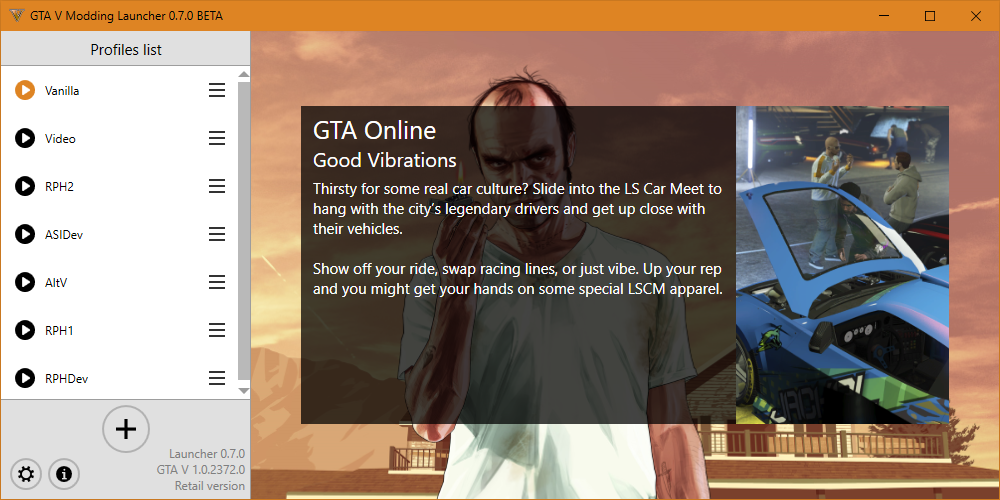
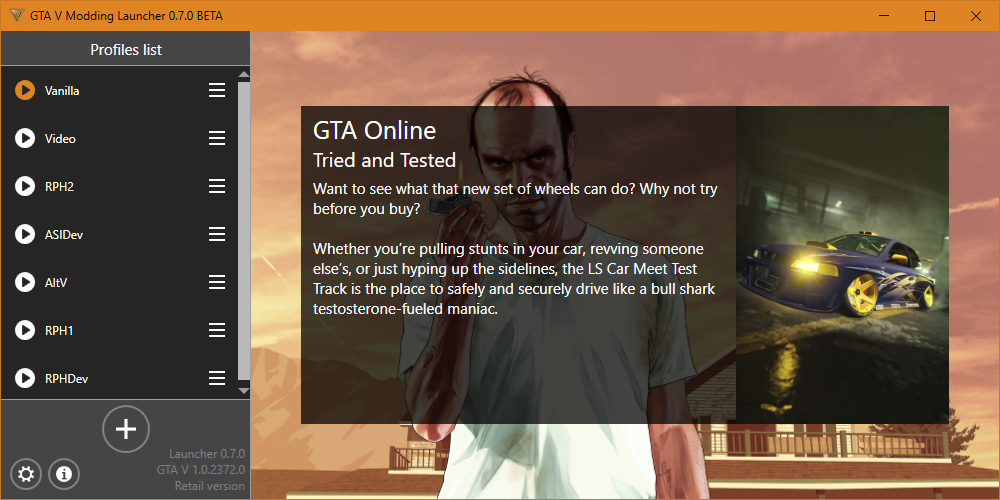
Simply create a new profile (with the + button), make it active (with a right click on its name) and put mods in your game's folder normally (while being sure not to replace any base game file).
When first starting the launcher, if your game is already modded, a new profile called "Modded Profile" will automatically be created with the current mods.
How does it work ?
The launcher searches for modded files using a provided manifest of all vanilla files. When you switch profiles, it moves the mods in the GTA V directory to an external folder, then moves the mods of the other profile to the game. Using this launcher, you don't need several "Grand Theft Auto V" folders anymore !
Changelog
0.7.9
* Added BattlEye files to the list of vanilla game files
0.7.8
* Added libtox.dll to the list of vanilla game files
0.7.7
* Added new files to the list of vanilla game files (Thanks to @octylFractal)
0.7.6
* Fixed a typo that prevented the new vanilla game files from being taken into account
0.7.5
* Added new files to the list of vanilla game files (Thanks to SirMallard)
0.7.4
* Fixed a bug that made the launcher believe a vanilla DLC pack from the "Mercenaries" DLC was modded
0.7.3
* Fixed a bug that made the launcher believe a vanilla DLC pack from the "Mercenaries" DLC was modded (Thanks to SirMallard)
+ Added the Russian language (Thanks to VALKREE)
0.7.2
* Fixed a bug that prevented the launcher from launching the Epic Games version of the game
0.7.1
* Added .egstore and EOSSDK-Win64-Shipping.dll to the game manifest
0.7.0
* The tool now uses .NET 5
* Fixed an issue regarding permission propagation
* Fixed the news display
* Added "uninstall.exe" to the game manifest
0.6.9
* Fixed a crash that could occur when the option to kill the game's launcher was enabled
- Legacy compatbility was removed (ie: the launcher doesn't convert old config files anymore)
- The option to launch modded profiles in offline mode was removed since it doesn't work properly with the new R* launcher
0.6.8
* Fixed a crash that occured when switching from a modded vanilla profile to another profile without launching the game
0.6.7
* Fixed a crash that could occur when the launcher tried to display a modern popup while the main window wasn't visible
0.6.6
* The launcher now properly launches the EGS version of the game (Thanks to mips!)
0.6.5
* All dialogs now use the modern theme
* The launcher should now be able to launch the Epic Games version of the game
0.6.4
* Partial support for the Epic Games version of the game
0.6.3
* Failed attempt to support the Epic Games version
0.6.2
* Fixed a crash that occured when the selected / detected installation was invalid
0.6.1
* Mods could sometimes not be moved properly
0.6.0
* The launcher's code has been cleaned
* Popups are now handled in a better way
+ Custom installations can now be easily specified in no installation is found
* The launcher now uses a Modern theme
* Added support for the new Rockstar Games launcher
+ The launcher can now optionally close the Rockstar Games launcher after launching the game
* The launcher's UI has been overhauled
* The launcher can now display the game's news
* The launcher now uses an external game manifest rather than an hardcoded one
- The integrity check feature has been removed
* Profiles are now saved in the launcher's folder
0.5.6
* Fixed a crash that happened when the update check failed
* The launcher is now using a custom theme and should look more like a native program
+ You can now use the launcher on a custom GTA V directory (but you still have to have the registry key stating where your game is installed, to prevent piracy)
0.5.5
* Fixed bad handling of dlc mods
0.5.4
* Fixed a crash that occured when starting the game after deleting a profile (#1 and #2)
* Fixed a wrong message that was displayed when the game's integrity was compromised
0.5.3
* Fixed a crash that could happen when starting the launcher
0.5.2
* Fixed a bug that prevented the launcher from working in the GTA V directory
* Newtonsoft.Json.dll is now embedded.
* Crash report improved
0.5.1
* Progress bar enhancements
+ You can now change the game's language in the launcher settings
* The user can now disable logging
+ Added an update check
* The crash reporter uses github now
* (hopefully) fixed an issue with some Steam users ("No GTA installation found.")
0.5.0
* The launcher now uses WPF
- Removed launcherResources.zip, the resources are now embedded in the .exe file
* The settings menu is now more compact
* Localization system improved
* The launcher now only detects Steam files when it's running with the Steam version of the game
* The crash reporter has been redone
* Several bugfixes
+ The launcher can now scan for modded x64.rpf files
0.4.0
* Log system enhancements
* Fixed popups position
* Fixed error messages
+ Profiles can now be stored in a custom folder
+ The user can now choose whether to play on a modded profile in offline mode or not
0.3.1
* Fixed the title
* Fixed a crash that could occur when the "GTA V Modding Launcher" folder doesn't exist
0.3.0
+ Initial public release
Note: This launcher doesn't need to be installed in a particular location. You only need to extract the archive somewhere, and ensure all the included files are in the same directory. However, the launcher cannot be installed in the game's directory.
Credits
GTA V Modding Launcher Created by Pursuit.
Beta testing by KertFaceMan.
Thanks to MulleDK19 for all his advice.
Grand Theft Auto V and all backgrounds used in this software are the property of Rockstar Games and Rockstar North.
Copyright © 2023 Pursuit - All rights reserved
GTA V Modding Launcher is using the MIT license. See License.txt for details.
Please do not reupload, in whole or in part, to any other website without my permission.
The launcher is open source on github.
This launcher enables you to easily switch between several sets of mods without having to move the mods yourself. It can also be used to move all your mods outside of your game directory automatically.
In order for the launcher to work properly, all vanilla files have to be genuine. GTA V can be modded without replacing any core file, which is, in my opinion, the best practice. Since the launcher works by moving files, it obviously won't work if core files have been modified.
For example, if you want to modify vanilla .rpf files, you must keep the original file as it is, and use OpenIV.asi for the game to load the modified version in the "mods" folder.
How to use the launcher ?
Simply create a new profile (with the + button), make it active (with a right click on its name) and put mods in your game's folder normally (while being sure not to replace any base game file).
When first starting the launcher, if your game is already modded, a new profile called "Modded Profile" will automatically be created with the current mods.
How does it work ?
The launcher searches for modded files using a provided manifest of all vanilla files. When you switch profiles, it moves the mods in the GTA V directory to an external folder, then moves the mods of the other profile to the game. Using this launcher, you don't need several "Grand Theft Auto V" folders anymore !
Changelog
0.7.9
* Added BattlEye files to the list of vanilla game files
0.7.8
* Added libtox.dll to the list of vanilla game files
0.7.7
* Added new files to the list of vanilla game files (Thanks to @octylFractal)
0.7.6
* Fixed a typo that prevented the new vanilla game files from being taken into account
0.7.5
* Added new files to the list of vanilla game files (Thanks to SirMallard)
0.7.4
* Fixed a bug that made the launcher believe a vanilla DLC pack from the "Mercenaries" DLC was modded
0.7.3
* Fixed a bug that made the launcher believe a vanilla DLC pack from the "Mercenaries" DLC was modded (Thanks to SirMallard)
+ Added the Russian language (Thanks to VALKREE)
0.7.2
* Fixed a bug that prevented the launcher from launching the Epic Games version of the game
0.7.1
* Added .egstore and EOSSDK-Win64-Shipping.dll to the game manifest
0.7.0
* The tool now uses .NET 5
* Fixed an issue regarding permission propagation
* Fixed the news display
* Added "uninstall.exe" to the game manifest
0.6.9
* Fixed a crash that could occur when the option to kill the game's launcher was enabled
- Legacy compatbility was removed (ie: the launcher doesn't convert old config files anymore)
- The option to launch modded profiles in offline mode was removed since it doesn't work properly with the new R* launcher
0.6.8
* Fixed a crash that occured when switching from a modded vanilla profile to another profile without launching the game
0.6.7
* Fixed a crash that could occur when the launcher tried to display a modern popup while the main window wasn't visible
0.6.6
* The launcher now properly launches the EGS version of the game (Thanks to mips!)
0.6.5
* All dialogs now use the modern theme
* The launcher should now be able to launch the Epic Games version of the game
0.6.4
* Partial support for the Epic Games version of the game
0.6.3
* Failed attempt to support the Epic Games version
0.6.2
* Fixed a crash that occured when the selected / detected installation was invalid
0.6.1
* Mods could sometimes not be moved properly
0.6.0
* The launcher's code has been cleaned
* Popups are now handled in a better way
+ Custom installations can now be easily specified in no installation is found
* The launcher now uses a Modern theme
* Added support for the new Rockstar Games launcher
+ The launcher can now optionally close the Rockstar Games launcher after launching the game
* The launcher's UI has been overhauled
* The launcher can now display the game's news
* The launcher now uses an external game manifest rather than an hardcoded one
- The integrity check feature has been removed
* Profiles are now saved in the launcher's folder
0.5.6
* Fixed a crash that happened when the update check failed
* The launcher is now using a custom theme and should look more like a native program
+ You can now use the launcher on a custom GTA V directory (but you still have to have the registry key stating where your game is installed, to prevent piracy)
0.5.5
* Fixed bad handling of dlc mods
0.5.4
* Fixed a crash that occured when starting the game after deleting a profile (#1 and #2)
* Fixed a wrong message that was displayed when the game's integrity was compromised
0.5.3
* Fixed a crash that could happen when starting the launcher
0.5.2
* Fixed a bug that prevented the launcher from working in the GTA V directory
* Newtonsoft.Json.dll is now embedded.
* Crash report improved
0.5.1
* Progress bar enhancements
+ You can now change the game's language in the launcher settings
* The user can now disable logging
+ Added an update check
* The crash reporter uses github now
* (hopefully) fixed an issue with some Steam users ("No GTA installation found.")
0.5.0
* The launcher now uses WPF
- Removed launcherResources.zip, the resources are now embedded in the .exe file
* The settings menu is now more compact
* Localization system improved
* The launcher now only detects Steam files when it's running with the Steam version of the game
* The crash reporter has been redone
* Several bugfixes
+ The launcher can now scan for modded x64.rpf files
0.4.0
* Log system enhancements
* Fixed popups position
* Fixed error messages
+ Profiles can now be stored in a custom folder
+ The user can now choose whether to play on a modded profile in offline mode or not
0.3.1
* Fixed the title
* Fixed a crash that could occur when the "GTA V Modding Launcher" folder doesn't exist
0.3.0
+ Initial public release
Note: This launcher doesn't need to be installed in a particular location. You only need to extract the archive somewhere, and ensure all the included files are in the same directory. However, the launcher cannot be installed in the game's directory.
Credits
GTA V Modding Launcher Created by Pursuit.
Beta testing by KertFaceMan.
Thanks to MulleDK19 for all his advice.
Grand Theft Auto V and all backgrounds used in this software are the property of Rockstar Games and Rockstar North.
Copyright © 2023 Pursuit - All rights reserved
GTA V Modding Launcher is using the MIT license. See License.txt for details.
Please do not reupload, in whole or in part, to any other website without my permission.
First Uploaded: June 20, 2016
Last Updated: December 22, 2024
Last Downloaded: 29 minutes ago
All Versions
593 Comments
More mods by Pursuit:
This launcher needs .NET 5 Desktop Runtime (x64) to work. It usually is not installed by default on most Windows computers
The launcher is open source on github.
This launcher enables you to easily switch between several sets of mods without having to move the mods yourself. It can also be used to move all your mods outside of your game directory automatically.
In order for the launcher to work properly, all vanilla files have to be genuine. GTA V can be modded without replacing any core file, which is, in my opinion, the best practice. Since the launcher works by moving files, it obviously won't work if core files have been modified.
For example, if you want to modify vanilla .rpf files, you must keep the original file as it is, and use OpenIV.asi for the game to load the modified version in the "mods" folder.
How to use the launcher ?
Simply create a new profile (with the + button), make it active (with a right click on its name) and put mods in your game's folder normally (while being sure not to replace any base game file).
When first starting the launcher, if your game is already modded, a new profile called "Modded Profile" will automatically be created with the current mods.
How does it work ?
The launcher searches for modded files using a provided manifest of all vanilla files. When you switch profiles, it moves the mods in the GTA V directory to an external folder, then moves the mods of the other profile to the game. Using this launcher, you don't need several "Grand Theft Auto V" folders anymore !
Changelog
0.7.9
* Added BattlEye files to the list of vanilla game files
0.7.8
* Added libtox.dll to the list of vanilla game files
0.7.7
* Added new files to the list of vanilla game files (Thanks to @octylFractal)
0.7.6
* Fixed a typo that prevented the new vanilla game files from being taken into account
0.7.5
* Added new files to the list of vanilla game files (Thanks to SirMallard)
0.7.4
* Fixed a bug that made the launcher believe a vanilla DLC pack from the "Mercenaries" DLC was modded
0.7.3
* Fixed a bug that made the launcher believe a vanilla DLC pack from the "Mercenaries" DLC was modded (Thanks to SirMallard)
+ Added the Russian language (Thanks to VALKREE)
0.7.2
* Fixed a bug that prevented the launcher from launching the Epic Games version of the game
0.7.1
* Added .egstore and EOSSDK-Win64-Shipping.dll to the game manifest
0.7.0
* The tool now uses .NET 5
* Fixed an issue regarding permission propagation
* Fixed the news display
* Added "uninstall.exe" to the game manifest
0.6.9
* Fixed a crash that could occur when the option to kill the game's launcher was enabled
- Legacy compatbility was removed (ie: the launcher doesn't convert old config files anymore)
- The option to launch modded profiles in offline mode was removed since it doesn't work properly with the new R* launcher
0.6.8
* Fixed a crash that occured when switching from a modded vanilla profile to another profile without launching the game
0.6.7
* Fixed a crash that could occur when the launcher tried to display a modern popup while the main window wasn't visible
0.6.6
* The launcher now properly launches the EGS version of the game (Thanks to mips!)
0.6.5
* All dialogs now use the modern theme
* The launcher should now be able to launch the Epic Games version of the game
0.6.4
* Partial support for the Epic Games version of the game
0.6.3
* Failed attempt to support the Epic Games version
0.6.2
* Fixed a crash that occured when the selected / detected installation was invalid
0.6.1
* Mods could sometimes not be moved properly
0.6.0
* The launcher's code has been cleaned
* Popups are now handled in a better way
+ Custom installations can now be easily specified in no installation is found
* The launcher now uses a Modern theme
* Added support for the new Rockstar Games launcher
+ The launcher can now optionally close the Rockstar Games launcher after launching the game
* The launcher's UI has been overhauled
* The launcher can now display the game's news
* The launcher now uses an external game manifest rather than an hardcoded one
- The integrity check feature has been removed
* Profiles are now saved in the launcher's folder
0.5.6
* Fixed a crash that happened when the update check failed
* The launcher is now using a custom theme and should look more like a native program
+ You can now use the launcher on a custom GTA V directory (but you still have to have the registry key stating where your game is installed, to prevent piracy)
0.5.5
* Fixed bad handling of dlc mods
0.5.4
* Fixed a crash that occured when starting the game after deleting a profile (#1 and #2)
* Fixed a wrong message that was displayed when the game's integrity was compromised
0.5.3
* Fixed a crash that could happen when starting the launcher
0.5.2
* Fixed a bug that prevented the launcher from working in the GTA V directory
* Newtonsoft.Json.dll is now embedded.
* Crash report improved
0.5.1
* Progress bar enhancements
+ You can now change the game's language in the launcher settings
* The user can now disable logging
+ Added an update check
* The crash reporter uses github now
* (hopefully) fixed an issue with some Steam users ("No GTA installation found.")
0.5.0
* The launcher now uses WPF
- Removed launcherResources.zip, the resources are now embedded in the .exe file
* The settings menu is now more compact
* Localization system improved
* The launcher now only detects Steam files when it's running with the Steam version of the game
* The crash reporter has been redone
* Several bugfixes
+ The launcher can now scan for modded x64.rpf files
0.4.0
* Log system enhancements
* Fixed popups position
* Fixed error messages
+ Profiles can now be stored in a custom folder
+ The user can now choose whether to play on a modded profile in offline mode or not
0.3.1
* Fixed the title
* Fixed a crash that could occur when the "GTA V Modding Launcher" folder doesn't exist
0.3.0
+ Initial public release
Note: This launcher doesn't need to be installed in a particular location. You only need to extract the archive somewhere, and ensure all the included files are in the same directory. However, the launcher cannot be installed in the game's directory.
Credits
GTA V Modding Launcher Created by Pursuit.
Beta testing by KertFaceMan.
Thanks to MulleDK19 for all his advice.
Grand Theft Auto V and all backgrounds used in this software are the property of Rockstar Games and Rockstar North.
Copyright © 2023 Pursuit - All rights reserved
GTA V Modding Launcher is using the MIT license. See License.txt for details.
Please do not reupload, in whole or in part, to any other website without my permission.
The launcher is open source on github.
This launcher enables you to easily switch between several sets of mods without having to move the mods yourself. It can also be used to move all your mods outside of your game directory automatically.
In order for the launcher to work properly, all vanilla files have to be genuine. GTA V can be modded without replacing any core file, which is, in my opinion, the best practice. Since the launcher works by moving files, it obviously won't work if core files have been modified.
For example, if you want to modify vanilla .rpf files, you must keep the original file as it is, and use OpenIV.asi for the game to load the modified version in the "mods" folder.
How to use the launcher ?
Simply create a new profile (with the + button), make it active (with a right click on its name) and put mods in your game's folder normally (while being sure not to replace any base game file).
When first starting the launcher, if your game is already modded, a new profile called "Modded Profile" will automatically be created with the current mods.
How does it work ?
The launcher searches for modded files using a provided manifest of all vanilla files. When you switch profiles, it moves the mods in the GTA V directory to an external folder, then moves the mods of the other profile to the game. Using this launcher, you don't need several "Grand Theft Auto V" folders anymore !
Changelog
0.7.9
* Added BattlEye files to the list of vanilla game files
0.7.8
* Added libtox.dll to the list of vanilla game files
0.7.7
* Added new files to the list of vanilla game files (Thanks to @octylFractal)
0.7.6
* Fixed a typo that prevented the new vanilla game files from being taken into account
0.7.5
* Added new files to the list of vanilla game files (Thanks to SirMallard)
0.7.4
* Fixed a bug that made the launcher believe a vanilla DLC pack from the "Mercenaries" DLC was modded
0.7.3
* Fixed a bug that made the launcher believe a vanilla DLC pack from the "Mercenaries" DLC was modded (Thanks to SirMallard)
+ Added the Russian language (Thanks to VALKREE)
0.7.2
* Fixed a bug that prevented the launcher from launching the Epic Games version of the game
0.7.1
* Added .egstore and EOSSDK-Win64-Shipping.dll to the game manifest
0.7.0
* The tool now uses .NET 5
* Fixed an issue regarding permission propagation
* Fixed the news display
* Added "uninstall.exe" to the game manifest
0.6.9
* Fixed a crash that could occur when the option to kill the game's launcher was enabled
- Legacy compatbility was removed (ie: the launcher doesn't convert old config files anymore)
- The option to launch modded profiles in offline mode was removed since it doesn't work properly with the new R* launcher
0.6.8
* Fixed a crash that occured when switching from a modded vanilla profile to another profile without launching the game
0.6.7
* Fixed a crash that could occur when the launcher tried to display a modern popup while the main window wasn't visible
0.6.6
* The launcher now properly launches the EGS version of the game (Thanks to mips!)
0.6.5
* All dialogs now use the modern theme
* The launcher should now be able to launch the Epic Games version of the game
0.6.4
* Partial support for the Epic Games version of the game
0.6.3
* Failed attempt to support the Epic Games version
0.6.2
* Fixed a crash that occured when the selected / detected installation was invalid
0.6.1
* Mods could sometimes not be moved properly
0.6.0
* The launcher's code has been cleaned
* Popups are now handled in a better way
+ Custom installations can now be easily specified in no installation is found
* The launcher now uses a Modern theme
* Added support for the new Rockstar Games launcher
+ The launcher can now optionally close the Rockstar Games launcher after launching the game
* The launcher's UI has been overhauled
* The launcher can now display the game's news
* The launcher now uses an external game manifest rather than an hardcoded one
- The integrity check feature has been removed
* Profiles are now saved in the launcher's folder
0.5.6
* Fixed a crash that happened when the update check failed
* The launcher is now using a custom theme and should look more like a native program
+ You can now use the launcher on a custom GTA V directory (but you still have to have the registry key stating where your game is installed, to prevent piracy)
0.5.5
* Fixed bad handling of dlc mods
0.5.4
* Fixed a crash that occured when starting the game after deleting a profile (#1 and #2)
* Fixed a wrong message that was displayed when the game's integrity was compromised
0.5.3
* Fixed a crash that could happen when starting the launcher
0.5.2
* Fixed a bug that prevented the launcher from working in the GTA V directory
* Newtonsoft.Json.dll is now embedded.
* Crash report improved
0.5.1
* Progress bar enhancements
+ You can now change the game's language in the launcher settings
* The user can now disable logging
+ Added an update check
* The crash reporter uses github now
* (hopefully) fixed an issue with some Steam users ("No GTA installation found.")
0.5.0
* The launcher now uses WPF
- Removed launcherResources.zip, the resources are now embedded in the .exe file
* The settings menu is now more compact
* Localization system improved
* The launcher now only detects Steam files when it's running with the Steam version of the game
* The crash reporter has been redone
* Several bugfixes
+ The launcher can now scan for modded x64.rpf files
0.4.0
* Log system enhancements
* Fixed popups position
* Fixed error messages
+ Profiles can now be stored in a custom folder
+ The user can now choose whether to play on a modded profile in offline mode or not
0.3.1
* Fixed the title
* Fixed a crash that could occur when the "GTA V Modding Launcher" folder doesn't exist
0.3.0
+ Initial public release
Note: This launcher doesn't need to be installed in a particular location. You only need to extract the archive somewhere, and ensure all the included files are in the same directory. However, the launcher cannot be installed in the game's directory.
Credits
GTA V Modding Launcher Created by Pursuit.
Beta testing by KertFaceMan.
Thanks to MulleDK19 for all his advice.
Grand Theft Auto V and all backgrounds used in this software are the property of Rockstar Games and Rockstar North.
Copyright © 2023 Pursuit - All rights reserved
GTA V Modding Launcher is using the MIT license. See License.txt for details.
Please do not reupload, in whole or in part, to any other website without my permission.
First Uploaded: June 20, 2016
Last Updated: December 22, 2024
Last Downloaded: 29 minutes ago
 5mods on Discord

@nodarthvaderwastaken Indeed - I'll do that asap
In the meantime, you can modify the GameManifest.xml file to include the new files
Mod need update with the new game version files
@nodarthvaderwastaken @RealSmoke I've just published an official update to include the new game files to the manifest - sorry for the delay
@Pursuit No need to apologize , Thank you very much for this really helpful launcher
@Pursuit Thank you so much!, this launcher has really been very helpful, appreciate the work that you do!
malwarebytes is now registering this as ransomware, why?
I've noticed that while the launcher is doing a good job moving the primary mod files and the trainer I use, it does not seem to work properly with the mods folder created by OpenIV. It seems to delete the mods folder outright instead of moving it to the profile folder, as it does not get restored when I re-enable my modded profiles that have it.
I really like this tool, has alot of potential, but it doesnt remove mod files, only folders from what I experienced. The gta v remove tool removes all files and folders. I like this one more because I can create different profiles and easily switch between them. If by the next update, you can have this tool remove files along with folders, it will be the ultimate tool for everyone!!
This is an incredibly detailed and helpful post—thank you for sharing! The launcher sounds like a game-changer for managing GTA V mods more efficiently and safely. The ability to create separate modding profiles and keep core files intact is such a practical feature, especially for avoiding issues with the game's integrity.
For anyone looking to dive deeper into modding tips, tools, and tutorials, I highly recommend checking out thestripesblog.com. They have a wealth of information on gaming, modding, and optimizing setups that could be a great resource for both new and experienced modders.
Has anyone here tested this launcher with different versions of the game? I'd love to hear how it's working for you! 🎮
@DrSeussInDaHaus Hey! Good question... I suspect it is a false positive. I can attest to the safe nature of the source code, which is partially open source (ie: the source code of the launcher itself is open & accessible on GitHub, but my personal PursuitLib library isn't open source yet)
@Jambopaul Oh really? That's definitely a bug. Is your "Profiles" folder in the same drive as your GTA V directory?
@skeeze415 It should definitely move files too, as long as they're not in the list of files from the vanilla game. That looks like a bug too
Looks like I have quite a few things to fix :D
@Wering1995 Thanks for the feedback! Happy to see you're finding this launcher helpful :)
@Pursuit thankyou, apologies about how bluntly i put that too its not that i don't trust you or anything just a bit tired and grumpy after some medical issues and all nighters at the ED, I'm normally alot less harsh i swear (sweaty laugh emote) anyway I've been using your mod for over a year and it makes modding so much easier i really appreciate what you do and really i didnt think you would suddenly decide to add malware after all this time just thought i should let you know it comes up that way
@DrSeussInDaHaus Hey! No worries :) - and thanks for the report.
To be honest I would completely understand a suspicion here, there have been multiple examples of bad actors implementing malware into an otherwise harmless application or library, even years after the initial release...
This issue simply highlights a broader security concern about software downloaded from the Internet in general, and in particular about tools like mine. The reality is that I don't have any way to guarantee without the shadow of a doubt that the code is safe. Coming to that conclusion today relies on the following hypotheses:
- That I am a trustworthy developer that didn't implement malware myself, or didn't program the tool in a grossly bad way that would put the user's computer or data in jeopardy (which I can only attest by putting my own reputation on the line, as my software hasn't been audited by any external party outside of the GTA5-mods verification system)
- That GTA5-mods is a trustworthy software distributor that didn't alter the file in any way, (which again, can only be attested today by looking at the website's reputation) - for what it's worth, it is my personal opinion that this website is indeed trustworthy :)
I'm trying to think about how I can increase the security guarantees I can provide to users of my applications. Cryptography (ie: signing my code) seems like it's a promising option, but it's only just a thought I have for now ^^
Hi. After updating GTA, trying to switch profile from vanilla says mods have been detected in my vanilla folder. Is this an error or do I just have to wait for the launcher to update to add whatever new files there are to the list of vanilla files?
@Van981 Hi! Looks like new vanilla files have been added... I will try to update the launcher to include them in the manifest. In the meantime, you can manually update the "GameManifest.xml" file yourself based on the list of files the launcher is moving by default
Thanks for the help! I love the work you've done with this launcher. Another question, are you planning on making it compatible with GTA Enhanced? If not, can changing the manifest myself be enough for me to use it with Enhanced?
@Van981 np! I haven't looked at GTA Enhanced yet, but Enhanced compatibility sounds like a worthy feature :)
@Pursuit Yes please ! I think that having a good way to switch profiles in order to adjust the mods and also quickly have a way to play Online by having a clean profile. It might actually help the modding progress on Enhanced. I hope you consider to develop the compatibility with Enhanced soon :D
Not sure why, but this program does nothing for me.
I have a profile called Mods1, I put the mods in \GTAVModdingLauncher\Profiles\Mods1, I click on the profile in the program, it asks if I want to use mods, I click yes, it launches GTA V with no mods.
Watching in File Explorer I can see nothing gets moved at all. I have the required runtime installed, I have a fresh Steam copy of GTA V I just reinstalled to make sure that wasn't the problem. I launch the application in administrator mode. Nothing.
is it still usable for the lastest version?
after pressing select custom installation the button isnt pressable anymore untill the app restarts and it does nothing